Python制作词云的方法
需求:
看到朋友圈有人发词云照片,感觉自己也可以玩一玩,于是乎借助wordcloud实现功能。
环境:
MacOS 10.12 +Python 2.7 +Wordcloud
Windows通用
准备:
安装wordcloud
$ pip install wordcloud
SIP功能是Apple在OSX上推出的系统完整性保护功能,新版本的macOS直接用pip安装报错,在不关闭SIP功能的前提下,可以使用
$ pip install wordcloud --user -U
某些情况还会提示错误,需要安装VS for Python,直接上官网下载安装即可。
实现:
源码
#! /usr/bin/env python

# import
from os import path
from PIL import Image
import numpy as np
import matplotlib.pyplot as plt
from wordcloud import WordCloud, STOPWORDS

# current path
d = path.dirname(__file__)

# Read the whole text.
text = open(path.join(d, 'test.txt')).read()

# read the mask image
test_mask = np.array(Image.open(path.join(d, "test_mask.png")))

stopwords = set(STOPWORDS)
stopwords.add("said")

# setting
wc = WordCloud(background_color="black", max_words=2000, mask=test_mask,
        stopwords=stopwords)

# generate word cloud
wc.generate(text)

# plot and show
plt.imshow(wc, interpolation='bilinear')
plt.axis("off")
plt.figure()
plt.imshow(test_mask, cmap=plt.cm.gray, interpolation='bilinear')
plt.axis("off")
plt.show()

# store to file
wc.to_file(path.join(d, "test.png"))
辅助文件
test_mask.png
test.txt
The list of big's prior run-ins with the far-right fringe is long and varied. He tweeted fake crime statistics spread by racists to paint black cans as violent, then defended them as credible. He sparked a firestorm last year when he declined to renounce
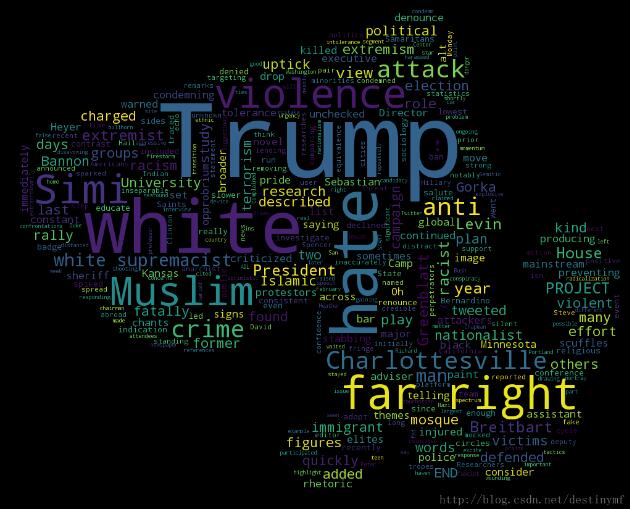
效果图

其它说明:
1.文档可以是任意英文txt文件,以上的是网络上英文新闻中的一小段,仅起示例作用。
2.关于中文支持,有多种方法,主要就是分词的问题,这里不讨论了。
3.我不清楚许多人说的定制是什么意思,因为如果想要自己任意想要的形状的话,我觉得用PS做一个png图可以达到同样的效果,经测试也没有发现问题。
4.写的第一篇文章,不足之处欢迎来喷,毕竟我是要学习的。
以上就是本文的全部内容,希望对大家的学习有所帮助,也希望大家多多支持【听图阁-专注于Python设计】。