python实现剪切功能
本文实例为大家分享了python实现剪切功能的具体代码,供大家参考,具体内容如下
#!/usr/bin/env python
#coding: utf8

import sys

mystr = []

def inputstr():
 item = raw_input('Please input your string:')
 mystr[:] = [] #清空列表
 mystr.extend(item) #将输入的字符串拆开为一个一个字符填入列表

def printstr():
 lenth = len(mystr) - 1
 index = 0
 print "Your result is :"
 print "*****" + ''.join(mystr) + "*****"
 #.join()与之前的extend对应,将字符合并为一个元素,用''里面的内容分割。''里面为空,则字符之间没有间隙
 print "----------------分割符----------------"

def leftstrip(): #左剪切
 while True:
 if mystr[0] == ' ':
  mystr.pop(0)
 else:
  break
 printstr()

def rightstrip():#右剪切
 while True:
 if mystr[-1] == ' ':
  mystr.pop()
 else:
  break
 printstr()

def bothsidestrip():
 while True:
 if mystr[-1] == ' ':
  mystr.pop()
 elif mystr[0] == ' ':
  mystr.pop(0)
 else:
  break
 printstr()
#使用字典的方式,实现case的语法功能
CMDs = {'l':leftstrip,'r':rightstrip,'b':bothsidestrip}

def showmenu():
 prompt = """(L)eftstrip
(R)ightstrip
(B)othsidestrip
(Q)uit
Please select a choice:"""
 while True:
 choice = raw_input(prompt).lower()
 if choice not in 'lrbq':
  continue
 if choice == 'q':
  break
 inputstr()
 CMDs[choice]()

if __name__=='__main__':
 showmenu()
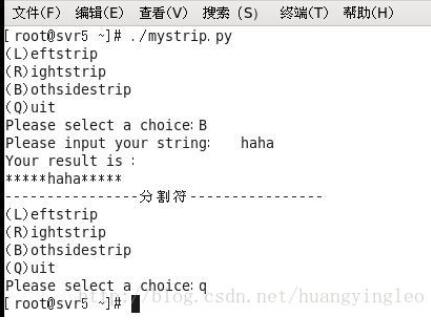
效果图:
以上就是本文的全部内容,希望对大家的学习有所帮助,也希望大家多多支持【听图阁-专注于Python设计】。