Python+threading模块对单个接口进行并发测试
本文实例为大家分享了Python threading模块对单个接口进行并发测试的具体代码,供大家参考,具体内容如下
本文知识点
通过在threading.Thread继承类中重写run()方法实现定制输出结果
代码如下
import requests
import threading
import sys, io
# 解决console显示乱码的编码问题
sys.stdout = io.TextIOWrapper(sys.stdout.buffer, encoding='utf-8')

class Mythread(threading.Thread):
 """This class customizes the output thu overriding the run() method"""
 def __init__(self, obj):
 super(Mythread, self).__init__()
 self.obj = obj

 def run(self):
 ret = self.obj.test_search_tags_movie()
 print('result--%s:\n%s' % (self.getName(), ret))


class Douban(object):
 """A class containing interface test method of Douban object"""
 def __init__(self):
 self.host = 'movie.douban.com'
 self.headers = {'User-Agent': 'Mozilla/5.0 (Windows NT 10.0; Win64; x64; rv:61.0) Gecko/20100101 Firefox/61.0',
 'Referer':'https://movie.douban.com/',
 }

 def get_response(self, url, data):
 resp = requests.post(url=url, data=data, headers=self.headers).content.decode('utf-8')
 return resp

 def test_search_tags_movie(self):
 method = 'search_tags'
 url = 'https://%s/j/%s' % (self.host, method)
 post_data = {
  'type':'movie',
  'source':'index'
 }
 resp = self.get_response(url=url, data=post_data)
 return resp

if __name__ == '__main__':
 douban = Douban()
 thds = []
 for i in range(9):
 thd = Mythread(douban)
 thd.start()
 thds.append(thd)

 for thd in thds:
 thd.join()
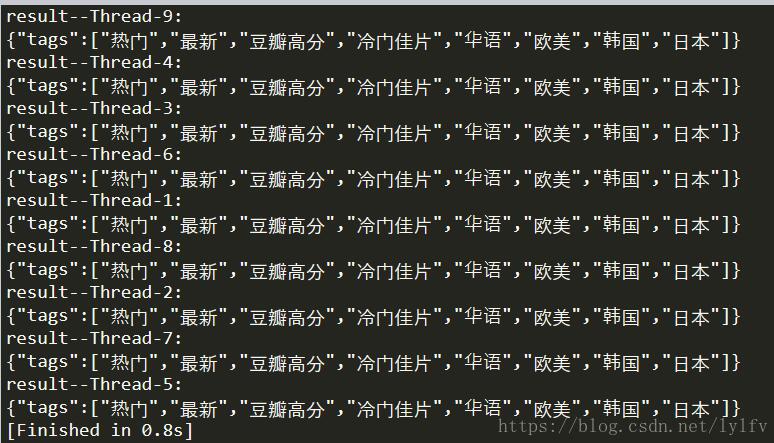
运行结果
以上就是本文的全部内容,希望对大家的学习有所帮助,也希望大家多多支持【听图阁-专注于Python设计】。