Django组件content-type使用方法详解
前言
一个表和多个表进行关联,但具体随着业务的加深,表不断的增加,关联的数量不断的增加,怎么通过一开始通过表的设计后,不在后期在修改表,彻底的解决这个问题呢呢
django中的一个组件content-type可以帮助我们解决这样的一个问题
在这里我先设计了3张表 学位表 普通课程 和价格策略表 大致的设计如下
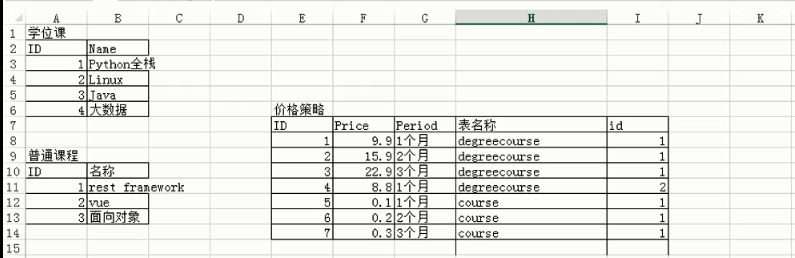
在上图中我们可以看到价格策略表和其他的两个表进行了关联,可以根据表明
models.py
from django.db import models
from django.contrib.contenttypes.fields import GenericForeignKey, GenericRelation
from django.contrib.contenttypes.models import ContentType


class Course(models.Model):
  """
  普通课程
  """
  title = models.CharField(max_length=32)
  # 仅用于反向查找 不在数据库中添加字段
  price_policy_list = GenericRelation("PricePolicy")

class DegreeCourse(models.Model):
  """
  学位课程
  """
  title = models.CharField(max_length=32)

  # 仅用于反向查找
  price_policy_list = GenericRelation("PricePolicy")


class PricePolicy(models.Model):
  """
  价格策略
  """
  price = models.IntegerField()
  period = models.IntegerField()

  # 关联表
  content_type = models.ForeignKey(ContentType, verbose_name='关联的表名称') # 7,8 表名称
  object_id = models.IntegerField(verbose_name='关联的表中的数据行的ID')  #
  # 帮助你快速实现content_type操作 ,快速插入数据 不生成数据库中的字段
  content_object = GenericForeignKey('content_type', 'object_id')
进行插入数据的类视图
from django.shortcuts import render,HttpResponse
from app01 import models
def test(request):

  # 1. 为学位课“Python全栈”添加一个价格策略:一个月 9.9
  # obj1 = models.DegreeCourse.objects.filter(title='Python全栈').first()
  # models.PricePolicy.objects.create(price=9.9, period=30, content_object=obj1)
  #
  # obj2 = models.DegreeCourse.objects.filter(title='Python全栈').first()
  # models.PricePolicy.objects.create(price=19.9, period=60, content_object=obj2)
  #
  # obj3 = models.DegreeCourse.objects.filter(title='Python全栈').first()
  # models.PricePolicy.objects.create(price=29.9, period=90, content_object=obj3)

  # 2. 为学位课“rest”添加一个价格策略:一个月 9.9
  # obj1 = models.Course.objects.filter(title='rest framework').first()
  # models.PricePolicy.objects.create(price=9.9, period=30, content_object=obj1)
  #
  # obj2 = models.Course.objects.filter(title='rest framework').first()
  # models.PricePolicy.objects.create(price=19.9, period=60, content_object=obj2)
  #
  # obj3 = models.Course.objects.filter(title='rest framework').first()
  # models.PricePolicy.objects.create(price=29.9, period=90, content_object=obj3)

  # 3. 根据课程ID获取课程, 并获取该课程的所有价格策略
  # course = models.Course.objects.filter(id=1).first()
  #
  # price_policys = course.price_policy_list.all()
  #
  # print(price_policys)


  return HttpResponse('...')
为其添加路由
from django.conf.urls import url
from django.contrib import admin
from app01 import views

urlpatterns = [
  url(r'^admin/', admin.site.urls),
  url(r'^test/', views.test),
]
我们自己进行插入数据可能会这样写
# 1. 为学位课“Python全栈”添加一个价格策略:一个月 9.9
"""
obj = DegreeCourse.objects.filter(title='Python全栈').first()
# obj.id
cobj = ContentType.objects.filter(model='course').first()
# cobj.id
PricePolicy.objects.create(price='9.9',period='30',content_type_id=cobj.id,object_id=obj.id)
"""
# obj = DegreeCourse.objects.filter(title='Python全栈').first()
# PricePolicy.objects.create(price='9.9',period='30',content_object=obj)
输入以下的地址进行测试
http://127.0.0.1:8000/test
数据库中的结果如下

以上就是本文的全部内容,希望对大家的学习有所帮助,也希望大家多多支持【听图阁-专注于Python设计】。