python使用tomorrow实现多线程的例子

yipeiwu_com6年前Python基础

如下所示:

import time,requestes
from tomorrow import threads
@threads(10)#使用装饰器,这个函数异步执行
def  download(url):

  return requests.get(url)
def  main():
  start = time.time()
  urls = [
   'https://pypi.org/project/tomorrow/0.2.0/',
   'https://www.cnblogs.com/pyld/p/4716744.html',
   'http://www.xicidaili.com/nn/10',
   'http://baidu.com',
   'http://www.bubuko.com/infodetail-1028793.html?yyue=a21bo.50862.201879',
  ]
  responses = [download(i) for i in urls]
  end = time.time()
  print("Time: %f seconds" % (end - start))
if  __name__=="__main__":
  main()

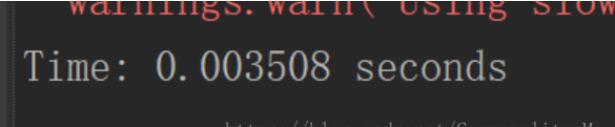
不使用多线程:

使用多线程:
以上这篇python使用tomorrow实现多线程的例子就是小编分享给大家的全部内容了,希望能给大家一个参考,也希望大家多多支持【听图阁-专注于Python设计】。


相关文章

Python3 全自动更新已安装的模块实现

Python3 全自动更新已安装的模块实现

1. 手动操作 1.1. 显示模块 pip list 1.2. 显示过期模块 pip list --outdated 1.3. 安装模块 pip install...

python网络编程实例简析

本文实例讲述了python网络编程,分享给大家供大家参考。 具体方法如下: 服务端代码如下: from SocketServer import(TCPServer as TCP,...

Pytorch 多块GPU的使用详解

Pytorch 多块GPU的使用详解

注:本文针对单个服务器上多块GPU的使用,不是多服务器多GPU的使用。 在一些实验中,由于Batch_size的限制或者希望提高训练速度等原因,我们需要使用多块GPU。本文针对Pytor...

利用python-docx模块写批量生日邀请函

利用python-docx模块写批量生日邀请函

利用python-docx模块,写批量生日邀请函 有关python-docx的使用方法,可以参考官方的API文档。这里使用了其中的一些基本功能,来完成一个简单的任务:为参加聚会的好友,每...

用Python编写一个高效的端口扫描器的方法

用Python编写一个高效的端口扫描器的方法

PyPortScanner python多线程端口扫描器。 输出示例: Github 此端口扫描器的源码,文档及详细调用方法见Github PythonPortScanner by...