Python多线程经典问题之乘客做公交车算法实例
本文实例讲述了Python多线程经典问题之乘客做公交车算法。分享给大家供大家参考,具体如下:
问题描述:
乘客乘坐公交车问题,司机,乘客,售票员协同工作,通过多线程模拟三者的工作。
司机:开车,停车
售票员:打开车门,关闭车门
乘客:上车,下车
用Python的Event做线程同步通信,代码如下:
# *-* coding:gb2312 *-*
import threading
import time
stationName=("车站0","车站1","车站2","车站3","车站4","车站5","车站6")
currentStationIndex = -1
eventBusStop = threading.Event()
eventClosedDoor = threading.Event()
eventOpenedDoor = threading.Event()
stationCount = len(stationName)
class Passenger(threading.Thread):
  def __init__(self,no,getonStation,getoffStation):
    self.no =no
    self.getonStation=getonStation
    self.getoffStation=getoffStation
    threading.Thread.__init__(self)
  def run(self):
    bExit= False
    global currentStationIndex
    global stationCount
    bAlreadyGetOnStation = False
    while not bExit:
      eventOpenedDoor.wait()
      if self.getonStation == currentStationIndex and bAlreadyGetOnStation == False:
        print "乘客%d在%s上车" %(self.no,stationName[currentStationIndex])
        bAlreadyGetOnStation =True
      elif self.getoffStation == currentStationIndex:
        print "乘客%d在%s下车" %(self.no,stationName[currentStationIndex])
        bExit = True
      time.sleep(1)
class Driver(threading.Thread):
  def run(self):
    bExit= False
    global currentStationIndex
    global stationCount
    while not bExit:
      print "司机: 公交车开始行驶....."
      time.sleep(5)
      currentStationIndex += 1
      print "司机: 到站 ",stationName[currentStationIndex]
      eventBusStop.set()
      eventClosedDoor.wait()
      eventClosedDoor.clear()
      if currentStationIndex == stationCount-1:
        bExit= True
class Conductor(threading.Thread):
  def run(self):
    bExit= False
    global currentStationIndex
    global stationCount
    while not bExit:
      eventBusStop.wait()
      eventBusStop.clear()
      print "售票员打开车门:%s到了" %(stationName[currentStationIndex])
      eventOpenedDoor.set()
      time.sleep(5)
      print "售票员关闭车门"
      eventOpenedDoor.clear()
      eventClosedDoor.set()
      if currentStationIndex == stationCount-1:
        bExit = True
def test():
  passPool=[]
  passPool.append(Passenger(0,0,3))
  passPool.append(Passenger(1,1,3))
  passPool.append(Passenger(2,2,4))
  passPool.append(Passenger(3,0,5))
  passPool.append(Passenger(4,1,3))
  passPool.append(Passenger(5,2,4))
  passPool.append(Passenger(6,4,5))
  passPool.append(Passenger(7,0,2))
  passPool.append(Passenger(8,1,3))
  passPool.append(Conductor())
  passPool.append(Driver())
  leng = len(passPool)
  for i in range(leng):
    passPool[i].start()
if __name__=='__main__':
  test()
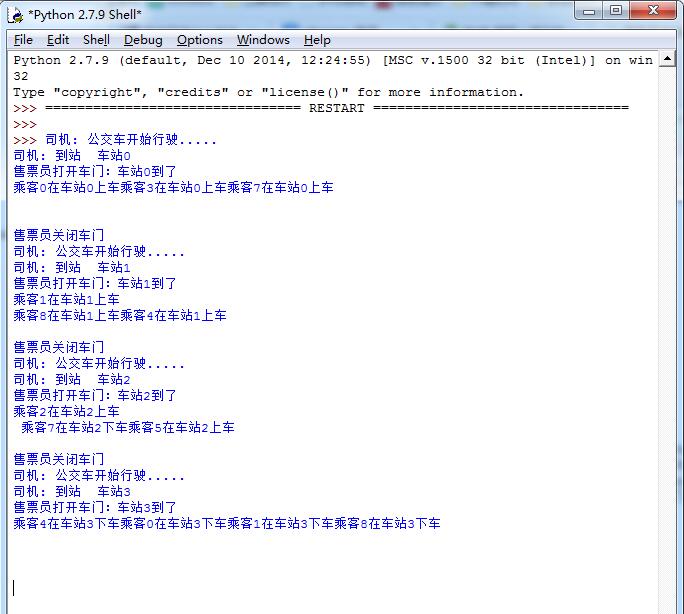
输出结果如下:
更多关于Python相关内容感兴趣的读者可查看本站专题:《Python进程与线程操作技巧总结》、《Python Socket编程技巧总结》、《Python图片操作技巧总结》、《Python数据结构与算法教程》、《Python函数使用技巧总结》、《Python字符串操作技巧汇总》、《Python入门与进阶经典教程》及《Python文件与目录操作技巧汇总》
希望本文所述对大家Python程序设计有所帮助。