django的csrf实现过程详解
如果是ajax提交,可以按照下面的方式处理
<script src="/static/jq/jquery-3.3.1.js"></script>
 <script src="/static/jq/jquery.cookie.js"></script>
 <script>
   $(function () {
     ajax_buttion()
   })
   function ajax_buttion() {
     $("#btn").bind("click",function () {
       $.ajax(
         {
           url:"/test/app1/",
           type:"post",
           data:{
             username:"root",
             pwd:"admin"
           },
           headers:{
             "X-CSRFToken":$.cookie("csrftoken")
           },
           sucess:function (data) {
             console.log(data)

           }
         }
       )
     })
   }
 </script>
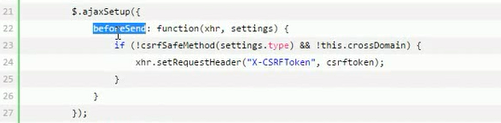
可以设置一个全局的设置,然后在$(function){
}中执行函数
$(function () {
  ajax_buttion()
  $.ajaxSetup()
})
如果是form表单提交,则可以按照下面的方式处理
<form action="/test/app1/" method="post">
  {% csrf_token %}
  <input type="text" name="uname">
  <input type="submit" value="submit">
  <input type="button" value="ajax" id="btn">
</form>
然后返回使用render的方式返回
def test(request):
  # int("hahah")
  # print(settings.C)
  print("test------->views",time.time())

  print(request.method)
  print("_".center(100,"-"))
  print(request)
  # return HttpResponse("last_app1")
  return render(request,"test.html")
中间件里csrf默认是全局都生效的,但是如果我们有需求,比如全局生效,但是我某个函数不需要使用csrf该怎么办;或者我的全局不设置csrf,但是对某个视图函数需要采用csrf,该怎么办
这里就需要导入2个模块
from django.views.decorators.csrf import csrf_exempt
from django.views.decorators.csrf import csrf_protect
然后在视图函数中使用使用装饰器来装饰视图函数
下面的例子就是起到全局启动csrf,但是我这个函数不启动csrf
@csrf_exempt
def test(request):
  # int("hahah")
  # print(settings.C)
  print("test------->views",time.time())

  print(request.method)
  print("_".center(100,"-"))
  print(request)
  # return HttpResponse("last_app1")
  return render(request,"test.html")
下面的例子就是全局不启用csrf,但是我这个函数不启动csrf
@csrf_protect
def test(request):
  # int("hahah")
  # print(settings.C)
  print("test------->views",time.time())

  print(request.method)
  print("_".center(100,"-"))
  print(request)
  # return HttpResponse("last_app1")
  return render(request,"test.html")
以上就是本文的全部内容,希望对大家的学习有所帮助,也希望大家多多支持【听图阁-专注于Python设计】。