利用python画一颗心的方法示例
前言
Python一般使用Matplotlib制作统计图形,用它自己的说法是‘让简单的事情简单,让复杂的事情变得可能'。用它可以制作折线图,直方图,条形图,散点图,饼图,谱图等等你能想到的和想不到的统计图形,这些图形可以导出为多种具有出版质量的格式。此外,它和ipython结合使用,确实方便,谁用谁知道!本文将介绍利用python中的matplotlib画一颗心,感兴趣的朋友们下面来一起看看吧。
安装matplotlib
首先要安装matplotlib
pip install matplotlib
windows用户可以去官网下载安装。官网看到matpltlib的作者John Hunter (1968-2012)刚去世不久,在此感谢他创造了这样一个强大的绘图工具。
上代码
#!/usr/bin/env python3
from mpl_toolkits.mplot3d import Axes3D
from matplotlib import cm
from matplotlib.ticker import LinearLocator, FormatStrFormatter
import matplotlib.pyplot as plt
import numpy as np


def heart_3d(x,y,z):
 return (x**2+(9/4)*y**2+z**2-1)**3-x**2*z**3-(9/80)*y**2*z**3


def plot_implicit(fn, bbox=(-1.5, 1.5)):
 ''' create a plot of an implicit function
 fn ...implicit function (plot where fn==0)
 bbox ..the x,y,and z limits of plotted interval'''
 xmin, xmax, ymin, ymax, zmin, zmax = bbox*3
 fig = plt.figure()
 ax = fig.add_subplot(111, projection='3d')
 A = np.linspace(xmin, xmax, 100) # resolution of the contour
 B = np.linspace(xmin, xmax, 40) # number of slices
 A1, A2 = np.meshgrid(A, A) # grid on which the contour is plotted

 for z in B: # plot contours in the XY plane
  X, Y = A1, A2
  Z = fn(X, Y, z)
  cset = ax.contour(X, Y, Z+z, [z], zdir='z', colors=('r',))
  # [z] defines the only level to plot
  # for this contour for this value of z

 for y in B: # plot contours in the XZ plane
  X, Z = A1, A2
  Y = fn(X, y, Z)
  cset = ax.contour(X, Y+y, Z, [y], zdir='y', colors=('red',))

 for x in B: # plot contours in the YZ plane
  Y, Z = A1, A2
  X = fn(x, Y, Z)
  cset = ax.contour(X+x, Y, Z, [x], zdir='x',colors=('red',))

 # must set plot limits because the contour will likely extend
 # way beyond the displayed level. Otherwise matplotlib extends the plot limits
 # to encompass all values in the contour.
 ax.set_zlim3d(zmin, zmax)
 ax.set_xlim3d(xmin, xmax)
 ax.set_ylim3d(ymin, ymax)

 plt.show()

if __name__ == '__main__':
 plot_implicit(heart_3d)
效果是这个样子,挺有意思的:
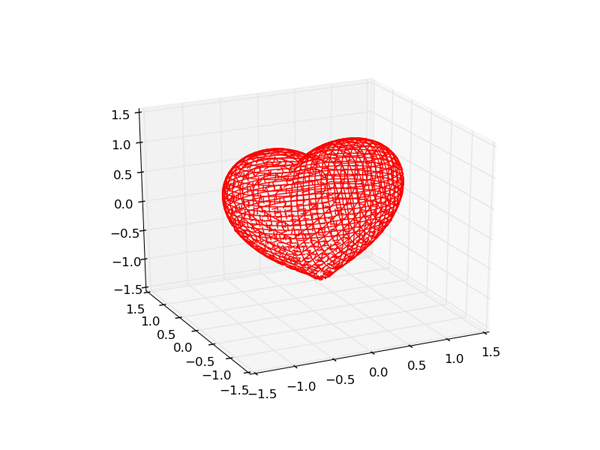
总结
以上就是这篇文章的全部内容了,希望本文的内容对大家学习或者使用python能带来一定的帮助,如果有疑问大家可以留言交流。