pthon贪吃蛇游戏详细代码
本文实例为大家分享了pthon贪吃蛇游戏的具体代码,供大家参考,具体内容如下
在写Python游戏项目时,最重要的时python中的pygame库。安装pygame库和用法在我CSDN博客另一篇文章上。这里就不详细说了,下边时运行游戏界面。
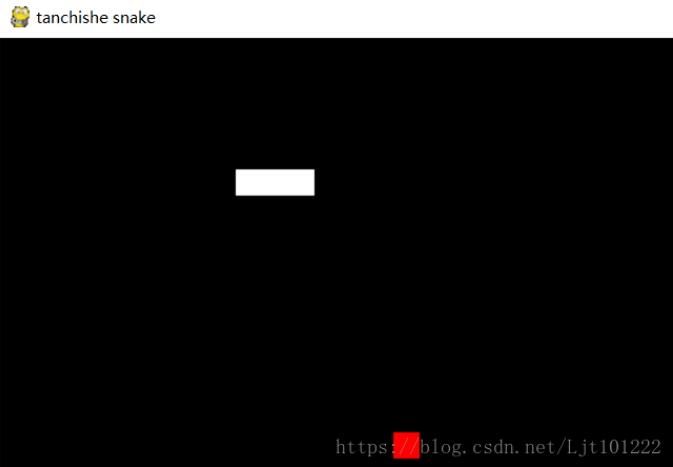
下边是详细的代码和注释
import pygame,sys,random,time
from pygame.locals import * #从pygame模块导入常用的函数和常量
#定义颜色变量
black_colour = pygame.Color(0,0,0)
white_colour = pygame.Color(255,255,255)
red_colour = pygame.Color(255,0,0)
grey_colour = pygame.Color(150,150,150)
#定义游戏结束函数
def GameOver(gamesurface):
 #设置提示字体的格式
 GameOver_font = pygame.font.SysFont("MicrosoftYaHei", 16)
 #设置提示字体的颜色
 GameOver_colour = GameOver_font.render('Game Over',True,grey_colour)
 #设置提示位置
 GameOver_location = GameOver_colour.get_rect()
 GameOver_location.midtop = (320,10)
 #绑定以上设置到句柄
 gamesurface.blit(GameOver_colour,GameOver_location)
 #提示运行信息
 pygame.display.flip()
 #休眠5秒
 time.sleep(5)
 #退出游戏
 pygame.quit()
 #退出程序
 sys.exit()
#定义主函数
def main():
 #初始化pygame,为使用硬件做准备
 pygame.init()
 pygame.time.Clock()
 ftpsClock = pygame.time.Clock()
 #创建一个窗口
 gamesurface = pygame.display.set_mode((640,480))
 #设置窗口的标题
 pygame.display.set_caption('tanchishe snake')
 #初始化变量
 #初始化贪吃蛇的起始位置
 snakeposition = [100,100]
 #初始化贪吃蛇的长度
 snakelength = [[100,100],[80,100],[60,100]]
 #初始化目标方块的位置
 square_purpose = [300,300]
 #初始化一个数来判断目标方块是否存在
 square_position = 1
 #初始化方向,用来使贪吃蛇移动
 derection = "right"
 change_derection = derection
 #进行游戏主循环
 while True:
  #检测按键等pygame事件
  for event in pygame.event.get():
   if event.type==QUIT:
    #接收到退出事件后,退出程序
    pygame.quit()
    sys.exit()
   elif event.type==KEYDOWN:
    #判断键盘事件,用w,s,a,d来表示上下左右
    if event.key==K_RIGHT or event.key==ord('d'):
     change_derection = "right"
    if event.key==K_LEFT or event.key==ord('a'):
     change_derection = "left"
    if event.key==K_UP or event.key==ord('w'):
     change_derection = "up"
    if event.key==K_DOWN or event.key==ord('s'):
     change_derection = "down"
    if event.key==K_ESCAPE:
     pygame.event.post(pygame.event.Event(QUIT))
  #判断移动的方向是否相反
  if change_derection =='left'and not derection =='right':
   derection = change_derection
  if change_derection =='right'and not derection =='left':
   derection = change_derection
  if change_derection == 'up' and not derection =='down':
   derection = change_derection
  if change_derection == 'down' and not derection == 'up':
   derection = change_derection
  #根据方向,改变坐标
  if derection == 'left':
   snakeposition[0] -= 20
  if derection == 'right':
   snakeposition[0] += 20
  if derection == 'up':
   snakeposition[1] -= 20
  if derection == 'down':
   snakeposition[1] += 20
  #增加蛇的长度
  snakelength.insert(0,list(snakeposition))
  #判断是否吃掉目标方块
  if snakeposition[0]==square_purpose[0] and snakeposition[1]==square_purpose[1]:
   square_position = 0
  else:
   snakelength.pop()
  #重新生成目标方块
  if square_position ==0:
   #随机生成x,y,扩大二十倍,在窗口范围内
   x = random.randrange(1,32)
   y = random.randrange(1,24)
   square_purpose = [int(x*20),int(y*20)]
   square_position = 1
  #绘制pygame显示层
  gamesurface.fill(black_colour)
  for position in snakelength:
   pygame.draw.rect(gamesurface,white_colour,Rect(position[0],position[1],20,20))
   pygame.draw.rect(gamesurface,red_colour,Rect(square_purpose[0],square_purpose[1],20,20))
  #刷新pygame显示层
  pygame.display.flip()
  #判断是否死亡
  if snakeposition[0]<0 or snakeposition[0]>620:
   GameOver(gamesurface)
  if snakeposition[1]<0 or snakeposition[1]>460:
   GameOver(gamesurface)
  for snakebody in snakelength[1:]:
   if snakeposition[0]==snakebody[0] and snakeposition[1]==snakebody[1]:
    GameOver(gamesurface)
  #控制游戏速度
  ftpsClock.tick(5)

if __name__ == "__main__":
 main()
以上就是本文的全部内容,希望对大家的学习有所帮助,也希望大家多多支持【听图阁-专注于Python设计】。