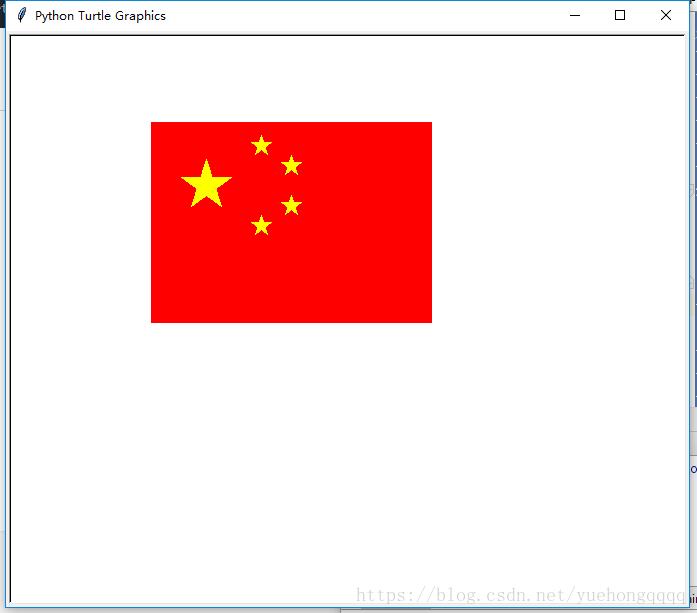
给你一面国旗 教你用python画中国国旗
本文实例为大家分享了python画中国国旗的具体代码,供大家参考,具体内容如下
# author : momo
import turtle
#中国国旗
turtle.up()
turtle.goto(-200,200)
turtle.down()
turtle.begin_fill()
turtle.fillcolor("red")
turtle.pencolor("red")
for i in range(2):
 turtle.forward(280)
 turtle.right(90)
 turtle.forward(200)
 turtle.right(90)
turtle.end_fill()

turtle.up()
turtle.goto(-170,145)
turtle.down()
turtle.begin_fill()
turtle.fillcolor("yellow")
turtle.pencolor("yellow")
for x in range(5):
 turtle.forward(50)
 turtle.right(144)
turtle.end_fill()

turtle.up()
turtle.goto(-100,180)
turtle.down()
turtle.begin_fill()
turtle.fillcolor("yellow")
turtle.pencolor("yellow")
for x in range(5):
 turtle.forward(20)
 turtle.right(144)
turtle.end_fill()

turtle.up()
turtle.goto(-70,160)
turtle.down()
turtle.begin_fill()
turtle.fillcolor("yellow")
turtle.pencolor("yellow")
for x in range(5):
 turtle.forward(20)
 turtle.right(144)
turtle.end_fill()

turtle.up()
turtle.goto(-70,120)
turtle.down()
turtle.begin_fill()
turtle.fillcolor("yellow")
turtle.pencolor("yellow")
for x in range(5):
 turtle.forward(20)
 turtle.right(144)
turtle.end_fill()

turtle.up()
turtle.goto(-100,100)
turtle.down()
turtle.begin_fill()
turtle.fillcolor("yellow")
turtle.pencolor("yellow")
for x in range(5):
 turtle.forward(20)
 turtle.right(144)
turtle.end_fill()


turtle.hideturtle()#隐藏小海龟
#维持面板
turtle.done()
以上就是本文的全部内容,希望对大家的学习有所帮助,也希望大家多多支持【听图阁-专注于Python设计】。