通过table标签,PHP输出EXCEL的实现方法
关键代码:
<?php
header("Content-type:application/vnd.ms-excel");
header("Conten-Disposition:filename=hp.xlsx");
?>
第一句是用来声明文件内容的格式;第二局是用来修改文件名的。如果没有第二个语句的话,生成的文件将是没有后缀名的。
实现代码:
<meta http-equiv="Content-Type" content="text/html; charset=utf-8" />
<?php
header("Content-type:application/vnd.ms-excel");
header("Conten-Disposition:filename=hp.xlsx");
?>
<table width="200" border="1">
<tr>
<td colspan="3" align="center">i love you</td>
</tr>
<tr>
<td>编号</td>
<td>姓名</td>
<td>年龄</td>
</tr>
<tr>
<td>1</td>
<td>test</td>
<td>20</td>
</tr>
<tr>
<td>2</td>
<td>test2</td>
<td>22</td>
</tr>
</table>
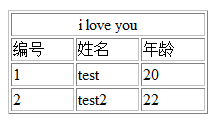
当然,我们很自然的想到了,是否可以把数据库的内容也通过这种方式输出到表格呢?
答案是可以的。
实现代码:
<meta http-equiv="Content-Type" content="text/html; charset=gbk" />
<?php
header("Content-type:application/vnd.ms-excel");
header("Content-Disposition:filename=qianshou.xls");
mysql_connect("localhost","root","");
mysql_select_db("test");
mysql_query("SET NAMES GBK");
$query="select * from city ";
$r=mysql_query($query);
?>
<table width="200" border="1">
<tr>
<td colspan="3" align="center">城市列表</td>
</tr>
<tr>
<td align="center">id</td>
<td align="center">p_id</td>
<td align="center">name</td>
</tr>
<?php
while($row=mysql_fetch_assoc($r)){
?>
<tr>
<td><?php echo $row[id] ?></td>
<td><?php echo $row[p_id] ?></td>
<td><?php echo $row[c_name]?></td>
</tr>
<?php
}
?>
</table>

复制代码 代码如下:
<?php
header("Content-type:application/vnd.ms-excel");
header("Conten-Disposition:filename=hp.xlsx");
?>
第一句是用来声明文件内容的格式;第二局是用来修改文件名的。如果没有第二个语句的话,生成的文件将是没有后缀名的。
实现代码:
复制代码 代码如下:
<meta http-equiv="Content-Type" content="text/html; charset=utf-8" />
<?php
header("Content-type:application/vnd.ms-excel");
header("Conten-Disposition:filename=hp.xlsx");
?>
<table width="200" border="1">
<tr>
<td colspan="3" align="center">i love you</td>
</tr>
<tr>
<td>编号</td>
<td>姓名</td>
<td>年龄</td>
</tr>
<tr>
<td>1</td>
<td>test</td>
<td>20</td>
</tr>
<tr>
<td>2</td>
<td>test2</td>
<td>22</td>
</tr>
</table>
当然,我们很自然的想到了,是否可以把数据库的内容也通过这种方式输出到表格呢?
答案是可以的。
实现代码:
复制代码 代码如下:
<meta http-equiv="Content-Type" content="text/html; charset=gbk" />
<?php
header("Content-type:application/vnd.ms-excel");
header("Content-Disposition:filename=qianshou.xls");
mysql_connect("localhost","root","");
mysql_select_db("test");
mysql_query("SET NAMES GBK");
$query="select * from city ";
$r=mysql_query($query);
?>
<table width="200" border="1">
<tr>
<td colspan="3" align="center">城市列表</td>
</tr>
<tr>
<td align="center">id</td>
<td align="center">p_id</td>
<td align="center">name</td>
</tr>
<?php
while($row=mysql_fetch_assoc($r)){
?>
<tr>
<td><?php echo $row[id] ?></td>
<td><?php echo $row[p_id] ?></td>
<td><?php echo $row[c_name]?></td>
</tr>
<?php
}
?>
</table>