Python的Bottle框架中返回静态文件和JSON对象的方法
代码如下:
# -*- coding: utf-8 -*-
#!/usr/bin/python
# filename: todo.py
# codedtime: 2014-8-28 20:50:44

import sqlite3
import bottle

@bottle.route('/help3')
def help():
  return bottle.static_file('help.html', root='.') #静态文件

@bottle.route('/json:json#[0-9]+#')
def show_json(json):
  conn = sqlite3.connect('todo.db')
  c = conn.cursor()
  c.execute("SELECT task FROM todo WHERE id LIKE ?", (json))
  result = c.fetchall()
  c.close()

  if not result:
    return {'task':'This item number does not exist!'}
  else:
    return {'Task': result[0]} #返回Json对象

bottle.debug(True)
bottle.run(host='127.0.0.1', port=8080, reloader = True)
第一个路由@bottle.route('/help3') 返回一个静态问,在浏览器中输入:http://127.0.0.1:8080/help3
结果如下:
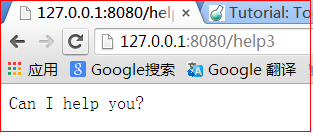
其中的 root='.')或 root='./')表示在程序当前目录下,当然你也可以知道其他的路径如: root='/path/to/file'
第二个路由@bottle.route('/json:json#[0-9]+#')返回一个Json对象,在浏览器中输入:http://127.0.0.1:8080/json4
结果如下:

Web程序难免会遇到访问失败的错误,那么怎样去捕获这些错误,Bottle可以用路由机制来捕捉错误,如下捕获403、404:
@error(403)
def mistake403(code):
  return 'The parameter you passed has the wrong format!'

@error(404)
def mistake404(code):
  return 'Sorry, this page does not exist!'
其他错误处理如法泡制!