Python实现excel转sqlite的方法
本文实例讲述了Python实现excel转sqlite的方法。分享给大家供大家参考,具体如下:
Python环境的安装配置就不说了,个人喜欢pydev的开发环境。
python解析excel需要使用第三方的库,这里选择使用xlrd
先看excel内容:
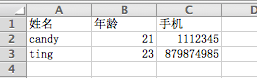
然后是生成的数据库:

下面是源代码:
#!/usr/bin/python
# encoding=utf-8
'''''
Created on 2013-4-2
@author: ting
'''
from xlrd import open_workbook
import sqlite3
import types
def read_excel(sheet):
  # 判断有效sheet
  if sheet.nrows > 0 and sheet.ncols > 0:
    for row in range(1, sheet.nrows):
      row_data = []
      for col in range(sheet.ncols):
        data = sheet.cell(row, col).value
        # excel表格内容数据类型转换 float->int,unicode->utf-8
        if type(data) is types.UnicodeType: data = data.encode("utf-8")
        elif type(data) is types.FloatType: data = int(data)
        row_data.append(data)
      check_data_length(row_data)
# 检查row_data长度
def check_data_length(row_data):
  if len(row_data) == 3:
    insert_sqlite(row_data)
def insert_sqlite(row_data):
  # 打开数据库(不存在时会创建数据库)
  con = sqlite3.connect("test.db")
  cur = con.cursor()
  try:
    cur.execute("create table if not exists contacts(_id integer primary key "\
            "autoincrement,name text,age integer,number integer)")
    # 插入数据不要使用拼接字符串的方式,容易收到sql注入攻击
    cur.execute("insert into contacts(name,age,number) values(?,?,?)", row_data)
    con.commit()
  except sqlite3.Error as e:
    print "An error occurred: %s", e.args[0]
  finally:
    cur.close
    con.close
xls_file = "test.xls"
book = open_workbook(xls_file)
for sheet in book.sheets():
  read_excel(sheet)
print "------ Done ------"
更多关于Python相关内容感兴趣的读者可查看本站专题:《Python常见数据库操作技巧汇总》、《Python数据结构与算法教程》、《Python函数使用技巧总结》、《Python字符串操作技巧汇总》、《Python入门与进阶经典教程》及《Python文件与目录操作技巧汇总》
希望本文所述对大家Python程序设计有所帮助。