python+pyqt实现右下角弹出框
本文实例为大家分享了pyqt实现右下角弹出框的具体代码,供大家参考,具体内容如下
构造函数中:
self.desktop=QDesktopWidget()
self.move((self.desktop.availableGeometry().width()-self.width()),self.desktop.availableGeometry().height()) #初始化位置到右下角
self.showAnimation()
#弹出动画
def showAnimation(self):
  #显示弹出框动画
  self.animation=QPropertyAnimation(self,"pos")
  self.animation.setDuration(1000)
  self.animation.setStartValue(QPoint(self.x(),self.y()))
  self.animation.setEndValue(QPoint((self.desktop.availableGeometry().width()-self.width()),(self.desktop.availableGeometry().height()-self.height()+self.SHADOW_WIDTH)))
  self.animation.start()

  #设置弹出框1秒弹出,然后渐隐
  self.remainTimer=QTimer()
  self.connect(self.remainTimer,SIGNAL("timeout()"),self,SLOT("closeAnimation()"))
  self.remainTimer.start(10000) #定时器10秒
#关闭动画
@pyqtSlot()
def closeAnimation(self):
  #清除Timer和信号槽
  self.remainTimer.stop()
  self.disconnect(self.remainTimer,SIGNAL("timeout()"),self,SLOT("closeAnimation()"))
  self.remainTimer.deleteLater()
  self.remainTimer=None
  #弹出框渐隐
  self.animation =QPropertyAnimation(self,"windowOpacity")
  self.animation.setDuration(1000)
  self.animation.setStartValue(1)
  self.animation.setEndValue(0)
  self.animation.start()
  #动画完成后清理
  self.connect(self.animation,SIGNAL("finished()"),self,SLOT("clearAll()"))

#清理及退出
@pyqtSlot()
def clearAll(self):
  self.disconnect(self.animation,SIGNAL("finished()"),self,SLOT("clearAll()"))
  sys.exit()    #退出
或者直接: self.connect(self.animation,SIGNAL("finished()"),self,SLOT("close()"))
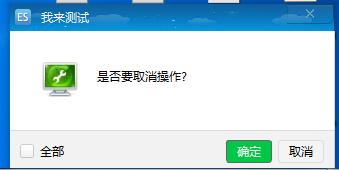
效果如下:
以上就是本文的全部内容,希望对大家的学习有所帮助,也希望大家多多支持【听图阁-专注于Python设计】。