Python实现PS滤镜碎片特效功能示例
本文实例讲述了Python实现PS滤镜碎片特效功能。分享给大家供大家参考,具体如下:
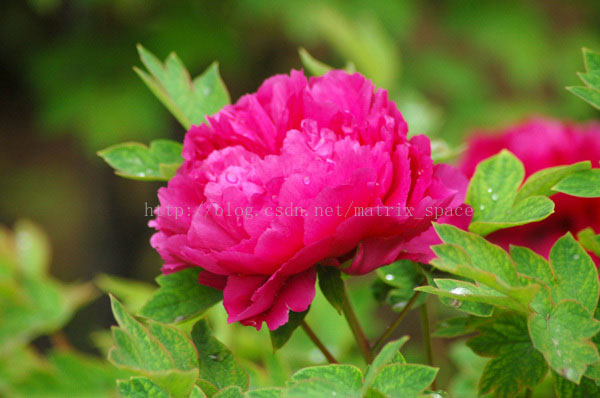
这里用 Python 实现 PS 滤镜中的碎片特效,这个特效简单来说就是将图像在 上,下,左,右 四个方向做平移,然后将四个方向的平移的图像叠加起来做平均。具体的效果图与说明可参考附录说明
from skimage import img_as_float
import matplotlib.pyplot as plt
from skimage import io
file_name='D:/Visual Effects/PS Algorithm/4.jpg';
img=io.imread(file_name)
img = img_as_float(img)
img_1 = img.copy()
img_2 = img.copy()
img_3 = img.copy()
img_4 = img.copy()
img_out = img.copy()
Offset = 7
row, col, channel = img.shape
img_1[:, 0 : col-1-Offset, :] = img[:, Offset:col-1, :]
img_2[:, Offset:col-1, :] = img[:, 0 : col-1-Offset, :]
img_3[0:row-1-Offset, :, :] = img[Offset:row-1, :, :]
img_4[Offset:row-1, :, :] = img[0:row-1-Offset, :, :]
img_out = (img_1 + img_2 + img_3 + img_4) / 4.0
plt.figure(1)
plt.imshow(img)
plt.axis('off');
plt.figure(2)
plt.imshow(img_out)
plt.axis('off');
附:PS 滤镜算法原理——碎片效果
%%% Fragment
%%% 对原图做四个方向的平移,然后对平移的结果取平均
%%% 碎片效果
clc;
clear all;
Image=imread('4.jpg');
Image=double(Image)/255;
[row,col,k]=size(Image);
Image1=Image;
Image2=Image;
Image3=Image;
Image4=Image;
Offset=5;
%%% 左移
Image1(:,1:col-Offset,:)=Image(:,1+Offset:col,:);
%%% 右移
Image2(:,1+Offset:col,:)=Image(:,1:col-Offset,:);
%%%% 上移
Image3(1+Offset:row,:,:)=Image(1:row-Offset,:,:);
%%% 下移
Image4(1:row-Offset,:,:)=Image(1+Offset:row,:,:);
Image=(Image1+Image2+Image3+Image4)/4;
figure, imshow(Image);
原图:
效果图:

更多关于Python相关内容感兴趣的读者可查看本站专题:《Python图片操作技巧总结》、《Python数据结构与算法教程》、《Python Socket编程技巧总结》、《Python函数使用技巧总结》、《Python字符串操作技巧汇总》、《Python入门与进阶经典教程》及《Python文件与目录操作技巧汇总》
希望本文所述对大家Python程序设计有所帮助。