python监控键盘输入实例代码
本文研究的主要是python监控键盘输入的相关代码,用到了os,sys,time等,具体实现代码如下:
#!/usr/bin/env python
# -*- coding: utf-8 -*-
import os
import sys
import tty, termios
import time

if __name__ == '__main__':
  print "Reading form keybord"
  print """  i
j k l
  m"""
  print 'press Q to quit'
  while True:
    fd=sys.stdin.fileno()
    old_settings=termios.tcgetattr(fd)
    #old_settings[3]= old_settings[3] & ~termios.ICANON & ~termios.ECHO
    try:
      tty.setraw(fd)
      ch=sys.stdin.read(1)
    finally:
      termios.tcsetattr(fd, termios.TCSADRAIN, old_settings)
      #print 'error'
    if ch=='i':
      print 'move forward'
    elif ch=='m':
      print 'move back'
    elif ch=='j':
      print "turn left!"
    elif ch=='l':
      print "turn right!"
    elif ch=='u':
      print "turn right!"
    elif ch=='o':
      print "turn right!"
    elif ch=='k':
      print "stop motor!"
    elif ch=='q':
      print "shutdown!"
      break
    elif ord(ch)==0x3:
      #这个是ctrl c
      print "shutdown"
      break
    print "Reading form keybord"
    print """  i
j k l
  m"""
    print 'press Q or ctrl+c to quit'
    #rate.sleep()
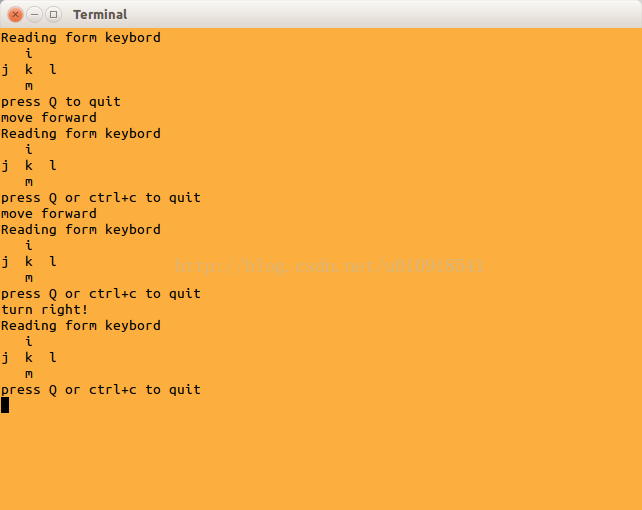
结果:
总结
以上就是本文关于python监控键盘输入实例代码的全部内容,希望对大家有所帮助。感兴趣的朋友可以继续参阅本站其他相关专题,如有不足之处,欢迎留言指出。感谢朋友们对本站的支持!