Python实现时钟显示效果思路详解
语言:Python
IDE:Python.IDE
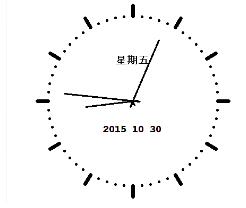
1.编写时钟程序,要求根据时间动态更新
2.代码思路
需求:5个Turtle对象, 1个绘制外表盘+3个模拟表上针+1个输出文字
Step1:建立Turtle对象并初始化
Step2:静态表盘绘制
Step3:根据时钟更新表针位置与时间信息
基本库:Turtle、datetime
3.代码段
from turtle import *
from datetime import *
def Skip(step):
  penup()
  forward(step)
  pendown()
def mkHand(name, length):
  #注册Turtle形状,建立表针Turtle
  reset()
  Skip(-length*0.1)
  begin_poly()
  forward(length*1.1)
  end_poly()
  handForm = get_poly()
  #注册Turtle形状命令register_shape(name,shape=None)
  register_shape(name, handForm)
def Init():
  global secHand, minHand, hurHand, printer
  mode("logo")# 重置Turtle指向北
  #建立三个表针Turtle并初始化
  #第二个参数为长度
  mkHand("secHand", 125)
  mkHand("minHand", 130)
  mkHand("hurHand", 90)
  secHand = Turtle()
  secHand.shape("secHand")
  minHand = Turtle()
  minHand.shape("minHand")
  hurHand = Turtle()
  hurHand.shape("hurHand")
  for hand in secHand, minHand, hurHand:
    hand.shapesize(1, 1, 3)
    hand.speed(0)
  #建立输出文字Turtle
  printer = Turtle()
  printer.hideturtle()
  printer.penup()
def SetupClock(radius):
  #建立表的外框
  reset()
  pensize(7)
  for i in range(60):
    Skip(radius)
    if i % 5 == 0:
      forward(20)
      Skip(-radius-20)
    else:
      dot(5)
      Skip(-radius)
    right(6)
def Week(t):
  week = ["星期一", "星期二", "星期三",
      "星期四", "星期五", "星期六", "星期日"]
  return week[t.weekday()]
def Date(t):
  y = t.year
  m = t.month
  d = t.day
  return "%s %d %d" % (y, m, d)
def Tick():
  #绘制表针的动态显示
  #当前时间
  t = datetime.today()
  second = t.second + t.microsecond*0.000001
  minute = t.minute + second/60.0
  hour = t.hour + minute/60.0
  secHand.setheading(6*second)
  minHand.setheading(6*minute)
  hurHand.setheading(30*hour)
   #介入Tracer函数以控制刷新速度
  tracer(False)
  printer.forward(65)
  printer.write(Week(t), align="center",
         font=("Courier", 14, "bold"))
  printer.back(130)
  printer.write(Date(t), align="center",
         font=("Courier", 14, "bold"))
  printer.home()
  tracer(True)
  ontimer(Tick, 100)#100ms后继续调用tick
def main():
  tracer(False)
  Init()
  SetupClock(160)
  tracer(True)
  Tick()
  mainloop()
if __name__ == "__main__":
  main()
补充:
Python实现时钟
1.小时钟获取当前时间并用打印在Console上
2.上代码
 import time,sys,os
 while(1):
   t = time.strftime('%H:%M:%S',time.localtime(time.time()))
   sys.stdout.write(t+'\b'*10)
   sys.stdout.flush()
   time.sleep(0.1)
   os.system('cls')
3.解释
第一步:导入time,sys,os模块
第二部:实现无限循环
第三步:实现格式化输出,具体的详细使用方法,参见:这里
第四部:重定向到Console上
第五步:刷新
第六步:间隔0.1执行一次
第七步:清屏