Tensorflow卷积神经网络实例
CNN最大的特点在于卷积的权值共享结构,可以大幅减少神经网络的参数量,防止过拟合的同时又降低了神经网络模型的复杂度。在CNN中,第一个卷积层会直接接受图像像素级的输入,每一个卷积操作只处理一小块图像,进行卷积变化后再传到后面的网络,每一层卷积都会提取数据中最有效的特征。这种方法可以提取到图像中最基础的特征,比如不同方向的边或者拐角,而后再进行组合和抽象形成更高阶的特征。
一般的卷积神经网络由多个卷积层构成,每个卷积层中通常会进行如下几个操作:
- 图像通过多个不同的卷积核的滤波,并加偏置(bias),特取出局部特征,每个卷积核会映射出一个新的2D图像。
- 将前面卷积核的滤波输出结果,进行非线性的激活函数处理。目前最常见的是使用ReLU函数,而以前Sigmoid函数用得比较多。
- 对激活函数的结果再进行池化操作(即降采样,比如将2*2的图片将为1*1的图片),目前一般是使用最大池化,保留最显著的特征,并提升模型的畸变容忍能力。
总结一下,CNN的要点是局部连接(local Connection)、权值共享(Weight Sharing)和池化层(Pooling)中的降采样(Down-Sampling)。
本文将使用Tensorflow实现一个简单的卷积神经网络,使用的数据集是MNIST,网络结构:两个卷积层加一个全连接层。
from tensorflow.examples.tutorials.mnist import input_data
import tensorflow as tf

# 载入MNIST数据集,并创建默认的Interactive Session。
mnist = input_data.read_data_sets("MNIST_data/", one_hot=True)
sess = tf.InteractiveSession()

# 创建权重和偏置,以便重复使用。我们需要给权重制造一些随机的噪声来打破完全对称,比如截断的正态分布噪声,标准差设为0.1
def weight_variable(shape):
 initial = tf.truncated_normal(shape, stddev=0.1)
 return tf.Variable(initial)

def bias_variable(shape):
 initial = tf.constant(0.1, shape=shape)
 return tf.Variable(initial)

# 创建卷积层、池化层,以便重复使用
def conv2d(x, W):
 return tf.nn.conv2d(x, W, strides=[1, 1, 1, 1], padding='SAME')

def max_pool(x):
 return tf.nn.max_pool(x, ksize=[1, 2, 2, 1], strides=[1, 2, 2, 1], padding='SAME')

# 定义输入的placeholder
x = tf.placeholder(tf.float32, [None, 784])
y_ = tf.placeholder(tf.float32, [None, 10])
x_image = tf.reshape(x, [-1, 28, 28, 1])

# 定义第一个卷积层
W_conv1 = weight_variable([5, 5, 1, 32])
b_conv1 = bias_variable([32])
h_conv1 = tf.nn.relu(conv2d(x_image, W_conv1) + b_conv1)
h_pool1 = max_pool(h_conv1)

# 定义第二个卷积层
W_conv2 = weight_variable([5, 5, 32, 64])
b_conv2 = bias_variable([64])
h_conv2 = tf.nn.relu(conv2d(h_pool1, W_conv2) + b_conv2)
h_pool2 = max_pool(h_conv2)

# 定义全连接层。由于第二个卷积层输出的tensor是7*7*64,我们使用tf.reshape函数对其进行变形
W_fc1 = weight_variable([7*7*64, 1024])
b_fc1 = bias_variable([1024])
h_pool2_flat = tf.reshape(h_pool2, [-1, 7*7*64])
h_fc1 = tf.nn.relu(tf.matmul(h_pool2_flat, W_fc1) + b_fc1)

# 为了减轻过拟合,下面使用一个Dropout层。通过一个placeholder传入keep_prob比率来控制的。在训练时,我们随机丢弃一部分节点
# 的数据来减轻过拟合,预测时则保留全部数据来追求最好的预测性能。
keep_prob = tf.placeholder(dtype=tf.float32)
h_fc1_drop = tf.nn.dropout(h_fc1, keep_prob)

# 最后我们将Dropout层的输出连接一个Softmax层,得到最后的概率输出
W_fc2 = weight_variable([1024, 10])
b_fc2 = bias_variable([10])
y_conv = tf.nn.softmax(tf.matmul(h_fc1_drop, W_fc2) + b_fc2)

# 定义损失函数为cross entropy和优化器
cross_entropy = tf.reduce_mean(-tf.reduce_sum(y_ * tf.log(y_conv), reduction_indices=[1]))
train_step = tf.train.AdamOptimizer(1e-4).minimize(cross_entropy)

# 定义评测准确率的操作
correct_prediction = tf.equal(tf.argmax(y_conv, 1), tf.argmax(y_, 1))
accuracy = tf.reduce_mean(tf.cast(correct_prediction, tf.float32))

# 下面开始训练
tf.global_variables_initializer().run()
for i in range(20000):
 batch = mnist.train.next_batch(50)
 if i % 100 == 0:
  train_accuracy = accuracy.eval(feed_dict={x: batch[0], y_: batch[1], keep_prob: 1.0})
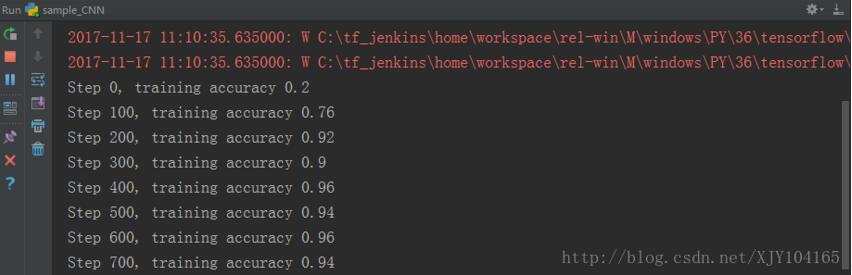
  print("Step %d, training accuracy %g" % (i, train_accuracy))
 train_step.run(feed_dict={x: batch[0], y_: batch[1], keep_prob: 0.5})

print("test accuracy %g" % accuracy.eval(feed_dict={x: mnist.test.images, y_: mnist.test.labels, keep_prob: 1.0}))

# 载入MNIST数据集,并创建默认的Interactive Session。
mnist = input_data.read_data_sets("MNIST_data/", one_hot=True)
sess = tf.InteractiveSession()

# 创建权重和偏置,以便重复使用。我们需要给权重制造一些随机的噪声来打破完全对称,比如截断的正态分布噪声,标准差设为0.1
def weight_variable(shape):
 initial = tf.truncated_normal(shape, stddev=0.1)
 return tf.Variable(initial)

def bias_variable(shape):
 initial = tf.constant(0.1, shape=shape)
 return tf.Variable(initial)

# 创建卷积层、池化层,以便重复使用
def conv2d(x, W):
 return tf.nn.conv2d(x, W, strides=[1, 1, 1, 1], padding='SAME')

def max_pool(x):
 return tf.nn.max_pool(x, ksize=[1, 2, 2, 1], strides=[1, 2, 2, 1], padding='SAME')

# 定义输入的placeholder
x = tf.placeholder(tf.float32, [None, 784])
y_ = tf.placeholder(tf.float32, [None, 10])
x_image = tf.reshape(x, [-1, 28, 28, 1])

# 定义第一个卷积层
W_conv1 = weight_variable([5, 5, 1, 32])
b_conv1 = bias_variable([32])
h_conv1 = tf.nn.relu(conv2d(x_image, W_conv1) + b_conv1)
h_pool1 = max_pool(h_conv1)

# 定义第二个卷积层
W_conv2 = weight_variable([5, 5, 32, 64])
b_conv2 = bias_variable([64])
h_conv2 = tf.nn.relu(conv2d(h_pool1, W_conv2) + b_conv2)
h_pool2 = max_pool(h_conv2)

# 定义全连接层。由于第二个卷积层输出的tensor是7*7*64,我们使用tf.reshape函数对其进行变形
W_fc1 = weight_variable([7*7*64, 1024])
b_fc1 = bias_variable([1024])
h_pool2_flat = tf.reshape(h_pool2, [-1, 7*7*64])
h_fc1 = tf.nn.relu(tf.matmul(h_pool2_flat, W_fc1) + b_fc1)

# 为了减轻过拟合,下面使用一个Dropout层。通过一个placeholder传入keep_prob比率来控制的。在训练时,我们随机丢弃一部分节点
# 的数据来减轻过拟合,预测时则保留全部数据来追求最好的预测性能。
keep_prob = tf.placeholder(dtype=tf.float32)
h_fc1_drop = tf.nn.dropout(h_fc1, keep_prob)

# 最后我们将Dropout层的输出连接一个Softmax层,得到最后的概率输出
W_fc2 = weight_variable([1024, 10])
b_fc2 = bias_variable([10])
y_conv = tf.nn.softmax(tf.matmul(h_fc1_drop, W_fc2) + b_fc2)

# 定义损失函数为cross entropy和优化器
cross_entropy = tf.reduce_mean(-tf.reduce_sum(y_ * tf.log(y_conv), reduction_indices=[1]))
train_step = tf.train.AdamOptimizer(1e-4).minimize(cross_entropy)

# 定义评测准确率的操作
correct_prediction = tf.equal(tf.argmax(y_conv, 1), tf.argmax(y_, 1))
accuracy = tf.reduce_mean(tf.cast(correct_prediction, tf.float32))

# 下面开始训练
tf.global_variables_initializer().run()
for i in range(20000):
 batch = mnist.train.next_batch(50)
 if i % 100 == 0:
  train_accuracy = accuracy.eval(feed_dict={x: batch[0], y_: batch[1], keep_prob: 1.0})
  print("Step %d, training accuracy %g" % (i, train_accuracy))
 train_step.run(feed_dict={x: batch[0], y_: batch[1], keep_prob: 0.5})

print("test accuracy %g" % accuracy.eval(feed_dict={x: mnist.test.images, y_: mnist.test.labels, keep_prob: 1.0}))
运行结果:
以上就是本文的全部内容,希望对大家的学习有所帮助,也希望大家多多支持【听图阁-专注于Python设计】。