Python 获取中文字拼音首个字母的方法
Python:3.5
代码如下:
def single_get_first(unicode1):
 str1 = unicode1.encode('gbk')
 try:
 ord(str1)
 return str1.decode('gbk')
 except:
 asc = str1[0] * 256 + str1[1] - 65536
 if asc >= -20319 and asc <= -20284:
 return 'a'
 if asc >= -20283 and asc <= -19776:
 return 'b'
 if asc >= -19775 and asc <= -19219:
 return 'c'
 if asc >= -19218 and asc <= -18711:
 return 'd'
 if asc >= -18710 and asc <= -18527:
 return 'e'
 if asc >= -18526 and asc <= -18240:
 return 'f'
 if asc >= -18239 and asc <= -17923:
 return 'g'
 if asc >= -17922 and asc <= -17418:
 return 'h'
 if asc >= -17417 and asc <= -16475:
 return 'j'
 if asc >= -16474 and asc <= -16213:
 return 'k'
 if asc >= -16212 and asc <= -15641:
 return 'l'
 if asc >= -15640 and asc <= -15166:
 return 'm'
 if asc >= -15165 and asc <= -14923:
 return 'n'
 if asc >= -14922 and asc <= -14915:
 return 'o'
 if asc >= -14914 and asc <= -14631:
 return 'p'
 if asc >= -14630 and asc <= -14150:
 return 'q'
 if asc >= -14149 and asc <= -14091:
 return 'r'
 if asc >= -14090 and asc <= -13119:
 return 's'
 if asc >= -13118 and asc <= -12839:
 return 't'
 if asc >= -12838 and asc <= -12557:
 return 'w'
 if asc >= -12556 and asc <= -11848:
 return 'x'
 if asc >= -11847 and asc <= -11056:
 return 'y'
 if asc >= -11055 and asc <= -10247:
 return 'z'
 return ''


def getPinyin(string):
 if string == None:
 return None
 lst = list(string)
 charLst = []
 for l in lst:
 charLst.append(single_get_first(l))
 return ''.join(charLst)


if __name__ == '__main__':
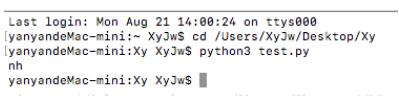
 print(getPinyin('你好'))
运行结果:
以上这篇Python 获取中文字拼音首个字母的方法就是小编分享给大家的全部内容了,希望能给大家一个参考,也希望大家多多支持【听图阁-专注于Python设计】。