使用Python横向合并excel文件的实例
起因:
有一批数据需要每个月进行分析,数据存储在excel中,行标题一致,需要横向合并进行分析。
数据示意:
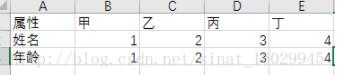
具有多个

代码:
# -*- coding: utf-8 -*-
"""
Created on Sun Nov 12 11:19:03 2017
@author: Li Ying
"""
#读取第一列作为合并后表格的第一列
from pandas import read_csv
df = read_csv(r'E:\excel\vb\excel1.csv',header=None)
sample_name = df[0]

file="combine"
filedestination = "E://excel//"
import glob
#from numpy import *
filearray=[]
for filename in glob.glob(r'E:\excel\*.xlsx'):
 filearray.append(filename)
#以上是从excel 文件夹下读取所有excel表格,并将所有的名字存储到列表filearray
print("在默认文件夹下有%d个文档哦"%len(filearray))
ge=len(filearray)
matrix = [None]*ge


#实现读写数据

#下面是将所有文件读数据到三维列表cell[][][]中(不包含表头)
import xlrd
for i in range(ge):
 fname=filearray[i]
 bk=xlrd.open_workbook(fname)
 try:
  sh=bk.sheet_by_name("Sheet1")
 except:
  print ("在文件%s中没有找到sheet1,读取文件数据失败,要不你换换表格的名字?" %fname)

 ncols=sh.ncols
 matrix[i] = [0]*(ncols-1)

 nrows=sh.nrows
 for m in range(ncols-1):
  matrix[i][m] = ["0"]*nrows

 for k in range(1,ncols):
  for j in range(0,nrows):
   matrix[i][k-1][j]=sh.cell(j,k).value

import xlwt
filename=xlwt.Workbook()
sheet=filename.add_sheet("hel")
#下面是把第一列写上
for i in range(0,len(sample_name)):
 sheet.write(i,0,sample_name[i])
#求和前面的文件一共写了多少列
zh=1
for i in range(ge):
 for j in range(len(matrix[i])):
  for k in range(len(matrix[i][j])):
   sheet.write(k,zh,matrix[i][j][k])
  zh=zh+1
print("我已经将%d个文件合并成1个文件,并命名为%s.xlsx."%(ge,file))
filename.save(filedestination+file+".xls")
合并结果:

以上这篇使用Python横向合并excel文件的实例就是小编分享给大家的全部内容了,希望能给大家一个参考,也希望大家多多支持【听图阁-专注于Python设计】。