python和mysql交互操作实例详解【基于pymysql库】
本文实例讲述了python和mysql交互操作。分享给大家供大家参考,具体如下:
python要和mysql交互,我们利用pymysql这个库。
下载地址:
https://github.com/PyMySQL/PyMySQL
安装(注意cd到我们项目的虚拟环境后):
cd 项目根目录/abc/bin/
#执行
./python3 -m pip install pymysql
稍等片刻,就会把pymysql库下载到项目虚拟环境abc/lib/python3.5/site-packages中。(注意我项目是这个路径,你的不一定)
文档地址:
http://pymysql.readthedocs.io/en/latest/
使用:
import pymysql.cursors
# 连接数据库
connection = pymysql.connect(host='localhost',
               user='root',
               password='root',
               db='test',
               charset='utf8mb4',
               cursorclass=pymysql.cursors.DictCursor)
try:
  with connection.cursor() as cursor:
    # Read a single record
    sql = "SELECT * From news"
    cursor.execute(sql)
    result = cursor.fetchone()
    print(result) # {'id': 1, 'title': '本机新闻标题'}
finally:
  connection.close()
我们连上了本地数据库test,从news表中取数据,数据结果为{'id': 1, 'title': '本机新闻标题'}
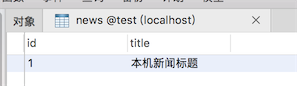
返回的结果是字典类型,这是因为在连接数据库的时候我们是这样设置的:
# 连接数据库
connection = pymysql.connect(host='localhost',
               user='root',
               password='root',
               db='test',
               charset='utf8mb4',
               cursorclass=pymysql.cursors.Cursor)
我们把cursorclass设置的是:pymysql.cursors.DictCursor。
字典游标,所以结果集是字典类型。
我们修改为如下:
cursorclass=pymysql.cursors.Cursor
结果集如下:
(1, '本机新闻标题')
变成了元组类型。我们还是喜欢字典类型,因为其中包含了表字段。
Cursor对象
主要有4种:
Cursor 默认,查询返回list或者tuple
DictCursor 查询返回dict,包含字段名
SSCursor 效果同Cursor,无缓存游标
SSDictCursor 效果同DictCursor,无缓存游标。
插入
try:
  with connection.cursor() as cursor:
    sql = "INSERT INTO news(`title`)VALUES (%s)"
    cursor.execute(sql,["今天的新闻"])
  # 手动提交 默认不自动提交
  connection.commit()
finally:
  connection.close()
一次性插入多条数据
try:
  with connection.cursor() as cursor:
    sql = "INSERT INTO news(`title`)VALUES (%s)"
    cursor.executemany(sql,["新闻标题1","新闻标题2"])
  # 手动提交 默认不自动提交
  connection.commit()
finally:
  connection.close()
注意executemany()有别于execute()。
sql绑定参数
sql = "INSERT INTO news(`title`)VALUES (%s)"
cursor.executemany(sql,["新闻标题1","新闻标题2"])
我们用%s占位,执行SQL的时候才传递具体的值。上面我们用的是list类型:
["新闻标题1","新闻标题2"]
可否用元组类型呢?
cursor.executemany(sql,("元组新闻1","元组新闻2"))
同样成功插入到数据表了。
把前面分析得到的基金数据入库
创建一个基金表:
CREATE TABLE `fund` (
  `code` varchar(50) NOT NULL,
  `name` varchar(255),
  `NAV` decimal(5,4),
  `ACCNAV` decimal(5,4),
  `updated_at` datetime,
  PRIMARY KEY (`code`)
) COMMENT='基金表';
准备插入SQL:
注意%(code)s这种占位符,要求我们执行这SQL的时候传入的参数必须是字典数据类型。
MySQL小知识:
在插入的时候如果有重复的主键,就更新
insert into 表名 xxxx ON duplicate Key update 表名
我们这里要准备执行的SQL就变成这样了:
INSERT INTO fund(code,name,NAV,ACCNAV,updated_at)VALUES (%(code)s,%(name)s,%(NAV)s,%(ACCNAV)s,%(updated_at)s)
ON duplicate Key UPDATE updated_at=%(updated_at)s,NAV=%(NAV)s,ACCNAV=%(ACCNAV)s;
1、回顾我们前面分析处理的基金网站数据
/post/162452.htm
#...
codes = soup.find("table",id="oTable").tbody.find_all("td","bzdm")
result = () # 初始化一个元组
for code in codes:
  result += ({
    "code":code.get_text(),
    "name":code.next_sibling.find("a").get_text(),
    "NAV":code.next_sibling.next_sibling.get_text(),
    "ACCNAV":code.next_sibling.next_sibling.next_sibling.get_text()
   },)
最后我们是把数据存放在一个result的元组里了。
我们打印这个result可以看到:
元组里每个元素 都是字典。
看字典是不是我们数据表的字段能对应了,但还少一个updated_at字段的数据。
2、我们把分析的网页数据重新处理一下
from datetime import datetime
updated_at = datetime.now().strftime("%Y-%m-%d %H:%M:%S")
result = () # 初始化一个元组
for code in codes:
  result += ({
    "code":code.get_text(),
    "name":code.next_sibling.find("a").get_text(),
    "NAV":code.next_sibling.next_sibling.get_text(),
    "ACCNAV":code.next_sibling.next_sibling.next_sibling.get_text(),
    "updated_at":updated_at
   },)
3、最后插入的代码
try:
  with connection.cursor() as cursor:
    sql = """INSERT INTO fund(`code`,`name`,`NAV`,`ACCNAV`,`updated_at`)VALUES (%(code)s,%(name)s,%(NAV)s,%(ACCNAV)s,%(updated_at)s)
ON duplicate Key UPDATE `updated_at`=%(updated_at)s,`NAV`=%(NAV)s,`ACCNAV`=%(ACCNAV)s"""
    cursor.executemany(sql,result)
  # 手动提交 默认不自动提交
  connection.commit()
finally:
  connection.close()

4、完整的分析html内容(基金网站网页内容),然后插入数据库代码:
from bs4 import BeautifulSoup
import pymysql.cursors
from datetime import datetime
# 读取文件内容
with open("1.txt", "rb") as f:
  html = f.read().decode("utf8")
  f.close()
# 分析html内容
soup = BeautifulSoup(html,"html.parser")
# 所有基金编码
codes = soup.find("table",id="oTable").tbody.find_all("td","bzdm")
updated_at = datetime.now().strftime("%Y-%m-%d %H:%M:%S")
result = () # 初始化一个元组
for code in codes:
  result += ({
    "code":code.get_text(),
    "name":code.next_sibling.find("a").get_text(),
    "NAV":code.next_sibling.next_sibling.get_text(),
    "ACCNAV":code.next_sibling.next_sibling.next_sibling.get_text(),
    "updated_at":updated_at
   },)
# 连接数据库
connection = pymysql.connect(host='localhost',
               user='root',
               password='root',
               db='test',
               charset='utf8mb4',
               cursorclass=pymysql.cursors.Cursor)
try:
  with connection.cursor() as cursor:
    sql = """INSERT INTO fund(`code`,`name`,`NAV`,`ACCNAV`,`updated_at`)VALUES (%(code)s,%(name)s,%(NAV)s,%(ACCNAV)s,%(updated_at)s)
ON duplicate Key UPDATE `updated_at`=%(updated_at)s,`NAV`=%(NAV)s,`ACCNAV`=%(ACCNAV)s"""
    cursor.executemany(sql,result)
  # 手动提交 默认不自动提交
  connection.commit()
finally:
  connection.close()
更多关于Python相关内容感兴趣的读者可查看本站专题:《Python常见数据库操作技巧汇总》、《Python数学运算技巧总结》、《Python数据结构与算法教程》、《Python函数使用技巧总结》、《Python字符串操作技巧汇总》、《Python入门与进阶经典教程》及《Python文件与目录操作技巧汇总》
希望本文所述对大家Python程序设计有所帮助。