Python中请不要再用re.compile了
前言
如果大家在网上搜索Python 正则表达式,你将会看到大量的垃圾文章会这样写代码:
import re

pattern = re.compile('正则表达式')
text = '一段字符串'
result = pattern.findall(text)
这些文章的作者,可能是被其他语言的坏习惯影响了,也可能是被其他垃圾文章误导了,不假思索拿来就用。
在Python里面,真的不需要使用re.compile!
为了证明这一点,我们来看Python的源代码。
在PyCharm里面输入:
import re

re.search
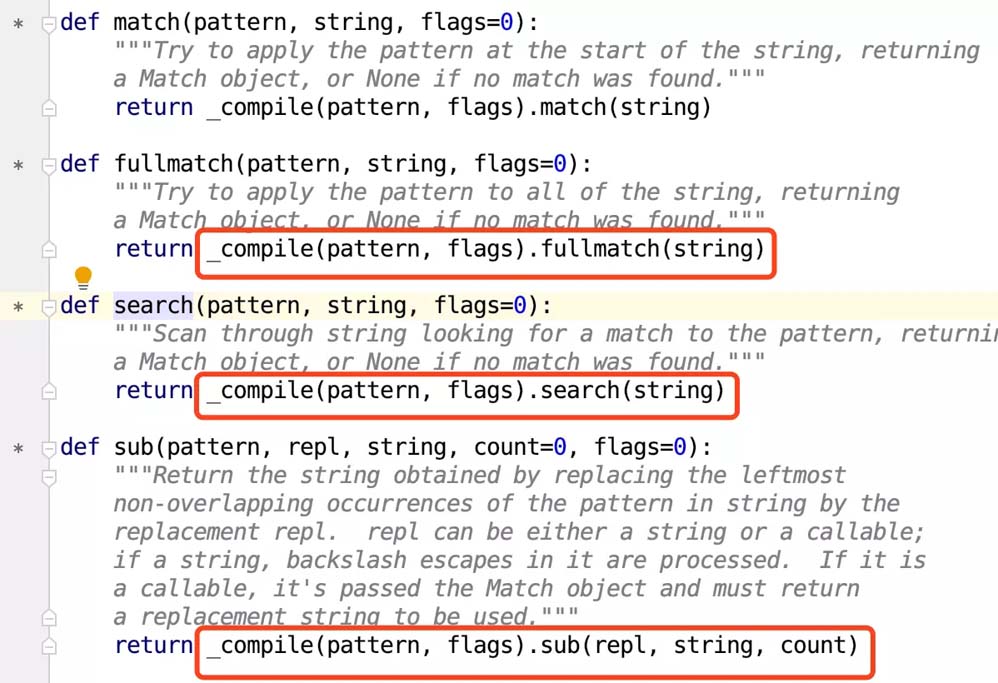
然后Windows用户按住键盘上的Ctrl键,鼠标左键点击search,Mac用户按住键盘上的Command键,鼠标左键点击search,PyCharm会自动跳转到Python的re模块。在这里,你会看到我们常用的正则表达式方法,无论是findall还是search还是sub还是match,全部都是这样写的:
_compile(pattern, flag).对应的方法(string)
例如:
def findall(pattern, string, flags=0):
 """Return a list of all non-overlapping matches in the string.

 If one or more capturing groups are present in the pattern, return
 a list of groups; this will be a list of tuples if the pattern
 has more than one group.

 Empty matches are included in the result."""
 return _compile(pattern, flags).findall(string)
如下图所示:
然后我们再来看compile:
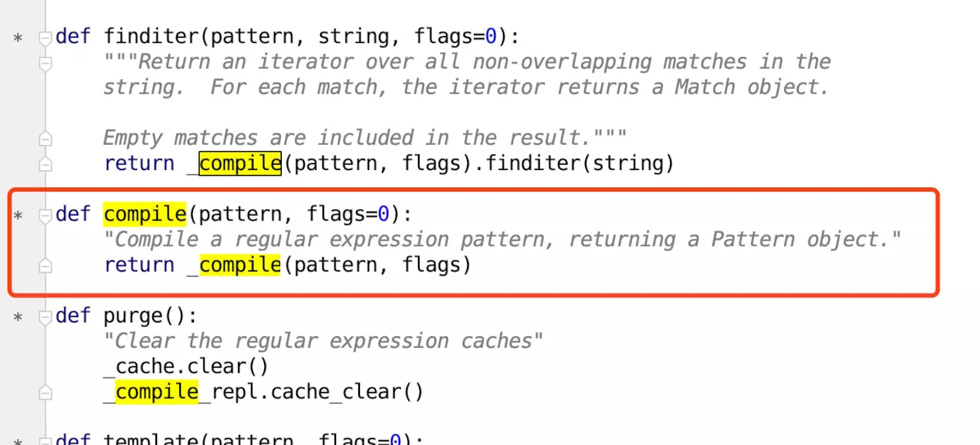
def compile(pattern, flags=0):
 "Compile a regular expression pattern, returning a Pattern object."
 return _compile(pattern, flags)
如下图所示:
看出问题来了吗?
我们常用的正则表达式方法,都已经自带了compile了!
根本没有必要多此一举先re.compile再调用正则表达式方法。
此时,可能会有人反驳:
如果我有一百万条字符串,使用使用某一个正则表达式去匹配,那么我可以这样写代码:
texts = [包含一百万个字符串的列表]
pattern = re.compile('正则表达式')
for text in texts:
 pattern.search(text)
这个时候,re.compile只执行了1次,而如果你像下面这样写代码:
texts = [包含一百万个字符串的列表]
for text in texts:
 re.search('正则表达式', text)
相当于你在底层对同一个正则表达式执行了100万次re.compile。
Talk is cheap, show me the code.
我们来看源代码,正则表达式re.compile调用的是_compile,我们就去看_compile的源代码,如下图所示:
红框中的代码,说明了_compile自带缓存。它会自动储存最多512条由type(pattern), pattern, flags)组成的Key,只要是同一个正则表达式,同一个flag,那么调用两次_compile时,第二次会直接读取缓存。
综上所述,请你不要再手动调用re.compile了,这是从其他语言(对的,我说的就是Java)带过来的陋习。
总结
以上就是这篇文章的全部内容了,希望本文的内容对大家的学习或者工作具有一定的参考学习价值,谢谢大家对【听图阁-专注于Python设计】的支持。