用Python实现将一张图片分成9宫格的示例
经常看到朋友圈或者空间里有朋友发布照片时,将朋友圈的照片切分为九宫格,参考了一些大神的博客资料,现整理如下;
将图片分拆成九宫格的思路:
读取图片->填充图片为正方形(fill_image函数)->将图片切分为9张(cut_image函数)->保存图片(save_image)->over
代码实现如下:
from PIL import Image
import sys
#将图片填充为正方形
def fill_image(image):
  width, height = image.size
  #选取长和宽中较大值作为新图片的
  new_image_length = width if width > height else height
  #生成新图片[白底]
  new_image = Image.new(image.mode, (new_image_length, new_image_length), color='white')
  #将之前的图粘贴在新图上,居中
  if width > height:#原图宽大于高,则填充图片的竖直维度
    #(x,y)二元组表示粘贴上图相对下图的起始位置
    new_image.paste(image, (0, int((new_image_length - height) / 2)))
  else:
    new_image.paste(image, (int((new_image_length - width) / 2),0))
  return new_image
#切图
def cut_image(image):
  width, height = image.size
  item_width = int(width / 3)
  box_list = []
  # (left, upper, right, lower)
  for i in range(0,3):#两重循环,生成9张图片基于原图的位置
    for j in range(0,3):
      #print((i*item_width,j*item_width,(i+1)*item_width,(j+1)*item_width))
      box = (j*item_width,i*item_width,(j+1)*item_width,(i+1)*item_width)
      box_list.append(box)

  image_list = [image.crop(box) for box in box_list]
  return image_list
#保存
def save_images(image_list):
  index = 1
  for image in image_list:
    image.save(str(index) + '.jpg')
    index += 1

if __name__ == '__main__':
  file_path = "微信图片_20180809234441.jpg"
  image = Image.open(file_path)
  # image.show()
  image = fill_image(image)
  image_list = cut_image(image)
  save_images(image_list)
效果如下:
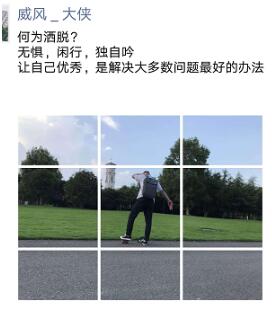
参考了二胖大神提供的思路,里面的逻辑很有趣:
1.开始相当于是拿一张白底的图片粘贴到了原图上;
2.切图的时候分成9宫格,的循环写的也非常漂亮。
3.代码中出现了很多次for循环的迭代使用:[image.crop(box) for box in box_list],以后自己也要多练习这种写法。
以上这篇用Python实现将一张图片分成9宫格的示例就是小编分享给大家的全部内容了,希望能给大家一个参考,也希望大家多多支持【听图阁-专注于Python设计】。