python使用多线程编写tcp客户端程序
今天在网上找了半天,发现很多关于此题目的程序都只能接收数据,所以随便找了个程序研究了一下,然后做出一些修改
代码如下:
from socket import *
import threading
tcp_socket = socket(AF_INET, SOCK_STREAM)
tcp_socket.connect(('192.168.1.102', 8080))
true = True


def rece_msg(tcp_socket):
 global true
 while true:
  recv_msg = tcp_socket.recv(1024).decode("utf8")
  if recv_msg == "exit":
   true = False
  print('接收到的信息为:%s' % recv_msg)


def send_msg(tcp_socket):
 global true
 while true:
  send_msg = input('请输入要发送的内容')
  tcp_socket.send(send_msg.encode('utf-8'))
  if send_msg == "exit":
   true = False


def main():
 while True:
  print('*'*50)
  print('1 发送消息\n2 接收消息')
  option = int(input('请选择操作内容'))
  print('*'*50)
  if option == 1:
   threading.Thread(target=send_msg, args=(tcp_socket,)).start()
  elif option == 2:
   threading.Thread(target=rece_msg, args=(tcp_socket,)).start()
  else:
   print('输入有误')
  break


if __name__ == '__main__':
 main()
该代码只能实现要么一直发送,要么一直接收
运行如图
发送数据时截图
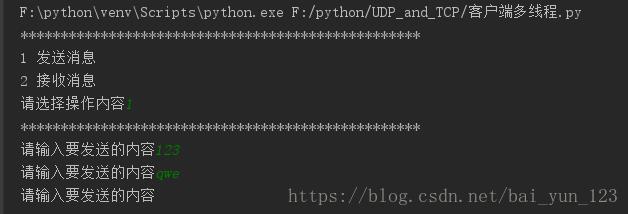

接收数据时截图


为解决只能单方发送和接收问题,现将代码修改如下
from socket import *
import threading
tcp_socket = socket(AF_INET, SOCK_STREAM)
tcp_socket.connect(('192.168.1.102', 8080))
true = True


def rece_msg(tcp_socket):
 global true
 while true:
  recv_msg = tcp_socket.recv(1024).decode("utf8")
  if recv_msg == "exit":
   true = False
  print('接收到的信息为:%s\n' % recv_msg)


def send_msg(tcp_socket):
 global true
 while true:
  send_msg = input('请输入要发送的内容\n')
  tcp_socket.send(send_msg.encode('utf-8'))
  if send_msg == "exit":
   true = False


threading.Thread(target=send_msg, args=(tcp_socket,)).start()
threading.Thread(target=rece_msg, args=(tcp_socket,)).start()
运行结果


以上就是本文的全部内容,希望对大家的学习有所帮助,也希望大家多多支持【听图阁-专注于Python设计】。