python系列 文件操作的代码
核心代码
import numpy as np
import os,sys

#获取当前文件夹,并根据文件名
def path(fileName):
 p=sys.path[0]+'\\'+fileName
 return p

#读文件
def readFile(fileName):
 f=open(path(fileName))
 str=f.read()
 f.close()
 return str

#写文件
def writeFile(fileName,str):
 f=open(path(fileName),'w')
 f.write(str)
 f.close()

def str1():
 str=','.join('我在中国大地上骄傲地生长着!')
 return str

def str2():
 return str(np.random.randint(-49,50,[3,3,3]))

#实验1
def test_1():
 fileName='中国大地.txt'
 writeFile(fileName,str1())
 list=readFile(fileName).split(',')
 print(list)

#实验2
def test_2():
 writeFile('str1',str1())
 writeFile('str2',str2())
 str_1=readFile('str1')
 str_2=readFile('str2')
 print(str_1)
 print(str_2)

test_2()
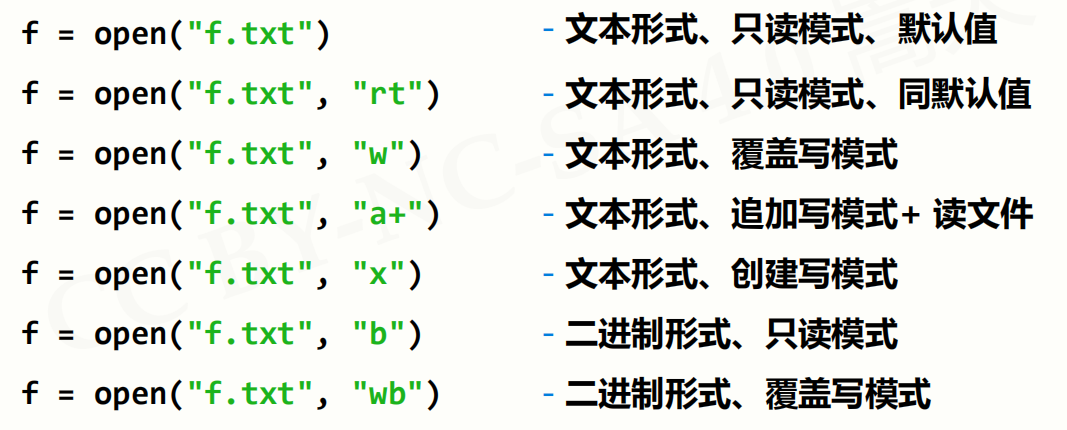
下面是一些
打开和关闭示例:
读取


写入


randint(low[,high,shape]) 根据shape创建随机整数或整数数组,范围是[low, high)
numpy.random.randint的详细用法
函数的作用是,返回一个随机整型数,范围从低(包括)到高(不包括),即[low, high)。如果没有写参数high的值,则返回[0,low)的值。
numpy.random.randint(low, high=None, size=None, dtype='l')
参数如下:
| 参数 | 描述 |
|---|---|
| low: int | 生成的数值最低要大于等于low。 (hign = None时,生成的数值要在[0, low)区间内) |
| high: int (可选) | 如果使用这个值,则生成的数值在[low, high)区间。 |
| size: int or tuple of ints(可选) | 输出随机数的尺寸,比如size=(m * n* k)则输出同规模即m * n* k个随机数。默认是None的,仅仅返回满足要求的单一随机数。 |
| dtype: dtype(可选): | 想要输出的格式。如int64、int等等 |
输出:
返回一个随机数或随机数数组
例子
>>> np.random.randint(2, size=10)
array([1, 0, 0, 0, 1, 1, 0, 0, 1, 0])
>>> np.random.randint(1, size=10)
array([0, 0, 0, 0, 0, 0, 0, 0, 0, 0])
>>> np.random.randint(5, size=(2, 4))
array([[4, 0, 2, 1],
[3, 2, 2, 0]])
>>>np.random.randint(2, high=10, size=(2,3))
array([[6, 8, 7],
[2, 5, 2]])
好了这篇文章先介绍到这,后续【听图阁-专注于Python设计】小编会为大家分享更多的资料。