pygame实现贪吃蛇游戏(上)
本文实例为大家分享了pygame贪吃蛇游戏的具体代码,供大家参考,具体内容如下
1.准备工作
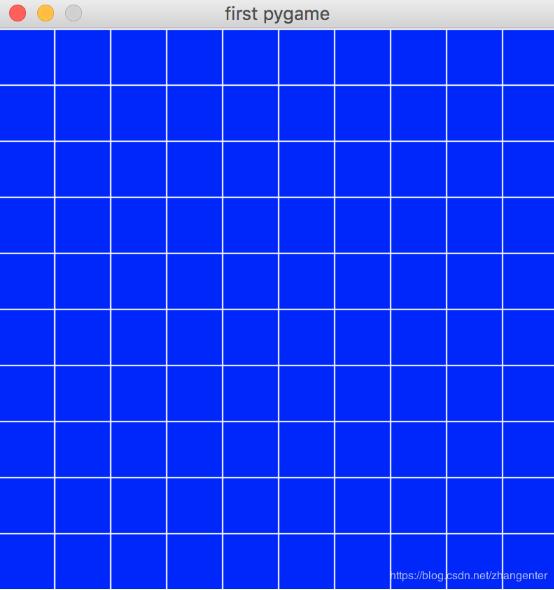
我们已经初始化了一个400*400的界面,为方便看我们的游戏,我们先在界面上画40*40的格子,即纵向切10份,横向切10份,这样我们就需要画20个线段,下面是20个线段的画法
for x in range(0,400,40):
 pygame.draw.line(screen,(255,255,255),(x,0),(x,400),1)
 for y in range(0,400,40):
 pygame.draw.line(screen,(255,255,255),(0,y),(400,y),1)
绘制后效果如下
2.蛇头和豆子的位置
可以使用random取一个随机位置
import random
snake_x = random.randint(0,9)*40+20
snake_y = random.randint(0,9)*40+20
绘制一个圆形的蛇头
yellow = 255,255,0
pygame.draw.circle(screen,yellow,[snake_x,snake_y],20,2)
豆子的绘制类似,我们可以把豆子的圈画小一点,把线宽画宽一点,这样就有一个实心的豆子
pygame.draw.circle(screen,yellow,[bean_x,bean_y],10,10)
现在看到的界面是这样的

目前的完整代码是这样的
# -*- coding=utf-8 -*-
import random
import pygame
pygame.init()
screencaption = pygame.display.set_caption('first pygame')
screen = pygame.display.set_mode((400,400)) #设置400*400窗口

snake_x = random.randint(0,9)*40+20
snake_y = random.randint(0,9)*40+20

def get_bean_pos():
 return random.randint(0,9)*40+20,random.randint(0,9)*40+20

yellow = 255,255,0

bean_x,bean_y = get_bean_pos()

while True:
 for event in pygame.event.get():
  if event.type == pygame.QUIT:
  pygame.quit()
  exit()

 screen.fill((0,0,255)) # 将界面设置为蓝色

 for x in range(0,400,40):
 pygame.draw.line(screen,(255,255,255),(x,0),(x,400),1)
 for y in range(0,400,40):
 pygame.draw.line(screen,(255,255,255),(0,y),(400,y),1)

 pygame.draw.circle(screen,yellow,[snake_x,snake_y],20,2)
 pygame.draw.circle(screen,yellow,[bean_x,bean_y],10,10)
 pygame.display.update() # 必须调用update才能看到绘图显示
3.用键盘控制蛇头的移动
导入事件判断的变量
from pygame.locals import KEYDOWN,K_LEFT,K_RIGHT,K_UP,K_DOWN
在事件判断中增加一下程序
if event.type == KEYDOWN:
 if event.key == K_LEFT:
    if snake_x-40>0: snake_x-=40
   if event.key == K_RIGHT:
    if snake_x+40<400: snake_x+=40
   if event.key == K_UP:
    if snake_y-40>0: snake_y-=40
   if event.key == K_DOWN:
    if snake_y+40<400: snake_y+=40
现在再运行程序时,已经看到可以对蛇头进行方向的控制了
4.使蛇头向某一方向匀速移动
首先我们定义一个用于计算时间间隔的时间戳
diff_ticks = 500 # 移动一次蛇头的事件,单位毫秒
ticks = pygame.time.get_ticks()
ticks += diff_ticks
在主循环里判断,如果时间满了则触发蛇头移动到下一个
if pygame.time.get_ticks() >= ticks:
  snake_x,snake_y = set_snake_next_pos(snake_x,snake_y)
  ticks += diff_ticks
set_snake_next_pos函数的实现如下
dire = random.randint(0,3) # 假设0、1、2、3分别代表方向左、右、上、下

def set_snake_next_pos(snake_x, snake_y):
 if dire == 0:
  if snake_x - 40 > 0:
   snake_x -= 40
 if dire == 1:
  if snake_x + 40 < 400:
   snake_x += 40
 if dire == 2:
  if snake_y - 40 > 0:
   snake_y -= 40
 if dire == 3:
  if snake_y + 40 < 400:
   snake_y += 40
 return snake_x,snake_y
此外,主循环里键盘的判断也要做下修改,一是要在键盘按下后修改移动方向,二是按下时不用马上移动蛇头,等待时间满后的自动移动,判断代码修改后如下
if event.type == KEYDOWN:
    if event.key == K_LEFT:
     if dire!=0 and dire!=1 and snake_x - 40 > 0: # 和当前方向不是同方向或反方向并且可以左移
      dire = 0
    if event.key == K_RIGHT:
     if dire!=0 and dire!=1 and snake_x + 40 < 400: # 和当前方向不是同方向或反方向并且可以右移
      dire = 1
    if event.key == K_UP:
     if dire!=2 and dire!=3 and snake_y - 40 > 0: # 和当前方向不是同方向或反方向并且可以上移
      dire = 2
    if event.key == K_DOWN:
     if dire!=2 and dire!=3 and snake_y + 40 < 400: # 和当前方向不是同方向或反方向并且可以下移
      dire = 3
为避免蛇头出来就撞墙,我们对初始的蛇头方向再做个处理,让蛇头往空白多的地方前进,代码如下
#dire = random.randint(0,3) # 假设0、1、2、3分别代表方向左、右、上、下
if snake_x < 5:
 dire = 1 # 往右移动
else:
 dire = 0 # 往左移动
5.使给蛇增加身体
我们用一个方块做蛇的身体,身体应该是头的后面一格,按蛇头的移动方向放到后面一格,如果后面一个已经没有位置了,则往垂直方向上放到上方或者下方
定义身体初始位置的代码如下
body_y = snake_y
if dire == 0: # 向左移动
 if snake_x + 40 < 400:
  body_x = snake_x + 40
 else: # 身体不能放右侧了,只能往上下方向放
  if snake_y > 200:
   body_x = snake_x
   body_y -= 40
  else:
   body_x = snake_x
   body_y += 40
else: # 向右移动
 if snake_x - 40 > 0:
  body_x = snake_x - 40
 else: # 身体不能放左侧了,只能往上下方向放
  if snake_y > 200:
   body_x = snake_x
   body_y -= 40
  else:
   body_x = snake_x
   body_y += 40
主循环里增加矩形身体的绘制
pygame.draw.rect(screen,yellow,[body_x-20,body_y-20,40,40],5)
在每次更新蛇位置时可以先把身体的位置变成蛇头的位置,再进行蛇头移动操作
if pygame.time.get_ticks() >= ticks:
  body_x = snake_x
  body_y = snake_y
  snake_x,snake_y = set_snake_next_pos(snake_x,snake_y)
  ticks += diff_ticks
目前的效果图如下

最后附下目前的完整代码,下章再介绍吃豆和身体变长部分的代码修改
# -*- coding=utf-8 -*-
import random
import pygame
from pygame.locals import KEYDOWN,K_LEFT,K_RIGHT,K_UP,K_DOWN
pygame.init()
screencaption = pygame.display.set_caption('first pygame')
screen = pygame.display.set_mode((400,400)) #设置400*400窗口

snake_x = random.randint(0,9)*40+20
snake_y = random.randint(0,9)*40+20

def get_bean_pos():
 return random.randint(0,9)*40+20,random.randint(0,9)*40+20

yellow = 255,255,0

bean_x,bean_y = get_bean_pos()

diff_ticks = 500 # 移动一次蛇头的事件,单位毫秒
ticks = pygame.time.get_ticks()
ticks += diff_ticks

#dire = random.randint(0,3) # 假设0、1、2、3分别代表方向左、右、上、下
if snake_x < 5:
 dire = 1 # 往右移动
else:
 dire = 0 # 往左移动

body_y = snake_y
if dire == 0: # 向左移动
 if snake_x + 40 < 400:
  body_x = snake_x + 40
 else: # 身体不能放右侧了,只能往上下方向放
  if snake_y > 200:
   body_x = snake_x
   body_y -= 40
  else:
   body_x = snake_x
   body_y += 40
else: # 向右移动
 if snake_x - 40 > 0:
  body_x = snake_x - 40
 else: # 身体不能放左侧了,只能往上下方向放
  if snake_y > 200:
   body_x = snake_x
   body_y -= 40
  else:
   body_x = snake_x
   body_y += 40

def set_snake_next_pos(snake_x, snake_y):
 if dire == 0:
  if snake_x - 40 > 0:
   snake_x -= 40
 if dire == 1:
  if snake_x + 40 < 400:
   snake_x += 40
 if dire == 2:
  if snake_y - 40 > 0:
   snake_y -= 40
 if dire == 3:
  if snake_y + 40 < 400:
   snake_y += 40
 return snake_x,snake_y

while True:
 for event in pygame.event.get():
   if event.type == pygame.QUIT:
    pygame.quit()
    exit()
   if event.type == KEYDOWN:
    if event.key == K_LEFT:
     if dire!=0 and dire!=1 and snake_x - 40 > 0: # 和当前方向不是同方向或反方向并且可以左移
      dire = 0
    if event.key == K_RIGHT:
     if dire!=0 and dire!=1 and snake_x + 40 < 400: # 和当前方向不是同方向或反方向并且可以右移
      dire = 1
    if event.key == K_UP:
     if dire!=2 and dire!=3 and snake_y - 40 > 0: # 和当前方向不是同方向或反方向并且可以上移
      dire = 2
    if event.key == K_DOWN:
     if dire!=2 and dire!=3 and snake_y + 40 < 400: # 和当前方向不是同方向或反方向并且可以下移
      dire = 3

 screen.fill((0,0,255)) # 将界面设置为蓝色

 for x in range(0,400,40):
  pygame.draw.line(screen,(255,255,255),(x,0),(x,400),1)
 for y in range(0,400,40):
  pygame.draw.line(screen,(255,255,255),(0,y),(400,y),1)

 pygame.draw.circle(screen,yellow,[snake_x,snake_y],20,2)
 pygame.draw.rect(screen,yellow,[body_x-20,body_y-20,40,40],5)

 pygame.draw.circle(screen,yellow,[bean_x,bean_y],10,10)

 pygame.display.update() # 必须调用update才能看到绘图显示

 if pygame.time.get_ticks() >= ticks:
  body_x = snake_x
  body_y = snake_y
  snake_x,snake_y = set_snake_next_pos(snake_x,snake_y)
  ticks += diff_ticks
以上就是本文的全部内容,希望对大家的学习有所帮助,也希望大家多多支持【听图阁-专注于Python设计】。