使用python实现画AR模型时序图
背景:
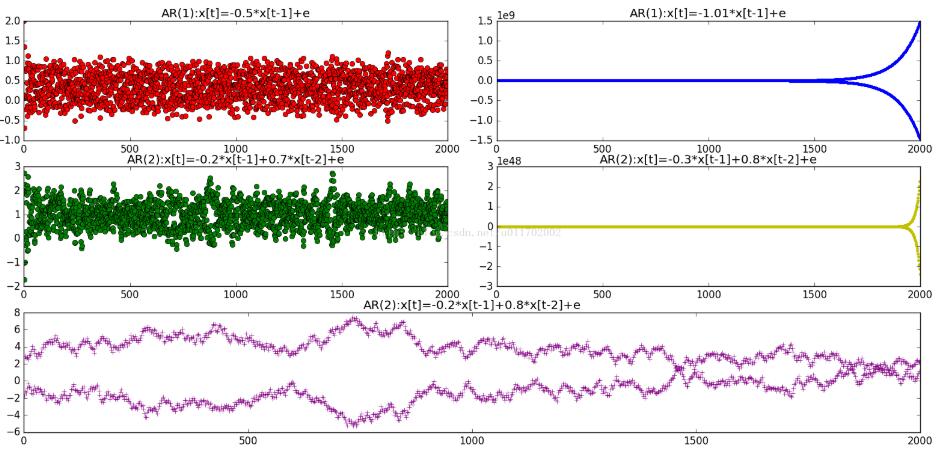
用python画AR模型的时序图。
结果:
代码:
import numpy as np
import matplotlib.pyplot as plt
"""
AR(1)的时序图:x[t]=a*x[t-1]+e
"""
num = 2000
e = np.random.rand(num)
x = np.empty(num)

"""
平稳AR(1)
"""
a = -0.5
x[0] = 2
for i in range(1,num):
 x[i] = a*x[i-1]+e[i]
plt.subplot(321,title = "AR({0}):x[t]={1}*x[t-1]+e".format(1,a))
plt.plot(x,"or")

"""
非平稳AR(1)
"""
a = -1.01
x[0] = 2
for i in range(1,num):
 x[i] = a*x[i-1]+e[i]
plt.subplot(322,title = "AR({0}):x[t]={1}*x[t-1]+e".format(1,a))
plt.plot(x,".b")

"""
平稳AR(2)
"""
a = -0.2
b = 0.7
x[0] = 2
for i in range(2,num):
 x[i] = a*x[i-1]+b*x[i-2]+e[i]
plt.subplot(323,title = "AR({0}):x[t]={1}*x[t-1]+{2}*x[t-2]+e".format(2,a,b))
plt.plot(x,"og")

"""
非平稳AR(2)
"""
a = -0.3
b = 0.8
x[0] = 2
for i in range(2,num):
 x[i] = a*x[i-1]+b*x[i-2]+e[i]
plt.subplot(324,title = "AR({0}):x[t]={1}*x[t-1]+{2}*x[t-2]+e".format(2,a,b))
plt.plot(x,".y")

"""
非平稳AR(2)
"""
a = -0.2
b = 0.8
x[0] = 2
for i in range(2,num):
 x[i] = a*x[i-1]+b*x[i-2]+e[i]
plt.subplot(313,title = "AR({0}):x[t]={1}*x[t-1]+{2}*x[t-2]+e".format(2,a,b))
plt.plot(x,"+",color="purple")

plt.show()
以上这篇使用python实现画AR模型时序图就是小编分享给大家的全部内容了,希望能给大家一个参考,也希望大家多多支持【听图阁-专注于Python设计】。