使用Python的Turtle绘制哆啦A梦实例
这是我几年前为了练习python的turtle库而画的,今天翻出了代码,分享给大家。
这是我初学python时画的,当时还没有面向对象的概念,也没有采取类方法之类,纯原始手工,供大家参考。
若有兴趣可以自行优化简洁代码,有时间我也会重新写一遍。
画出来的效果如下图:
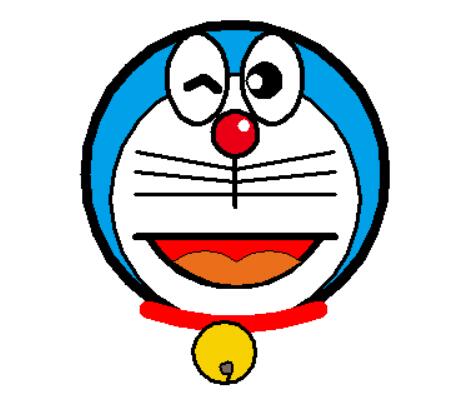
代码如下:
# * -- utf-8 -- *
# Author: Tang

import turtle as t

t.speed(10)
t.pensize(8)
t.hideturtle()
t.screensize(500, 500, bg='white')

# 猫脸
t.fillcolor('#00A1E8')
t.begin_fill()
t.circle(120)
t.end_fill()

t.pensize(3)
t.fillcolor('white')
t.begin_fill()
t.circle(100)
t.end_fill()

t.pu()
t.home()
t.goto(0, 134)
t.pd()
t.pensize(4)
t.fillcolor("#EA0014")
t.begin_fill()
t.circle(18)
t.end_fill()

t.pu()
t.goto(7, 155)
t.pensize(2)
t.color('white', 'white')
t.pd()
t.begin_fill()
t.circle(4)
t.end_fill()

t.pu()
t.goto(-30, 160)
t.pensize(4)
t.pd()
t.color('black', 'white')
t.begin_fill()
a = 0.4
for i in range(120):
  if 0 <= i < 30 or 60 <= i < 90:
    a = a+0.08
    t.lt(3) #向左转3度
    t.fd(a) #向前走a的步长
  else:
    a = a-0.08
    t.lt(3)
    t.fd(a)
t.end_fill()

t.pu()
t.goto(30, 160)
t.pensize(4)
t.pd()
t.color('black', 'white')
t.begin_fill()
for i in range(120):
  if 0 <= i < 30 or 60 <= i < 90:
    a = a+0.08
    t.lt(3) # 向左转3度
    t.fd(a) # 向前走a的步长
  else:
    a = a-0.08
    t.lt(3)
    t.fd(a)
t.end_fill()

t.pu()
t.goto(-38,190)
t.pensize(8)
t.pd()
t.right(-30)
t.forward(15)
t.right(70)
t.forward(15)

t.pu()
t.goto(15, 185)
t.pensize(4)
t.pd()
t.color('black', 'black')
t.begin_fill()
t.circle(13)
t.end_fill()

t.pu()
t.goto(13, 190)
t.pensize(2)
t.pd()
t.color('white', 'white')
t.begin_fill()
t.circle(5)
t.end_fill()

t.pu()
t.home()
t.goto(0, 134)
t.pensize(4)
t.pencolor('black')
t.pd()
t.right(90)
t.forward(40)

t.pu()
t.home()
t.goto(0, 124)
t.pensize(3)
t.pencolor('black')
t.pd()
t.left(10)
t.forward(80)

t.pu()
t.home()
t.goto(0, 114)
t.pensize(3)
t.pencolor('black')
t.pd()
t.left(6)
t.forward(80)

t.pu()
t.home()
t.goto(0,104)
t.pensize(3)
t.pencolor('black')
t.pd()
t.left(0)
t.forward(80)

# 左边的胡子
t.pu()
t.home()
t.goto(0,124)
t.pensize(3)
t.pencolor('black')
t.pd()
t.left(170)
t.forward(80)

t.pu()
t.home()
t.goto(0, 114)
t.pensize(3)
t.pencolor('black')
t.pd()
t.left(174)
t.forward(80)

t.pu()
t.home()
t.goto(0, 104)
t.pensize(3)
t.pencolor('black')
t.pd()
t.left(180)
t.forward(80)

t.pu()
t.goto(-70, 70)
t.pd()
t.color('black', 'red')
t.pensize(6)
t.seth(-60)
t.begin_fill()
t.circle(80,40)
t.circle(80,80)
t.end_fill()

t.pu()
t.home()
t.goto(-80,70)
t.pd()
t.forward(160)

t.pu()
t.home()
t.goto(-50,50)
t.pd()
t.pensize(1)
t.fillcolor("#eb6e1a")
t.seth(40)
t.begin_fill()
t.circle(-40, 40)
t.circle(-40, 40)
t.seth(40)
t.circle(-40, 40)
t.circle(-40, 40)
t.seth(220)
t.circle(-80, 40)
t.circle(-80, 40)
t.end_fill()

# 领带
t.pu()
t.goto(-70, 12)
t.pensize(14)
t.pencolor('red')
t.pd()
t.seth(-20)
t.circle(200, 30)
t.circle(200, 10)

# 铃铛
t.pu()
t.goto(0, -46)
t.pd()
t.pensize(3)
t.color("black", '#f8d102')
t.begin_fill()
t.circle(25)
t.end_fill()


t.pu()
t.goto(-5, -40)
t.pd()
t.pensize(2)
t.color("black", '#79675d')
t.begin_fill()
t.circle(5)
t.end_fill()

t.pensize(3)
t.right(115)
t.forward(7)

t.mainloop()
以上这篇使用Python的Turtle绘制哆啦A梦实例就是小编分享给大家的全部内容了,希望能给大家一个参考,也希望大家多多支持【听图阁-专注于Python设计】。