PHP 动态随机生成验证码类代码
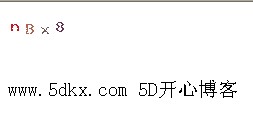
下面是效果图,这个效果图是没有开启干扰码的效果图
下面是类代码
<?php
/************************************************
//FILE:ImageCode
//DONE:生成动态验证码类
//DATE"2010-3-31
//Author:www.5dkx.com 5D开心博客
************************************************************************/
class ImageCode{
private $width; //验证码图片宽度
private $height; //验证码图片高度
private $codeNum; //验证码字符个数
private $checkCode; //验证码字符
private $image; //验证码画布
/************************************************************************
// Function:构造函数
// Done:成员属性初始化
// Author:www.5dkx.com 5D开心博客
************************************************************************/
function __construct($width=60,$height=20,$codeNum=4)
{
$this->width = $width;
$this->height = $height;
$this->codeNum = $codeNum;
$this->checkCode = $this->createCheckCode();
}
function showImage()
{
$this->getcreateImage();
$this->outputText();
$this->setDisturbColor();
$this->outputImage();
}
function getCheckCode()
{
return $this->chekCode;
}
private function getCreateImage()
{
$this->image = imagecreatetruecolor($this->width,$this->height);
$back = imagecolorallocate($this->image,255,255,255);
$border = imagecolorallocate($this->image,255,255,255);
imagefilledrectangle($this->image,0,0,$this->width-1,$this->height-1,$border);
//使用纯白色填充矩形框,这里用的话后面干扰码失效
/*如果想用干扰码的话使用下面的*/
//imagerectangle($this->image,0,0,$this->width-1,$this->height-1,$border);
}
private function createCheckCode()
{
for($i=0;$i<$this->codeNum;$i++)
{
$number = rand(0,2);
switch($number)
{
case 0: $rand_number = rand(48,57); break;//数字
case 1: $rand_number = rand(65,90);break;//大写字母
case 2: $rand_number = rand(97,122);break;//小写字母
}
$asc = sprintf("%c",$rand_number);
$asc_number = $asc_number.$asc;
}
return $asc_number;
}
private function setDisturbColor()//干扰吗设置
{
for($i=0;$i<=100;$i++)
{
//$color = imagecolorallocate($this->image,rand(0,255),rand(0,255),rand(0,255));
$color = imagecolorallocate($this->image,255,255,255);
imagesetpixel($this->image,rand(1,$this->width-2),rand(1,$this->height-2),$color);
}
//$color = imagecolorallocate($this->image,0,0,0);
//imagesetpixel($this->image,rand(1,$this->width-2),rand(1,$this->height-2),$color);
}
private function outputText()
{
//随机颜色、随机摆放、随机字符串向图像输出
for($i=0;$i<=$this->codeNum;$i++)
{
$bg_color = imagecolorallocate($this->image,rand(0,255),rand(0,128),rand(0,255));
$x = floor($this->width/$this->codeNum)*$i+3;
$y = rand(0,$this->height-15);
imagechar($this->image,5,$x,$y,$this->checkCode[$i],$bg_color);
}
}
private function outputImage()
{
if(imagetypes()&IMG_GIF)
{
header("Content_type:image/gif");
imagegif($this->image);
}
elseif(imagetypes()&IMG_JPG)
{
header("Content-type:image/jpeg");
imagejpeg($this->image,"",0.5);
}
elseif(imagetypes()&IMG_PNG)
{
header("Content-type:image/png");
imagejpeg($this->image);
}
elseif(imagetypes()&IMG_WBMP)
{
header("Content-type:image/vnd.wap.wbmp");
imagejpeg($this->image);
}
else
{
die("PHP不支持图像创建");
}
}
function __destruct()
{
imagedestroy($this->image);
}
}
/*显示*/
/*******************************************************************
session_start();
$image = new ImageCode(60,20,4);
$image->showImage();
$_SESSION['ImageCode'] = $image->getCheckCode();
*******************************************************************/
?>
下面是类代码
复制代码 代码如下:
<?php
/************************************************
//FILE:ImageCode
//DONE:生成动态验证码类
//DATE"2010-3-31
//Author:www.5dkx.com 5D开心博客
************************************************************************/
class ImageCode{
private $width; //验证码图片宽度
private $height; //验证码图片高度
private $codeNum; //验证码字符个数
private $checkCode; //验证码字符
private $image; //验证码画布
/************************************************************************
// Function:构造函数
// Done:成员属性初始化
// Author:www.5dkx.com 5D开心博客
************************************************************************/
function __construct($width=60,$height=20,$codeNum=4)
{
$this->width = $width;
$this->height = $height;
$this->codeNum = $codeNum;
$this->checkCode = $this->createCheckCode();
}
function showImage()
{
$this->getcreateImage();
$this->outputText();
$this->setDisturbColor();
$this->outputImage();
}
function getCheckCode()
{
return $this->chekCode;
}
private function getCreateImage()
{
$this->image = imagecreatetruecolor($this->width,$this->height);
$back = imagecolorallocate($this->image,255,255,255);
$border = imagecolorallocate($this->image,255,255,255);
imagefilledrectangle($this->image,0,0,$this->width-1,$this->height-1,$border);
//使用纯白色填充矩形框,这里用的话后面干扰码失效
/*如果想用干扰码的话使用下面的*/
//imagerectangle($this->image,0,0,$this->width-1,$this->height-1,$border);
}
private function createCheckCode()
{
for($i=0;$i<$this->codeNum;$i++)
{
$number = rand(0,2);
switch($number)
{
case 0: $rand_number = rand(48,57); break;//数字
case 1: $rand_number = rand(65,90);break;//大写字母
case 2: $rand_number = rand(97,122);break;//小写字母
}
$asc = sprintf("%c",$rand_number);
$asc_number = $asc_number.$asc;
}
return $asc_number;
}
private function setDisturbColor()//干扰吗设置
{
for($i=0;$i<=100;$i++)
{
//$color = imagecolorallocate($this->image,rand(0,255),rand(0,255),rand(0,255));
$color = imagecolorallocate($this->image,255,255,255);
imagesetpixel($this->image,rand(1,$this->width-2),rand(1,$this->height-2),$color);
}
//$color = imagecolorallocate($this->image,0,0,0);
//imagesetpixel($this->image,rand(1,$this->width-2),rand(1,$this->height-2),$color);
}
private function outputText()
{
//随机颜色、随机摆放、随机字符串向图像输出
for($i=0;$i<=$this->codeNum;$i++)
{
$bg_color = imagecolorallocate($this->image,rand(0,255),rand(0,128),rand(0,255));
$x = floor($this->width/$this->codeNum)*$i+3;
$y = rand(0,$this->height-15);
imagechar($this->image,5,$x,$y,$this->checkCode[$i],$bg_color);
}
}
private function outputImage()
{
if(imagetypes()&IMG_GIF)
{
header("Content_type:image/gif");
imagegif($this->image);
}
elseif(imagetypes()&IMG_JPG)
{
header("Content-type:image/jpeg");
imagejpeg($this->image,"",0.5);
}
elseif(imagetypes()&IMG_PNG)
{
header("Content-type:image/png");
imagejpeg($this->image);
}
elseif(imagetypes()&IMG_WBMP)
{
header("Content-type:image/vnd.wap.wbmp");
imagejpeg($this->image);
}
else
{
die("PHP不支持图像创建");
}
}
function __destruct()
{
imagedestroy($this->image);
}
}
/*显示*/
/*******************************************************************
session_start();
$image = new ImageCode(60,20,4);
$image->showImage();
$_SESSION['ImageCode'] = $image->getCheckCode();
*******************************************************************/
?>