python结合API实现即时天气信息
python结合API实现即时天气信息
import urllib.request
import urllib.parse
import json

"""
 利用“最美天气”抓取即时天气情况
 http://www.zuimeitianqi.com/

"""
class ZuiMei():
 def __init__(self):
  self.url = 'http://www.zuimeitianqi.com/zuimei/queryWeather'
  self.headers = {}
  self.headers['User-Agent'] = 'Mozilla/5.0 (Windows NT 10.0; WOW64) AppleWebKit/537.36 (KHTML, like Gecko) Chrome/47.0.2526.80 Safari/537.36'
  # 部分城市的id信息
  self.cities = {}
  self.cities['成都'] ='01012703'
  self.cities['杭州'] = '01013401'
  self.cities['深圳'] = '01010715'
  self.cities['广州'] = '01010704'
  self.cities['上海'] = '01012601'
  self.cities['北京'] = '01010101'
  # Form Data
  self.data = {}
  self.city = '北京'

 def query(self,city='北京'):
  if city not in self.cities:
   print('暂时不支持当前城市')
   return
  self.city = city
  data = urllib.parse.urlencode({'cityCode':self.cities[self.city]}).encode('utf-8')
  req = urllib.request.Request(self.url,data,self.headers)
  response = urllib.request.urlopen(req)

  html = response.read().decode('utf-8')
  # 解析json数据并打印结果
  self.json_parse(html)

 def json_parse(self,html):
  target = json.loads(html)
  high_temp = target['data'][0]['actual']['high']
  low_temp = target['data'][0]['actual']['low']
  current_temp = target['data'][0]['actual']['tmp']
  today_wea = target['data'][0]['actual']['wea']
  air_desc = target['data'][0]['actual']['desc']
  # 上海 6~-2°C 现在温度 1°C 湿度:53 空气质量不好,注意防霾。
  print('%s: %s~%s°C 现在温度 %s°C 湿度:%s %s'%(self.city,high_temp,low_temp,current_temp,today_wea,air_desc))

if __name__ == '__main__':
 zuimei = ZuiMei()
 zuimei.query('广州')
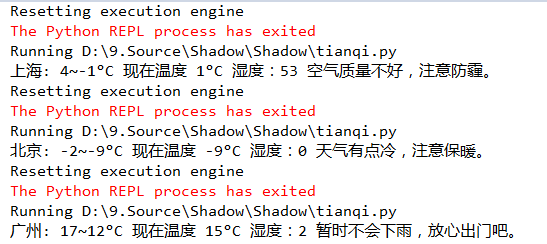
效果演示: