Python手机号码归属地查询代码
简单的一个例子,是以前用Dephi写的,前不久刚实现了一个在Python中使用Delphi控件来编写界面程序,于是趁热写一个类似的的查询方案。
本实例是通过www.ip138.com这个网站来查询的,这里需要的几个知识点,就是用Python模拟网页提交数据,获得数据返回信息,以及对返回的Html信息进行解析,模拟Http提交,Python自带有一个urllib和urllib2这两个库,相当方便,只是奇怪,为什么不将两个库合并成一个,这样来的更方便。然后就是窗体了,窗体还是用我之前写的一个Python模块DxVcl,就是可以在Python中调用Delphi界面控件的一个模块库。下面就贴上代码,相当简单的!
#-*-coding: gb2312 -*-
import urllib,urllib2,HTMLParser
from DxVcl import*
class MyParser(HTMLParser.HTMLParser):
def reset(self):
self._isInTd = False
self._retdata = []
HTMLParser.HTMLParser.reset(self)
def handle_starttag(self,tag,attris):
self._isInTd = tag =='td'
def handle_endtag(self,tag):
if self._isInTd:
self._isInTd = False
def handle_data(self,data):
if self._isInTd:
self._retdata.append(data)
class MainForm(Form):
def__init__(self,Owner):
self.Caption ='查询手机归属地'
self.Position =5
self.BorderStyle =3
self.Width =303
self.Height =375
self.lbl = Label(self)
self.lbl.SetProps(Parent = self,Caption ='手机号码')
self.lbl.SetBounds(16,8,60,13)
self.EdtPhone = Edit(self)
self.EdtPhone.SetProps(Parent = self,Text ='')
self.EdtPhone.SetBounds(77,3,121,21)
self.Button1 = Button(self)
self.Button1.SetProps(Parent = self,Caption ='查询')
self.Button1.SetBounds(204,1,75,25)
self.Button1.OnClick = self.Button1Click
self.Memo1 = Memo(self)
self.Memo1.Parent = self
self.Memo1.SetBounds(16,32,263,297)
def Button1Click(self,Sender):
postdata = urllib.urlencode([('action','mobile'),('mobile',self.EdtPhone.Text)])
req = urllib2.Request('http://www.ip138.com/:8080/search.asp')
fd = urllib2.urlopen(req,postdata)
h = fd.read()
my = MyParser()
my.feed(h)
self.Memo1.Lines.Clear()
for data in my._retdata:
self.Memo1.Lines.Add(data)
def main():
FreeConsole()
Application.Initialize()
Application.Title ='查询手机归属'
f = MainForm(Application)
f.Show()
Application.Run()
if__name__=='__main__':
main()
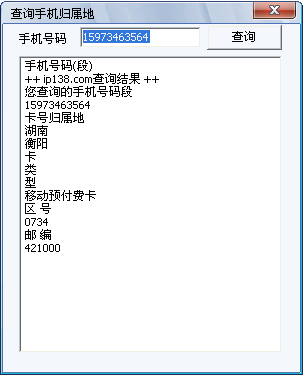
运行之后的界面
以上所述是小编给大家介绍的Python手机号码归属地查询代码,希望对大家有所帮助!