python实现发送邮件及附件功能
今天给大伙说说python发送邮件,官方的多余的话自己去百度好了,还有一大堆文档说实话不到万不得已的时候一般人都不会去看,回归主题:
本人是mac如果没有按照依赖模块的请按照下面的截图安装
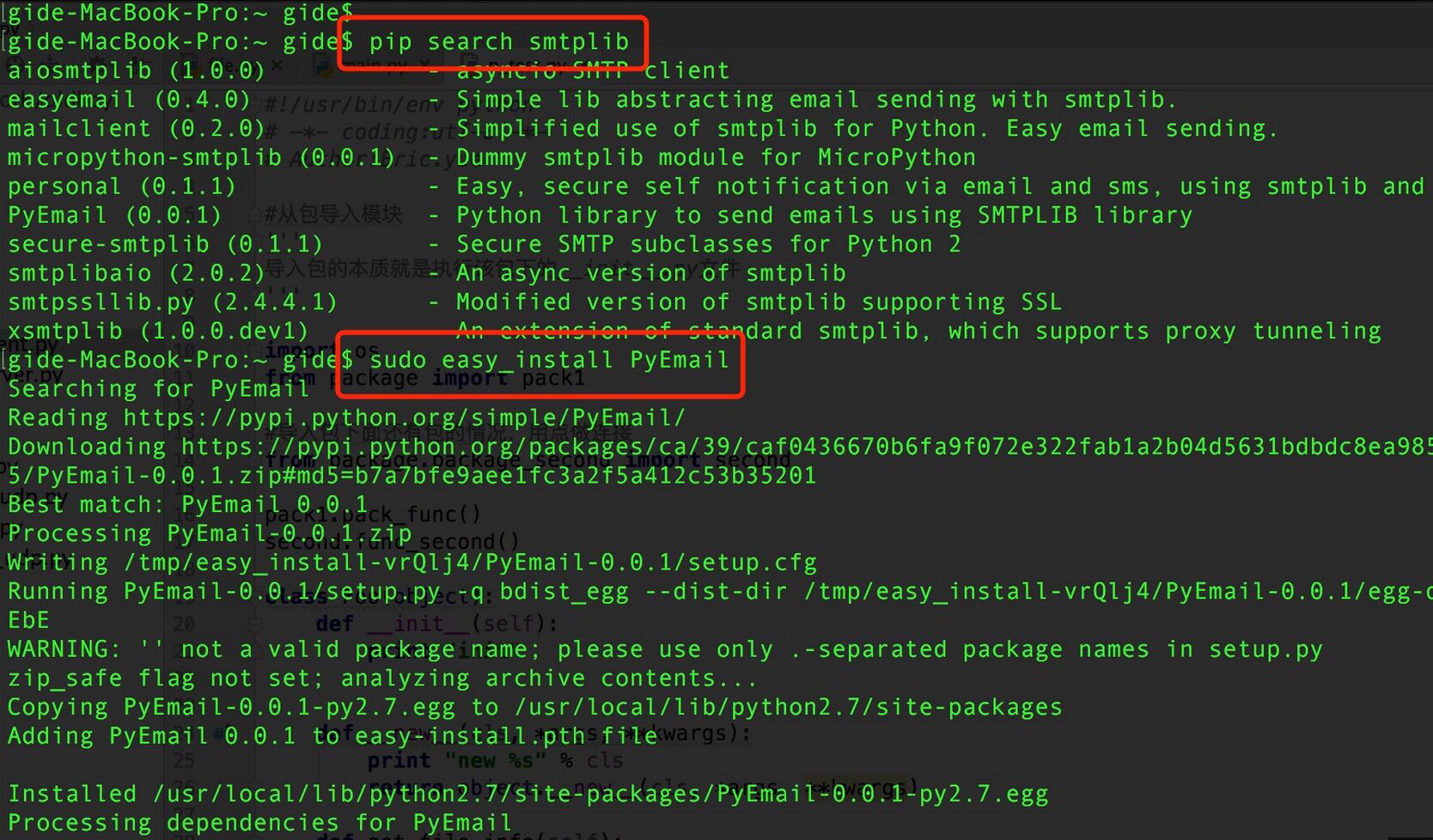
导入模块如果没有错误,表示已经安装成功。
Python发送一个未知MIME类型的文件附件其基本思路如下:
1. 构造MIMEMultipart对象做为根容器
2. 构造MIMEText对象做为邮件显示内容并附加到根容器
3. 构造MIMEBase对象做为文件附件内容并附加到根容器
a. 读入文件内容并格式化
b. 设置附件头
4. 设置根容器属性
5. 得到格式化后的完整文本
6. 用smtp发送邮件
实例代码:
 #!/usr/bin/env python
 # -*- coding:utf-8 -*-

 import smtplib
 from email.mime.multipart import MIMEMultipart
 from email.mime.text import MIMEText
 from email.mime.application import MIMEApplication

 class Mailer(object):
   def __init__(self,maillist,mailtitle,mailcontent):
     self.mail_list = maillist
     self.mail_title = mailtitle
     self.mail_content = mailcontent

     self.mail_host = "smtp.163.com"
     self.mail_user = "your email name"
     self.mail_pass = "your email password"
     self.mail_postfix = "163.com"

   def sendMail(self):

     me = self.mail_user + "<" + self.mail_user + "@" + self.mail_postfix + ">"
     msg = MIMEMultipart()
     msg['Subject'] = 'Python mail Test'
     msg['From'] = me
     msg['To'] = ";".join(self.mail_list)

     #puretext = MIMEText('<h1>你好,<br/>'+self.mail_content+'</h1>','html','utf-8')
     puretext = MIMEText('纯文本内容'+self.mail_content)
     msg.attach(puretext)

     # jpg类型的附件
     jpgpart = MIMEApplication(open('/home/mypan/1949777163775279642.jpg', 'rb').read())
     jpgpart.add_header('Content-Disposition', 'attachment', filename='beauty.jpg')
     msg.attach(jpgpart)

     # 首先是xlsx类型的附件
     #xlsxpart = MIMEApplication(open('test.xlsx', 'rb').read())
     #xlsxpart.add_header('Content-Disposition', 'attachment', filename='test.xlsx')
     #msg.attach(xlsxpart)

     # mp3类型的附件
     #mp3part = MIMEApplication(open('kenny.mp3', 'rb').read())
     #mp3part.add_header('Content-Disposition', 'attachment', filename='benny.mp3')
     #msg.attach(mp3part)

     # pdf类型附件
     #part = MIMEApplication(open('foo.pdf', 'rb').read())
     #part.add_header('Content-Disposition', 'attachment', filename="foo.pdf")
     #msg.attach(part)

     try:
       s = smtplib.SMTP() #创建邮件服务器对象
       s.connect(self.mail_host) #连接到指定的smtp服务器。参数分别表示smpt主机和端口
       s.login(self.mail_user, self.mail_pass) #登录到你邮箱
       s.sendmail(me, self.mail_list, msg.as_string()) #发送内容
       s.close()
       return True
     except Exception, e:
       print str(e)
       return False


 if __name__ == '__main__':
   #send list
   mailto_list = ["aaa@lsh123.com","bbb@163.com"]
   mail_title = 'Hey subject'
   mail_content = 'Hey this is content'
   mm = Mailer(mailto_list,mail_title,mail_content)
   res = mm.sendMail()
   print res
以上就是本文的全部内容,希望对大家的学习有所帮助,也希望大家多多支持【听图阁-专注于Python设计】。