用python结合jieba和wordcloud实现词云效果
0x00 前言
突然想做一个漏洞词云,看看哪些漏洞比较高频,如果某些厂商有漏洞公开(比如ly),也好针对性挖掘。就选x云吧(镜像站 http://wy.hxsec.com/bugs.php )。用jieba和wordcloud两个强大的第三方库,就可以轻松打造出x云漏洞词云。
github地址: https://github.com/theLSA/wooyun_wordcloud
本站下载地址:wooyun_wordcloud
0x01 爬取标题
直接上代码:
#coding:utf-8
#Author:LSA
#Description:wordcloud for wooyun
#Date:20170904

import urllib
import urllib2
import re
import threading
import Queue

q0 = Queue.Queue()

threads = 20

threadList = []

def gettitle():
 while not q0.empty():

 i = q0.get()
 url = 'http://wy.hxsec.com/bugs.php?page=' + str(i)
 html = urllib.urlopen(url).read()
 reg = re.compile(r'<li style="width:60%;height:25px;background-color:#FFFFFF;float:left" ><a href=".*?" rel="external nofollow" >(.*?)</a>')
 titleList = re.findall(reg,html)
 fwy = open("wooyunBugTitle.txt","a")
 for title in titleList:
 fwy.write(title+'\n')
 fwy.flush()
 fwy.close()
 print 'Page ' + str(i) + ' over!'

def main():
 for page in range(1,2962):
 q0.put(page)
 for thread in range(threads):
 t = threading.Thread(target=gettitle)
 t.start()
 threadList.append(t)
 for th in threadList:
 th.join()

 print '***********************All pages over!**********************'

if __name__ == '__main__':
 main()
0x02 打造词云
还是直接上代码:
# coding: utf-8

import jieba
from wordcloud import WordCloud
import matplotlib.pyplot as plt

data = open("wooyunBugTitle.txt","r").read()
cutData = jieba.cut(data, cut_all=True)
word = " ".join(cutData)

cloud = WordCloud(
 #设置字体,不指定可能会出现中文乱码
 font_path="msyh.ttf",
 #font_path=path.join(e,'xxx.ttc'),
 #设置背景色
 background_color='white',
 #词云形状
 #mask=color_mask,
 #允许最大词汇
 max_words=2000,
 #最大号字体
 max_font_size=40
 )

wc = cloud.generate(word)
wc.to_file("wooyunwordcloud.jpg")
plt.imshow(wc)
plt.axis("off")
plt.show()
0x03 效果演示:

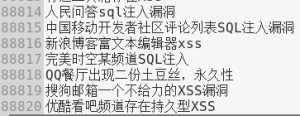
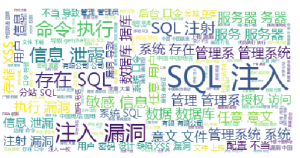
0x04 结语
由词云图可以看出,SQL注入依旧风光无限,其次是命令执行,继而是信息泄漏,整体看还是比较直观的。