解决Django模板无法使用perms变量问题的方法
前言
本文主要给大家介绍了关于Django模板无法使用perms变量的解决方法,分享出来供大家参考学习,下面话不多说了,来一起看看详细的介绍吧。
解决方法:
首先,在使用Django内置权限管理系统时,settings.py文件要添加
INSTALLED_APPS添加:
'django.contrib.auth',


MIDDLEWARE添加:
'django.contrib.auth.middleware.AuthenticationMiddleware',

'django.contrib.auth.context_processors.auth',
TEMPLATES = [
 {
  'BACKEND': 'django.template.backends.django.DjangoTemplates',
  'DIRS': [os.path.join(BASE_DIR, 'templates')],
  'APP_DIRS': True,
  'OPTIONS': {
   'context_processors': [
    'django.template.context_processors.debug',
    'django.template.context_processors.i18n',
    'django.template.context_processors.media',
    'django.template.context_processors.static',
    'django.template.context_processors.tz',
    'django.contrib.messages.context_processors.messages',
    'django.template.context_processors.request',
    'django.contrib.auth.context_processors.auth',
   ],
  },
 },
]
如何在模板进行权限检查呢?
根据官网说明 https://docs.djangoproject.com/en/1.11/topics/auth/default/ ,已登录用户权限保存在模板{{ perms }}变量中,是权限模板代理django.contrib.auth.context_processors.PermWrapper的一个实例,具体可以查看django/contrib/auth/context_processors.py源码
测试用例:
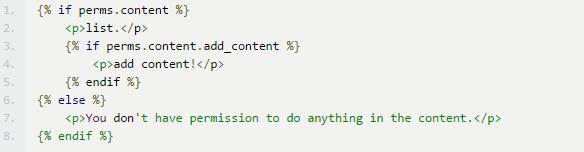
测试过程中,发现{{ perms }}变量压根不存在,没有任何输出;好吧,只能取Debug Django的源码了
def auth(request):
 """
 Returns context variables required by apps that use Django's authentication
 system.

 If there is no 'user' attribute in the request, uses AnonymousUser (from
 django.contrib.auth).
 """
 if hasattr(request, 'user'):
  user = request.user
 else:
  from django.contrib.auth.models import AnonymousUser
  user = AnonymousUser()
 print(user, PermWrapper(user), '-----------------------')
 return {
  'user': user,
  'perms': PermWrapper(user),
 }
测试访问接口,发现有的接口有打印权限信息,有的没有,似乎恍然醒悟
可以打印权限信息的接口返回:
return render(request, 'fms/fms_add.html', {'request': request, 'form': form, 'error': error})
不能打印权限新的接口返回:
return render_to_response( 'fms/fms.html', data)
render和render_to_response区别
render是比render_to_reponse更便捷渲染模板的方法,会自动使用RequestContext,而后者需要手动添加:
return render_to_response(request, 'fms/fms_add.html', {'request': request, 'form': form, 'error': error},context_instance=RequestContext(request))
其中RequestContext是django.template.Context的子类.接受request和context_processors ,从而将上下文填充渲染到模板问题已经很明确,由于使用了render_to_response方法,没有手动添加context_instance=RequestContext(request)导致模板不能使用{{ perms }}变量
总结
以上就是这篇文章的全部内容了,希望本文的内容对大家的学习或者工作具有一定的参考学习价值,如果有疑问大家可以留言交流,谢谢大家对【听图阁-专注于Python设计】的支持。