Mac中Python 3环境下安装scrapy的方法教程
前言
最近抽空想学习一下python的爬虫框架scrapy,在mac下安装的时候遇到了问题,逐一解决了问题,分享一下,话不多说了,来一起看看详细的介绍吧。
步骤如下:
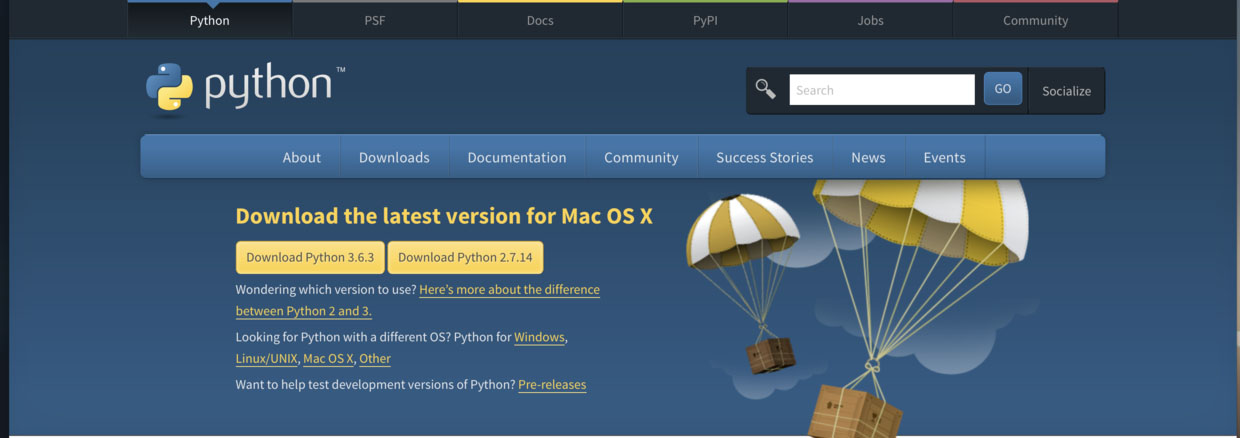
1. 从官网 下载最新版本Python 3.6.3(本地快速下载安装:https://www.jb51.net/softs/583651.html)
# 在Mac上Python3环境下安装scrapy
2. 安装 Python3
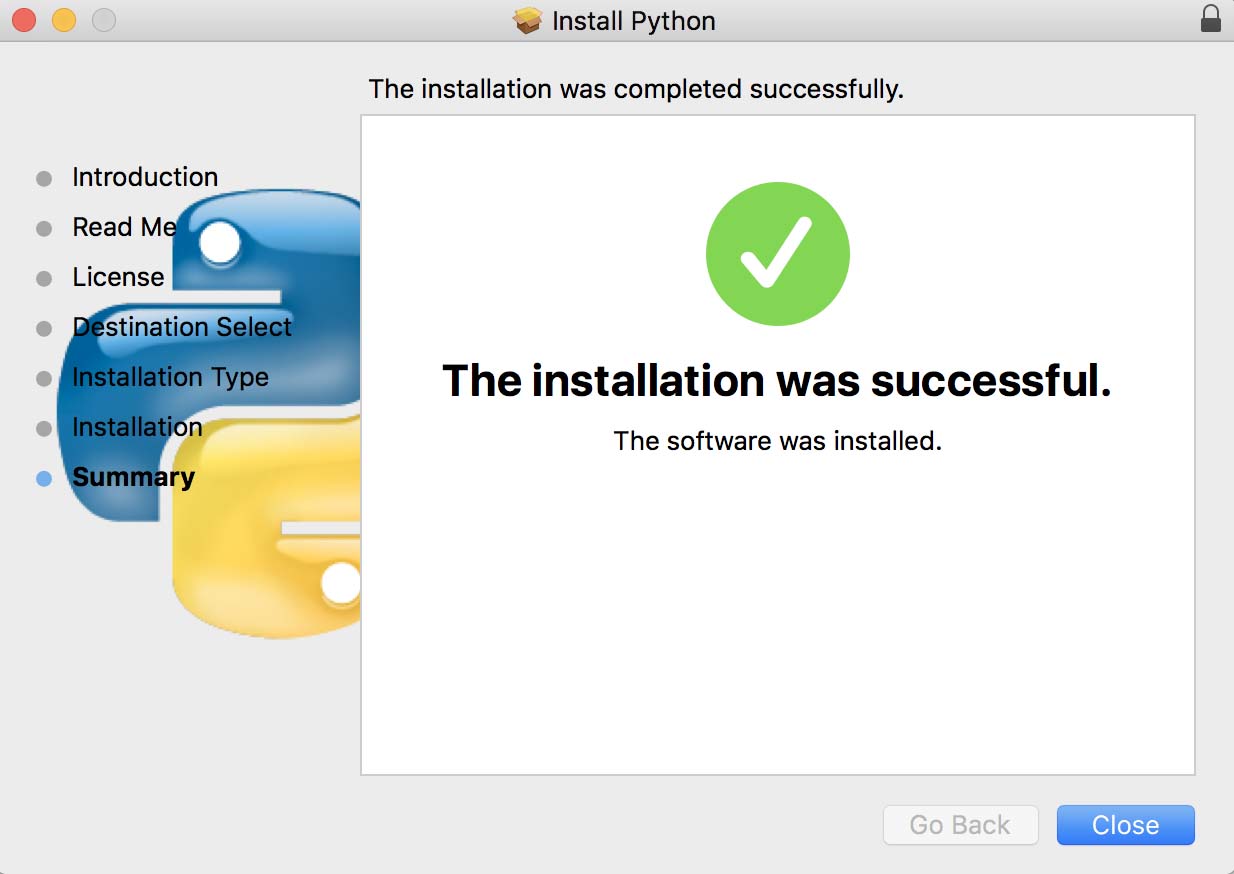
在终端输入python3出现下面的内容表示安装成功
➜ ~ python3
Python 3.6.3 (v3.6.3:2c5fed86e0, Oct 3 2017, 00:32:08)
[GCC 4.2.1 (Apple Inc. build 5666) (dot 3)] on darwin
Type "help", "copyright", "credits" or "license" for more information.
>>>
输入quit()退出编辑模式
3. 输入 pip install scrapy 执行 scrapy 安装
➜ ~ pip install Scrapy
Collecting Scrapy
 Using cached Scrapy-1.4.0-py2.py3-none-any.whl
Collecting lxml (from Scrapy)
 Using cached lxml-4.1.0-cp27-cp27m-macosx_10_6_intel.macosx_10_9_intel.macosx_10_9_x86_64.macosx_10_10_intel.macosx_10_10_x86_64.whl
Collecting PyDispatcher>=2.0.5 (from Scrapy)
 Using cached PyDispatcher-2.0.5.tar.gz
Collecting Twisted>=13.1.0 (from Scrapy)
 Using cached Twisted-17.9.0.tar.bz2
Requirement already satisfied: pyOpenSSL in /System/Library/Frameworks/Python.framework/Versions/2.7/Extras/lib/python (from Scrapy)
Collecting queuelib (from Scrapy)
 Using cached queuelib-1.4.2-py2.py3-none-any.whl
Collecting cssselect>=0.9 (from Scrapy)
 Using cached cssselect-1.0.1-py2.py3-none-any.whl
Collecting parsel>=1.1 (from Scrapy)
 Using cached parsel-1.2.0-py2.py3-none-any.whl
Collecting service-identity (from Scrapy)
 Using cached service_identity-17.0.0-py2.py3-none-any.whl
Collecting six>=1.5.2 (from Scrapy)
 Using cached six-1.11.0-py2.py3-none-any.whl
Collecting w3lib>=1.17.0 (from Scrapy)
 Using cached w3lib-1.18.0-py2.py3-none-any.whl
Requirement already satisfied: zope.interface>=3.6.0 in /System/Library/Frameworks/Python.framework/Versions/2.7/Extras/lib/python (from Twisted>=13.1.0->Scrapy)
Collecting constantly>=15.1 (from Twisted>=13.1.0->Scrapy)
 Using cached constantly-15.1.0-py2.py3-none-any.whl
Collecting incremental>=16.10.1 (from Twisted>=13.1.0->Scrapy)
 Using cached incremental-17.5.0-py2.py3-none-any.whl
Collecting Automat>=0.3.0 (from Twisted>=13.1.0->Scrapy)
 Using cached Automat-0.6.0-py2.py3-none-any.whl
Collecting hyperlink>=17.1.1 (from Twisted>=13.1.0->Scrapy)
 Using cached hyperlink-17.3.1-py2.py3-none-any.whl
Collecting pyasn1 (from service-identity->Scrapy)
 Using cached pyasn1-0.3.7-py2.py3-none-any.whl
Collecting pyasn1-modules (from service-identity->Scrapy)
 Using cached pyasn1_modules-0.1.5-py2.py3-none-any.whl
Collecting attrs (from service-identity->Scrapy)
 Using cached attrs-17.2.0-py2.py3-none-any.whl
Requirement already satisfied: setuptools in /System/Library/Frameworks/Python.framework/Versions/2.7/Extras/lib/python (from zope.interface>=3.6.0->Twisted>=13.1.0->Scrapy)
Installing collected packages: lxml, PyDispatcher, constantly, incremental, six, attrs, Automat, hyperlink, Twisted, queuelib, cssselect, w3lib, parsel, pyasn1, pyasn1-modules, service-identity, Scrapy
Exception:
Traceback (most recent call last):
 File "/Library/Python/2.7/site-packages/pip-9.0.1-py2.7.egg/pip/basecommand.py", line 215, in main
 status = self.run(options, args)
 File "/Library/Python/2.7/site-packages/pip-9.0.1-py2.7.egg/pip/commands/install.py", line 342, in run
 prefix=options.prefix_path,
 File "/Library/Python/2.7/site-packages/pip-9.0.1-py2.7.egg/pip/req/req_set.py", line 784, in install
 **kwargs
 File "/Library/Python/2.7/site-packages/pip-9.0.1-py2.7.egg/pip/req/req_install.py", line 851, in install
 self.move_wheel_files(self.source_dir, root=root, prefix=prefix)
 File "/Library/Python/2.7/site-packages/pip-9.0.1-py2.7.egg/pip/req/req_install.py", line 1064, in move_wheel_files
 isolated=self.isolated,
 File "/Library/Python/2.7/site-packages/pip-9.0.1-py2.7.egg/pip/wheel.py", line 345, in move_wheel_files
 clobber(source, lib_dir, True)
 File "/Library/Python/2.7/site-packages/pip-9.0.1-py2.7.egg/pip/wheel.py", line 316, in clobber
 ensure_dir(destdir)
 File "/Library/Python/2.7/site-packages/pip-9.0.1-py2.7.egg/pip/utils/__init__.py", line 83, in ensure_dir
 os.makedirs(path)
 File "/System/Library/Frameworks/Python.framework/Versions/2.7/lib/python2.7/os.py", line 157, in makedirs
 mkdir(name, mode)
OSError: [Errno 13] Permission denied: '/Library/Python/2.7/site-packages/lxml'
出现 OSError: [Errno 13] Permission denied: '/Library/Python/2.7/site-packages/lxml' 错误
4. 尝试重新安装lxml,执行 sudo pip install lxml
➜ ~ sudo pip install lxml
The directory '/Users/wangruofeng/Library/Caches/pip/http' or its parent directory is not owned by the current user and the cache has been disabled. Please check the permissions and owner of that directory. If executing pip with sudo, you may want sudo's -H flag.
The directory '/Users/wangruofeng/Library/Caches/pip' or its parent directory is not owned by the current user and caching wheels has been disabled. check the permissions and owner of that directory. If executing pip with sudo, you may want sudo's -H flag.
Collecting lxml
 Downloading lxml-4.1.0-cp27-cp27m-macosx_10_6_intel.macosx_10_9_intel.macosx_10_9_x86_64.macosx_10_10_intel.macosx_10_10_x86_64.whl (8.7MB)
 100% |████████████████████████████████| 8.7MB 97kB/s
Installing collected packages: lxml
Successfully installed lxml-4.1.0
➜ ~ sudo pip install scrapy
The directory '/Users/wangruofeng/Library/Caches/pip/http' or its parent directory is not owned by the current user and the cache has been disabled. Please check the permissions and owner of that directory. If executing pip with sudo, you may want sudo's -H flag.
The directory '/Users/wangruofeng/Library/Caches/pip' or its parent directory is not owned by the current user and caching wheels has been disabled. check the permissions and owner of that directory. If executing pip with sudo, you may want sudo's -H flag.
Collecting scrapy
 Downloading Scrapy-1.4.0-py2.py3-none-any.whl (248kB)
 100% |████████████████████████████████| 256kB 1.5MB/s
Requirement already satisfied: lxml in /Library/Python/2.7/site-packages (from scrapy)
Collecting PyDispatcher>=2.0.5 (from scrapy)
 Downloading PyDispatcher-2.0.5.tar.gz
Collecting Twisted>=13.1.0 (from scrapy)
 Downloading Twisted-17.9.0.tar.bz2 (3.0MB)
 100% |████████████████████████████████| 3.0MB 371kB/s
Requirement already satisfied: pyOpenSSL in /System/Library/Frameworks/Python.framework/Versions/2.7/Extras/lib/python (from scrapy)
Collecting queuelib (from scrapy)
 Downloading queuelib-1.4.2-py2.py3-none-any.whl
Collecting cssselect>=0.9 (from scrapy)
 Downloading cssselect-1.0.1-py2.py3-none-any.whl
Collecting parsel>=1.1 (from scrapy)
 Downloading parsel-1.2.0-py2.py3-none-any.whl
Collecting service-identity (from scrapy)
 Downloading service_identity-17.0.0-py2.py3-none-any.whl
Collecting six>=1.5.2 (from scrapy)
 Downloading six-1.11.0-py2.py3-none-any.whl
Collecting w3lib>=1.17.0 (from scrapy)
 Downloading w3lib-1.18.0-py2.py3-none-any.whl
Requirement already satisfied: zope.interface>=3.6.0 in /System/Library/Frameworks/Python.framework/Versions/2.7/Extras/lib/python (from Twisted>=13.1.0->scrapy)
Collecting constantly>=15.1 (from Twisted>=13.1.0->scrapy)
 Downloading constantly-15.1.0-py2.py3-none-any.whl
Collecting incremental>=16.10.1 (from Twisted>=13.1.0->scrapy)
 Downloading incremental-17.5.0-py2.py3-none-any.whl
Collecting Automat>=0.3.0 (from Twisted>=13.1.0->scrapy)
 Downloading Automat-0.6.0-py2.py3-none-any.whl
Collecting hyperlink>=17.1.1 (from Twisted>=13.1.0->scrapy)
 Downloading hyperlink-17.3.1-py2.py3-none-any.whl (73kB)
 100% |████████████████████████████████| 81kB 1.4MB/s
Collecting pyasn1 (from service-identity->scrapy)
 Downloading pyasn1-0.3.7-py2.py3-none-any.whl (63kB)
 100% |████████████████████████████████| 71kB 2.8MB/s
Collecting pyasn1-modules (from service-identity->scrapy)
 Downloading pyasn1_modules-0.1.5-py2.py3-none-any.whl (60kB)
 100% |████████████████████████████████| 61kB 2.5MB/s
Collecting attrs (from service-identity->scrapy)
 Downloading attrs-17.2.0-py2.py3-none-any.whl
Requirement already satisfied: setuptools in /System/Library/Frameworks/Python.framework/Versions/2.7/Extras/lib/python (from zope.interface>=3.6.0->Twisted>=13.1.0->scrapy)
Installing collected packages: PyDispatcher, constantly, incremental, six, attrs, Automat, hyperlink, Twisted, queuelib, cssselect, w3lib, parsel, pyasn1, pyasn1-modules, service-identity, scrapy
 Running setup.py install for PyDispatcher ... done
 Found existing installation: six 1.4.1
 DEPRECATION: Uninstalling a distutils installed project (six) has been deprecated and will be removed in a future version. This is due to the fact that uninstalling a distutils project will only partially uninstall the project.
 Uninstalling six-1.4.1:
 Successfully uninstalled six-1.4.1
 Running setup.py install for Twisted ... done
Successfully installed Automat-0.6.0 PyDispatcher-2.0.5 Twisted-17.9.0 attrs-17.2.0 constantly-15.1.0 cssselect-1.0.1 hyperlink-17.3.1 incremental-17.5.0 parsel-1.2.0 pyasn1-0.3.7 pyasn1-modules-0.1.5 queuelib-1.4.2 scrapy-1.4.0 service-identity-17.0.0 six-1.11.0 w3lib-1.18.0
成功安装lxml-4.1.0
5. 再次尝试安装scrapy,执行 sudo pip install scrapy
➜ ~ sudo pip install scrapy
The directory '/Users/wangruofeng/Library/Caches/pip/http' or its parent directory is not owned by the current user and the cache has been disabled. Please check the permissions and owner of that directory. If executing pip with sudo, you may want sudo's -H flag.
The directory '/Users/wangruofeng/Library/Caches/pip' or its parent directory is not owned by the current user and caching wheels has been disabled. check the permissions and owner of that directory. If executing pip with sudo, you may want sudo's -H flag.
Collecting scrapy
 Downloading Scrapy-1.4.0-py2.py3-none-any.whl (248kB)
 100% |████████████████████████████████| 256kB 1.5MB/s
Requirement already satisfied: lxml in /Library/Python/2.7/site-packages (from scrapy)
Collecting PyDispatcher>=2.0.5 (from scrapy)
 Downloading PyDispatcher-2.0.5.tar.gz
Collecting Twisted>=13.1.0 (from scrapy)
 Downloading Twisted-17.9.0.tar.bz2 (3.0MB)
 100% |████████████████████████████████| 3.0MB 371kB/s
Requirement already satisfied: pyOpenSSL in /System/Library/Frameworks/Python.framework/Versions/2.7/Extras/lib/python (from scrapy)
Collecting queuelib (from scrapy)
 Downloading queuelib-1.4.2-py2.py3-none-any.whl
Collecting cssselect>=0.9 (from scrapy)
 Downloading cssselect-1.0.1-py2.py3-none-any.whl
Collecting parsel>=1.1 (from scrapy)
 Downloading parsel-1.2.0-py2.py3-none-any.whl
Collecting service-identity (from scrapy)
 Downloading service_identity-17.0.0-py2.py3-none-any.whl
Collecting six>=1.5.2 (from scrapy)
 Downloading six-1.11.0-py2.py3-none-any.whl
Collecting w3lib>=1.17.0 (from scrapy)
 Downloading w3lib-1.18.0-py2.py3-none-any.whl
Requirement already satisfied: zope.interface>=3.6.0 in /System/Library/Frameworks/Python.framework/Versions/2.7/Extras/lib/python (from Twisted>=13.1.0->scrapy)
Collecting constantly>=15.1 (from Twisted>=13.1.0->scrapy)
 Downloading constantly-15.1.0-py2.py3-none-any.whl
Collecting incremental>=16.10.1 (from Twisted>=13.1.0->scrapy)
 Downloading incremental-17.5.0-py2.py3-none-any.whl
Collecting Automat>=0.3.0 (from Twisted>=13.1.0->scrapy)
 Downloading Automat-0.6.0-py2.py3-none-any.whl
Collecting hyperlink>=17.1.1 (from Twisted>=13.1.0->scrapy)
 Downloading hyperlink-17.3.1-py2.py3-none-any.whl (73kB)
 100% |████████████████████████████████| 81kB 1.4MB/s
Collecting pyasn1 (from service-identity->scrapy)
 Downloading pyasn1-0.3.7-py2.py3-none-any.whl (63kB)
 100% |████████████████████████████████| 71kB 2.8MB/s
Collecting pyasn1-modules (from service-identity->scrapy)
 Downloading pyasn1_modules-0.1.5-py2.py3-none-any.whl (60kB)
 100% |████████████████████████████████| 61kB 2.5MB/s
Collecting attrs (from service-identity->scrapy)
 Downloading attrs-17.2.0-py2.py3-none-any.whl
Requirement already satisfied: setuptools in /System/Library/Frameworks/Python.framework/Versions/2.7/Extras/lib/python (from zope.interface>=3.6.0->Twisted>=13.1.0->scrapy)
Installing collected packages: PyDispatcher, constantly, incremental, six, attrs, Automat, hyperlink, Twisted, queuelib, cssselect, w3lib, parsel, pyasn1, pyasn1-modules, service-identity, scrapy
 Running setup.py install for PyDispatcher ... done
 Found existing installation: six 1.4.1
 DEPRECATION: Uninstalling a distutils installed project (six) has been deprecated and will be removed in a future version. This is due to the fact that uninstalling a distutils project will only partially uninstall the project.
 Uninstalling six-1.4.1:
 Successfully uninstalled six-1.4.1
 Running setup.py install for Twisted ... done
Successfully installed Automat-0.6.0 PyDispatcher-2.0.5 Twisted-17.9.0 attrs-17.2.0 constantly-15.1.0 cssselect-1.0.1 hyperlink-17.3.1 incremental-17.5.0 parsel-1.2.0 pyasn1-0.3.7 pyasn1-modules-0.1.5 queuelib-1.4.2 scrapy-1.4.0 service-identity-17.0.0 six-1.11.0 w3lib-1.18.0
6. 执行 scrapy 出现下面错误
➜ ~ scrapy
Traceback (most recent call last):
 File "/usr/local/bin/scrapy", line 7, in <module>
 from scrapy.cmdline import execute
 File "/Library/Python/2.7/site-packages/scrapy/cmdline.py", line 9, in <module>
 from scrapy.crawler import CrawlerProcess
 File "/Library/Python/2.7/site-packages/scrapy/crawler.py", line 7, in <module>
 from twisted.internet import reactor, defer
 File "/Library/Python/2.7/site-packages/twisted/internet/reactor.py", line 38, in <module>
 from twisted.internet import default
 File "/Library/Python/2.7/site-packages/twisted/internet/default.py", line 56, in <module>
 install = _getInstallFunction(platform)
 File "/Library/Python/2.7/site-packages/twisted/internet/default.py", line 50, in _getInstallFunction
 from twisted.internet.selectreactor import install
 File "/Library/Python/2.7/site-packages/twisted/internet/selectreactor.py", line 18, in <module>
 from twisted.internet import posixbase
 File "/Library/Python/2.7/site-packages/twisted/internet/posixbase.py", line 18, in <module>
 from twisted.internet import error, udp, tcp
 File "/Library/Python/2.7/site-packages/twisted/internet/tcp.py", line 28, in <module>
 from twisted.internet._newtls import (
 File "/Library/Python/2.7/site-packages/twisted/internet/_newtls.py", line 21, in <module>
 from twisted.protocols.tls import TLSMemoryBIOFactory, TLSMemoryBIOProtocol
 File "/Library/Python/2.7/site-packages/twisted/protocols/tls.py", line 63, in <module>
 from twisted.internet._sslverify import _setAcceptableProtocols
 File "/Library/Python/2.7/site-packages/twisted/internet/_sslverify.py", line 38, in <module>
 TLSVersion.TLSv1_1: SSL.OP_NO_TLSv1_1,
AttributeError: 'module' object has no attribute 'OP_NO_TLSv1_1'
需要更新 OpenSSL 库,执行 sudo pip install --upgrade pyopenssl
➜ ~ sudo pip install --upgrade pyopenssl
Password:
The directory '/Users/wangruofeng/Library/Caches/pip/http' or its parent directory is not owned by the current user and the cache has been disabled. Please check the permissions and owner of that directory. If executing pip with sudo, you may want sudo's -H flag.
The directory '/Users/wangruofeng/Library/Caches/pip' or its parent directory is not owned by the current user and caching wheels has been disabled. check the permissions and owner of that directory. If executing pip with sudo, you may want sudo's -H flag.
Collecting pyopenssl
 Downloading pyOpenSSL-17.3.0-py2.py3-none-any.whl (51kB)
 100% |████████████████████████████████| 51kB 132kB/s
Requirement already up-to-date: six>=1.5.2 in /Library/Python/2.7/site-packages (from pyopenssl)
Collecting cryptography>=1.9 (from pyopenssl)
 Downloading cryptography-2.1.1-cp27-cp27m-macosx_10_6_intel.whl (1.5MB)
 100% |████████████████████████████████| 1.5MB 938kB/s
Collecting cffi>=1.7; platform_python_implementation != "PyPy" (from cryptography>=1.9->pyopenssl)
 Downloading cffi-1.11.2-cp27-cp27m-macosx_10_6_intel.whl (238kB)
 100% |████████████████████████████████| 245kB 2.2MB/s
Collecting enum34; python_version < "3" (from cryptography>=1.9->pyopenssl)
 Downloading enum34-1.1.6-py2-none-any.whl
Collecting idna>=2.1 (from cryptography>=1.9->pyopenssl)
 Downloading idna-2.6-py2.py3-none-any.whl (56kB)
 100% |████████████████████████████████| 61kB 3.1MB/s
Collecting asn1crypto>=0.21.0 (from cryptography>=1.9->pyopenssl)
 Downloading asn1crypto-0.23.0-py2.py3-none-any.whl (99kB)
 100% |████████████████████████████████| 102kB 2.7MB/s
Collecting ipaddress; python_version < "3" (from cryptography>=1.9->pyopenssl)
 Downloading ipaddress-1.0.18-py2-none-any.whl
Collecting pycparser (from cffi>=1.7; platform_python_implementation != "PyPy"->cryptography>=1.9->pyopenssl)
 Downloading pycparser-2.18.tar.gz (245kB)
 100% |████████████████████████████████| 256kB 3.6MB/s
Installing collected packages: pycparser, cffi, enum34, idna, asn1crypto, ipaddress, cryptography, pyopenssl
 Running setup.py install for pycparser ... done
 Found existing installation: pyOpenSSL 0.13.1
 DEPRECATION: Uninstalling a distutils installed project (pyopenssl) has been deprecated and will be removed in a future version. This is due to the fact that uninstalling a distutils project will only partially uninstall the project.
 Uninstalling pyOpenSSL-0.13.1:
 Successfully uninstalled pyOpenSSL-0.13.1
Successfully installed asn1crypto-0.23.0 cffi-1.11.2 cryptography-2.1.1 enum34-1.1.6 idna-2.6 ipaddress-1.0.18 pycparser-2.18 pyopenssl-17.3.0
更新 OpenSSL 成功,再次尝试执行 scrapy
➜ ~ scrapy
Scrapy 1.4.0 - no active project

Usage:
 scrapy <command> [options] [args]

Available commands:
 bench Run quick benchmark test
 fetch Fetch a URL using the Scrapy downloader
 genspider Generate new spider using pre-defined templates
 runspider Run a self-contained spider (without creating a project)
 settings Get settings values
 shell Interactive scraping console
 startproject Create new project
 version Print Scrapy version
 view Open URL in browser, as seen by Scrapy

 [ more ] More commands available when run from project directory

Use "scrapy <command> -h" to see more info about a command
出现上面内容,表明安装成功。现在可以通过 scrapy 创建一个爬虫项目了
7. 进入到你项目的目录,执行 scrapy startproject firstscrapy创建 firstscrapy 爬虫项目
➜ PycharmProjects scrapy startproject firstscrapy
New Scrapy project 'firstscrapy', using template directory '/Library/Python/2.7/site-packages/scrapy/templates/project', created in:
 /Users/wangruofeng/PycharmProjects/firstscrapy

You can start your first spider with:
 cd firstscrapy
 scrapy genspider example example.com
➜ PycharmProjects
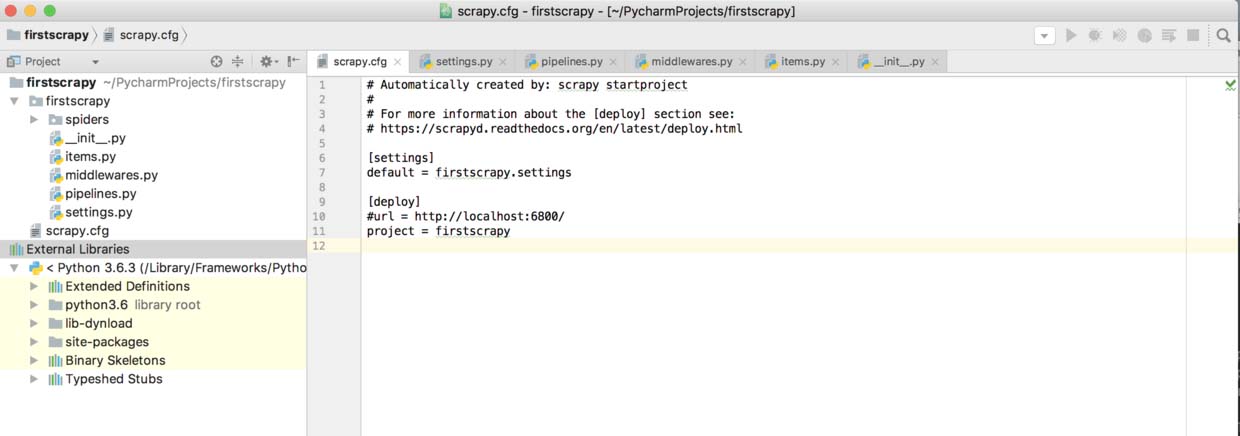
出现上面内容表明项目创建成功,但是使用的是2.7版本的Python怎么切换到3.6版本呢?
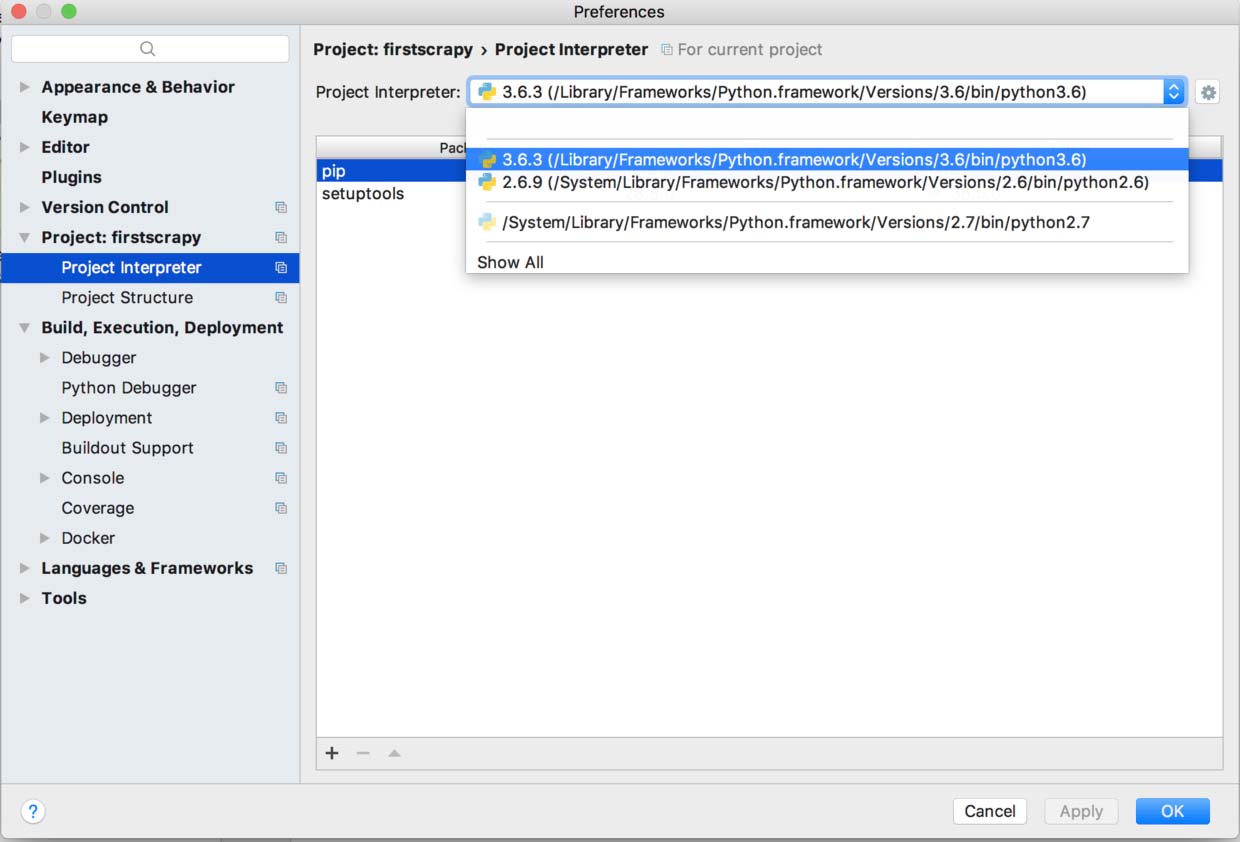
8. 使用 PyCharm IDE 打开刚才的项目,执行 command + , 打开偏好设置菜单,在Project里面选择 Projiect interpreter 来切换你需要依赖的Python库的版本,配置结束。
总结
以上就是这篇文章的全部内容了,希望本文的内容对大家的学习或者工作具有一定的参考学习价值,如果有疑问大家可以留言交流,谢谢大家对【听图阁-专注于Python设计】的支持。