Python绘制七段数码管实例代码
七段数码管(seven-segmentindicator)由7段数码管拼接而成,每段有亮或不亮两种情况,改进型的七段数码管还包括一个小数点位置
绘制模式:
input:输入当前日期的数字形式
process:根据每个数字绘制七段数码管表示
output:绘制当前日期的七段数码管表示
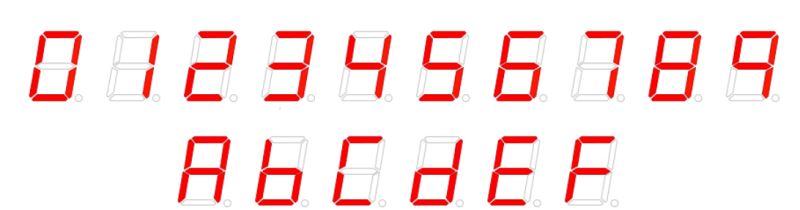
示例一:
#DrawSevenSegDisplay.py
import turtle, datetime
def drawLine(draw):  #绘制单段数码管
  turtle.pendown() if draw else turtle.penup()
  turtle.fd(40)
  turtle.right(90)
def drawDigit(digit): #根据数字绘制七段数码管
  drawLine(True) if digit in [2,3,4,5,6,8,9] else drawLine(False)
  drawLine(True) if digit in [0,1,3,4,5,6,7,8,9] else drawLine(False)
  drawLine(True) if digit in [0,2,3,5,6,8,9] else drawLine(False)
  drawLine(True) if digit in [0,2,6,8] else drawLine(False)
  turtle.left(90)
  drawLine(True) if digit in [0,4,5,6,8,9] else drawLine(False)
  drawLine(True) if digit in [0,2,3,5,6,7,8,9] else drawLine(False)
  drawLine(True) if digit in [0,1,2,3,4,7,8,9] else drawLine(False)
  turtle.left(180)
  turtle.penup()
  turtle.fd(20)
def drawDate(date): #获得要输出的数字
  for i in date:
    drawDigit(eval(i)) #注意: 通过eval()函数将数字变为整数
def main():
  turtle.setup(800, 350, 200, 200)
  turtle.penup()
  turtle.fd(-300)
  turtle.pensize(5)
  drawDate(datetime.datetime.now().strftime('%Y%m%d'))
turtle.hideturtle()
main()
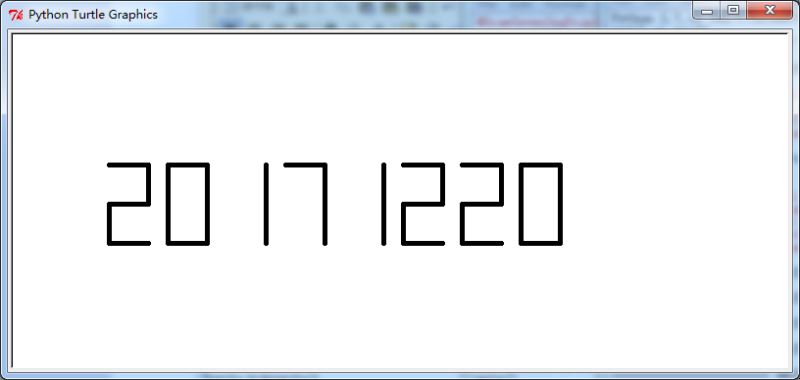
效果展示:
示例二:
#DrawSevenSegDisplay.py
import turtle, datetime
def drawGap(): #绘制数码管间隔
  turtle.penup()
  turtle.fd(5)
def drawLine(draw):  #绘制单段数码管
  drawGap()
  turtle.pendown() if draw else turtle.penup()
  turtle.fd(40)
  drawGap()
  turtle.right(90)
def drawDigit(d): #根据数字绘制七段数码管
  drawLine(True) if d in [2,3,4,5,6,8,9] else drawLine(False)
  drawLine(True) if d in [0,1,3,4,5,6,7,8,9] else drawLine(False)
  drawLine(True) if d in [0,2,3,5,6,8,9] else drawLine(False)
  drawLine(True) if d in [0,2,6,8] else drawLine(False)
  turtle.left(90)
  drawLine(True) if d in [0,4,5,6,8,9] else drawLine(False)
  drawLine(True) if d in [0,2,3,5,6,7,8,9] else drawLine(False)
  drawLine(True) if d in [0,1,2,3,4,7,8,9] else drawLine(False)
  turtle.left(180)
  turtle.penup()
  turtle.fd(20)
def drawDate(date):
  turtle.pencolor("red")
  for i in date:
    if i == '-':
      turtle.write('年',font=("Arial", 18, "normal"))
      turtle.pencolor("green")
      turtle.fd(40)
    elif i == '=':
      turtle.write('月',font=("Arial", 18, "normal"))
      turtle.pencolor("blue")
      turtle.fd(40)
    elif i == '+':
      turtle.write('日',font=("Arial", 18, "normal"))
    else:
      drawDigit(eval(i))
def main():
  turtle.setup(800, 350, 200, 200)
  turtle.penup()
  turtle.fd(-350)
  turtle.pensize(5)
  drawDate(datetime.datetime.now().strftime('%Y-%m=%d+'))
  turtle.hideturtle()
main()
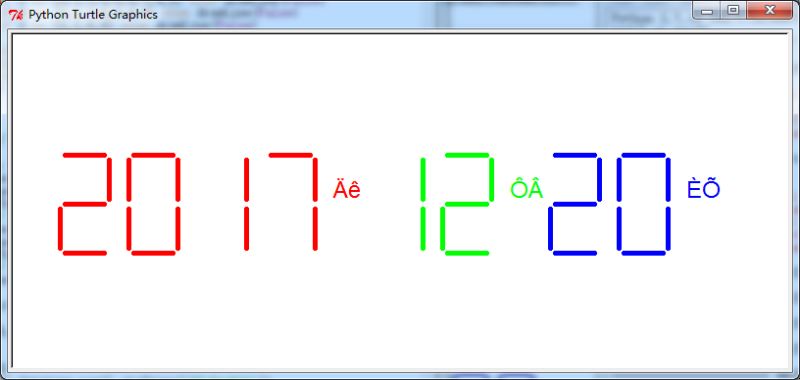
效果展示:
总结
以上就是本文关于Python绘制七段数码管实例代码的全部内容,希望对大家有所帮助。感兴趣的朋友可以继续参阅本站其他相关专题。如有不足之处,欢迎留言指出。感谢朋友们对本站的支持!