python3+PyQt5使用数据库表视图
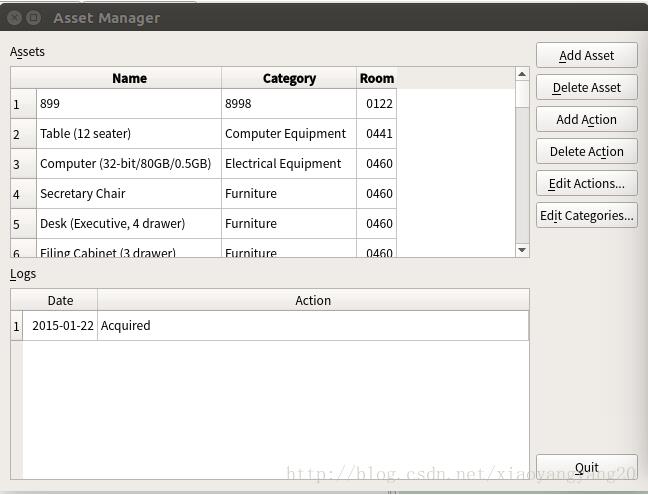
上文提到窗体可以一次性呈现出来自同一记录的各个域,但是对于用户希望能看到多条记录的表来说,就需要使用表格化的视图了。本文通过python3+pyqt5改写实现了python Qt gui 快速变成15章的例子,用户能够一次看到多条记录。
#!/usr/bin/env python3
import os
import sys
from PyQt5.QtCore import (PYQT_VERSION_STR, QDate, QFile, QRegExp, QVariant, QModelIndex,Qt)
from PyQt5.QtWidgets import (QApplication,QComboBox,
        QDateTimeEdit, QDialog, QGridLayout, QHBoxLayout, QLabel,
        QLineEdit, QDateEdit,QMessageBox, QPushButton,
        QStyleOptionViewItem, QTableView,QVBoxLayout)
from PyQt5.QtGui import QPixmap,QCursor,QRegExpValidator
from PyQt5.QtSql import (QSqlDatabase, QSqlQuery, QSqlRelation,
       QSqlRelationalDelegate, QSqlRelationalTableModel,QSqlTableModel)
import qrc_resources
MAC = True
try:
 from PyQt5.QtGui import qt_mac_set_native_menubar
except ImportError:
 MAC = False

ID = 0
NAME = ASSETID = 1
CATEGORYID = DATE = DESCRIPTION = 2
ROOM = ACTIONID = 3

ACQUIRED = 1


def createFakeData():
 import random

 print("Dropping tables...")
 query = QSqlQuery()
 query.exec_("DROP TABLE assets")
 query.exec_("DROP TABLE logs")
 query.exec_("DROP TABLE actions")
 query.exec_("DROP TABLE categories")
 QApplication.processEvents()

 print("Creating tables...")
 query.exec_("""CREATE TABLE actions (
    id INTEGER PRIMARY KEY AUTOINCREMENT UNIQUE NOT NULL,
    name VARCHAR(20) NOT NULL,
    description VARCHAR(40) NOT NULL)""")
 query.exec_("""CREATE TABLE categories (
    id INTEGER PRIMARY KEY AUTOINCREMENT UNIQUE NOT NULL,
    name VARCHAR(20) NOT NULL,
    description VARCHAR(40) NOT NULL)""")
 query.exec_("""CREATE TABLE assets (
    id INTEGER PRIMARY KEY AUTOINCREMENT UNIQUE NOT NULL,
    name VARCHAR(40) NOT NULL,
    categoryid INTEGER NOT NULL,
    room VARCHAR(4) NOT NULL,
    FOREIGN KEY (categoryid) REFERENCES categories)""")
 query.exec_("""CREATE TABLE logs (
    id INTEGER PRIMARY KEY AUTOINCREMENT UNIQUE NOT NULL,
    assetid INTEGER NOT NULL,
    date DATE NOT NULL,
    actionid INTEGER NOT NULL,
    FOREIGN KEY (assetid) REFERENCES assets,
    FOREIGN KEY (actionid) REFERENCES actions)""")
 QApplication.processEvents()

 print("Populating tables...")
 query.exec_("INSERT INTO actions (name, description) "
    "VALUES ('Acquired', 'When installed')")
 query.exec_("INSERT INTO actions (name, description) "
    "VALUES ('Broken', 'When failed and unusable')")
 query.exec_("INSERT INTO actions (name, description) "
    "VALUES ('Repaired', 'When back in service')")
 query.exec_("INSERT INTO actions (name, description) "
    "VALUES ('Routine maintenance', "
    "'When tested, refilled, etc.')")
 query.exec_("INSERT INTO categories (name, description) VALUES "
    "('Computer Equipment', "
    "'Monitors, System Units, Peripherals, etc.')")
 query.exec_("INSERT INTO categories (name, description) VALUES "
    "('Furniture', 'Chairs, Tables, Desks, etc.')")
 query.exec_("INSERT INTO categories (name, description) VALUES "
    "('Electrical Equipment', 'Non-computer electricals')")
 today = QDate.currentDate()
 floors = list(range(1, 12)) + list(range(14, 28))
 monitors = (('17" LCD Monitor', 1),
    ('20" LCD Monitor', 1),
    ('21" LCD Monitor', 1),
    ('21" CRT Monitor', 1),
    ('24" CRT Monitor', 1))
 computers = (("Computer (32-bit/80GB/0.5GB)", 1),
     ("Computer (32-bit/100GB/1GB)", 1),
     ("Computer (32-bit/120GB/1GB)", 1),
     ("Computer (64-bit/240GB/2GB)", 1),
     ("Computer (64-bit/320GB/4GB)", 1))
 printers = (("Laser Printer (4 ppm)", 1),
    ("Laser Printer (6 ppm)", 1),
    ("Laser Printer (8 ppm)", 1),
    ("Laser Printer (16 ppm)", 1))
 chairs = (("Secretary Chair", 2),
    ("Executive Chair (Basic)", 2),
    ("Executive Chair (Ergonimic)", 2),
    ("Executive Chair (Hi-Tech)", 2))
 desks = (("Desk (Basic, 3 drawer)", 2),
    ("Desk (Standard, 3 drawer)", 2),
    ("Desk (Executive, 3 drawer)", 2),
    ("Desk (Executive, 4 drawer)", 2),
    ("Desk (Large, 4 drawer)", 2))
 furniture = (("Filing Cabinet (3 drawer)", 2),
     ("Filing Cabinet (4 drawer)", 2),
     ("Filing Cabinet (5 drawer)", 2),
     ("Bookcase (4 shelves)", 2),
     ("Bookcase (6 shelves)", 2),
     ("Table (4 seater)", 2),
     ("Table (8 seater)", 2),
     ("Table (12 seater)", 2))
 electrical = (("Fan (3 speed)", 3),
     ("Fan (5 speed)", 3),
     ("Photocopier (4 ppm)", 3),
     ("Photocopier (6 ppm)", 3),
     ("Photocopier (8 ppm)", 3),
     ("Shredder", 3))
 query.prepare("INSERT INTO assets (name, categoryid, room) "
     "VALUES (:name, :categoryid, :room)")
 logQuery = QSqlQuery()
 logQuery.prepare("INSERT INTO logs (assetid, date, actionid) "
      "VALUES (:assetid, :date, :actionid)")
 assetid = 1
 for i in range(20):
  room = "{0:02d}{1:02d}".format(
    random.choice(floors), random.randint(1, 62))
  for name, category in (random.choice(monitors),
    random.choice(computers), random.choice(chairs),
    random.choice(desks), random.choice(furniture)):
   query.bindValue(":name", name)
   query.bindValue(":categoryid", category)
   query.bindValue(":room", room)
   query.exec_()
   logQuery.bindValue(":assetid", assetid)
   when = today.addDays(-random.randint(7, 1500))
   #when=when.toString()
   logQuery.bindValue(":date", when.toString("yyyy-MM-dd"))
   logQuery.bindValue(":actionid", ACQUIRED)
   logQuery.exec_()
   if random.random() > 0.7:
    logQuery.bindValue(":assetid", assetid)
    when = when.addDays(random.randint(1, 1500))
    if when <= today:
     logQuery.bindValue(":date", when.toString("yyyy-MM-dd"))
     logQuery.bindValue(":actionid",
       random.choice((2, 4)))
     logQuery.exec_()
   assetid += 1
  if random.random() > 0.8:
   name, category = random.choice(printers)
   query.bindValue(":name", name)
   query.bindValue(":categoryid", category)
   query.bindValue(":room", room)
   query.exec_()
   logQuery.bindValue(":assetid", assetid)
   when = today.addDays(-random.randint(7, 1500))
   logQuery.bindValue(":date", when.toString("yyyy-MM-dd"))
   logQuery.bindValue(":actionid",ACQUIRED)
   logQuery.exec_()
   if random.random() > 0.6:
    logQuery.bindValue(":assetid", assetid)
    when = when.addDays(random.randint(1, 1500))
    if when <= today:
     logQuery.bindValue(":date", when.toString("yyyy-MM-dd"))
     logQuery.bindValue(":actionid",
       random.choice((2, 4)))
     logQuery.exec_()
   assetid += 1
  if random.random() > 0.6:
   name, category = random.choice(electrical)
   query.bindValue(":name", name)
   query.bindValue(":categoryid", category)
   query.bindValue(":room", room)
   query.exec_()
   logQuery.bindValue(":assetid", assetid)
   when = today.addDays(-random.randint(7, 1500))
   logQuery.bindValue(":date", when.toString("yyyy-MM-dd"))
   logQuery.bindValue(":actionid",ACQUIRED)
   logQuery.exec_()
   if random.random() > 0.5:
    logQuery.bindValue(":assetid", assetid)
    when = when.addDays(random.randint(1, 1500))
    if when <= today:
     logQuery.bindValue(":date", when.toString("yyyy-MM-dd"))
     logQuery.bindValue(":actionid",
       random.choice((2, 4)))
     logQuery.exec_()
   assetid += 1
  QApplication.processEvents()

 print("Assets:")
 query.exec_("SELECT id, name, categoryid, room FROM assets "
    "ORDER by id")
 categoryQuery = QSqlQuery()
 while query.next():
  id = query.value(0)
  name = str(query.value(1))
  categoryid = query.value(2)
  room = str(query.value(3))
  categoryQuery.exec_("SELECT name FROM categories "
    "WHERE id = {0}".format(categoryid))
  category = "{0}".format(categoryid)
  if categoryQuery.next():
   category = str(categoryQuery.value(0))
  print("{0}: {1} [{2}] {3}".format(id, name, category, room))
 QApplication.processEvents()


class ReferenceDataDlg(QDialog):

 def __init__(self, table, title, parent=None):
  super(ReferenceDataDlg, self).__init__(parent)

  self.model = QSqlTableModel(self)
  self.model.setTable(table)
  self.model.setSort(NAME, Qt.AscendingOrder)
  self.model.setHeaderData(ID, Qt.Horizontal,"ID")
  self.model.setHeaderData(NAME, Qt.Horizontal, "Name")
  self.model.setHeaderData(DESCRIPTION, Qt.Horizontal,"Description")
  self.model.select()

  self.view = QTableView()
  self.view.setModel(self.model)
  self.view.setSelectionMode(QTableView.SingleSelection)
  self.view.setSelectionBehavior(QTableView.SelectRows)
  self.view.setColumnHidden(ID, True)
  self.view.resizeColumnsToContents()
  addButton = QPushButton("&Add")
  deleteButton = QPushButton("&Delete")
  okButton = QPushButton("&OK")
  if not MAC:
   addButton.setFocusPolicy(Qt.NoFocus)
   deleteButton.setFocusPolicy(Qt.NoFocus)

  buttonLayout = QHBoxLayout()
  buttonLayout.addWidget(addButton)
  buttonLayout.addWidget(deleteButton)
  buttonLayout.addStretch()
  buttonLayout.addWidget(okButton)
  layout = QVBoxLayout()
  layout.addWidget(self.view)
  layout.addLayout(buttonLayout)
  self.setLayout(layout)

  addButton.clicked.connect(self.addRecord)
  deleteButton.clicked.connect(self.deleteRecord)
  okButton.clicked.connect(self.accept)

  self.setWindowTitle(
    "Asset Manager - Edit {0} Reference Data".format(title))

 def addRecord(self):
  row = self.model.rowCount()
  self.model.insertRow(row)
  index = self.model.index(row, NAME)
  self.view.setCurrentIndex(index)
  self.view.edit(index)


 def deleteRecord(self):
  index = self.view.currentIndex()
  if not index.isValid():
   return
  #QSqlDatabase.database().transaction()
  record = self.model.record(index.row())
  id = record.value(ID)
  table = self.model.tableName()
  query = QSqlQuery()
  if table == "actions":
   query.exec_("SELECT COUNT(*) FROM logs "
        "WHERE actionid = {0}".format(id))
  elif table == "categories":
   query.exec_("SELECT COUNT(*) FROM assets "
        "WHERE categoryid = {0}".format(id))
  count = 0
  if query.next():
   count = query.value(0)
  if count:
   QMessageBox.information(self,
     "Delete {0}".format(table),
     ("Cannot delete {0}<br>"
        "from the {1} table because it is used by "
        "{2} records").format(record.value(NAME),table,count))
   #QSqlDatabase.database().rollback()
   return
  self.model.removeRow(index.row())
  self.model.submitAll()
  self.model.select()
  #QSqlDatabase.database().commit()


class AssetDelegate(QSqlRelationalDelegate):


 def __init__(self, parent=None):
  super(AssetDelegate, self).__init__(parent)


 def paint(self, painter, option, index):
  myoption = QStyleOptionViewItem(option)
  if index.column() == ROOM:
   myoption.displayAlignment |= (Qt.AlignRight|Qt.AlignVCenter)
  QSqlRelationalDelegate.paint(self, painter, myoption, index)


 def createEditor(self, parent, option, index):
  if index.column() == ROOM:
   editor = QLineEdit(parent)
   regex = QRegExp(r"(?:0[1-9]|1[0124-9]|2[0-7])"
         r"(?:0[1-9]|[1-5][0-9]|6[012])")
   validator = QRegExpValidator(regex, parent)
   editor.setValidator(validator)
   editor.setInputMask("9999")
   editor.setAlignment(Qt.AlignRight|Qt.AlignVCenter)
   return editor
  else:
   return QSqlRelationalDelegate.createEditor(self, parent,
              option, index)

 def setEditorData(self, editor, index):
  if index.column() == ROOM:
   text = index.model().data(index, Qt.DisplayRole)
   editor.setText(text)
  else:
   QSqlRelationalDelegate.setEditorData(self, editor, index)


 def setModelData(self, editor, model, index):
  if index.column() == ROOM:
   model.setData(index, editor.text())
  else:
   QSqlRelationalDelegate.setModelData(self, editor, model,
            index)


class LogDelegate(QSqlRelationalDelegate):

 def __init__(self, parent=None):
  super(LogDelegate, self).__init__(parent)


 def paint(self, painter, option, index):
  myoption = QStyleOptionViewItem(option)
  if index.column() == DATE:
   myoption.displayAlignment |= (Qt.AlignRight|Qt.AlignVCenter)
  QSqlRelationalDelegate.paint(self, painter, myoption, index)


 def createEditor(self, parent, option, index):
  if (index.column() == ACTIONID and
   index.model().data(index, Qt.DisplayRole) ==
   ACQUIRED): # Acquired is read-only
   return
  if index.column() == DATE:
   editor = QDateEdit(parent)
   editor.setMaximumDate(QDate.currentDate())
   editor.setDisplayFormat("yyyy-MM-dd")
   if PYQT_VERSION_STR >= "4.1.0":
    editor.setCalendarPopup(True)
   editor.setAlignment(Qt.AlignRight|
        Qt.AlignVCenter)
   return editor
  else:
   return QSqlRelationalDelegate.createEditor(self, parent,
              option, index)

 def setEditorData(self, editor, index):
  if index.column() == DATE:
   date = index.model().data(index, Qt.DisplayRole)
   editor.setDate(date)
  else:
   QSqlRelationalDelegate.setEditorData(self, editor, index)


 def setModelData(self, editor, model, index):
  if index.column() == DATE:
   model.setData(index, QVariant(editor.date()))
  else:
   QSqlRelationalDelegate.setModelData(self, editor, model,
            index)


class MainForm(QDialog):

 def __init__(self):
  super(MainForm, self).__init__()

  self.assetModel = QSqlRelationalTableModel(self)
  self.assetModel.setTable("assets")
  self.assetModel.setRelation(CATEGORYID,
    QSqlRelation("categories", "id", "name"))
  self.assetModel.setSort(ROOM, Qt.AscendingOrder)
  self.assetModel.setHeaderData(ID, Qt.Horizontal,"ID")
  self.assetModel.setHeaderData(NAME, Qt.Horizontal,"Name")
  self.assetModel.setHeaderData(CATEGORYID, Qt.Horizontal,"Category")
  self.assetModel.setHeaderData(ROOM, Qt.Horizontal,"Room")
  self.assetModel.select()

  self.assetView = QTableView()
  self.assetView.setModel(self.assetModel)
  self.assetView.setItemDelegate(AssetDelegate(self))
  self.assetView.setSelectionMode(QTableView.SingleSelection)
  self.assetView.setSelectionBehavior(QTableView.SelectRows)
  self.assetView.setColumnHidden(ID, True)
  self.assetView.resizeColumnsToContents()
  assetLabel = QLabel("A&ssets")
  assetLabel.setBuddy(self.assetView)

  self.logModel = QSqlRelationalTableModel(self)
  self.logModel.setTable("logs")
  self.logModel.setRelation(ACTIONID,
    QSqlRelation("actions", "id", "name"))
  self.logModel.setSort(DATE, Qt.AscendingOrder)
  self.logModel.setHeaderData(DATE, Qt.Horizontal, "Date")
  self.logModel.setHeaderData(ACTIONID, Qt.Horizontal,"Action")
  self.logModel.select()

  self.logView = QTableView()
  self.logView.setModel(self.logModel)
  self.logView.setItemDelegate(LogDelegate(self))
  self.logView.setSelectionMode(QTableView.SingleSelection)
  self.logView.setSelectionBehavior(QTableView.SelectRows)
  self.logView.setColumnHidden(ID, True)
  self.logView.setColumnHidden(ASSETID, True)
  self.logView.resizeColumnsToContents()
  self.logView.horizontalHeader().setStretchLastSection(True)
  logLabel = QLabel("&Logs")
  logLabel.setBuddy(self.logView)

  addAssetButton = QPushButton("&Add Asset")
  deleteAssetButton = QPushButton("&Delete Asset")
  addActionButton = QPushButton("Add A&ction")
  deleteActionButton = QPushButton("Delete Ac&tion")
  editActionsButton = QPushButton("&Edit Actions...")
  editCategoriesButton = QPushButton("Ed&it Categories...")
  quitButton = QPushButton("&Quit")
  for button in (addAssetButton, deleteAssetButton,
    addActionButton, deleteActionButton,
    editActionsButton, editCategoriesButton, quitButton):
   if MAC:
    button.setDefault(False)
    button.setAutoDefault(False)
   else:
    button.setFocusPolicy(Qt.NoFocus)

  dataLayout = QVBoxLayout()
  dataLayout.addWidget(assetLabel)
  dataLayout.addWidget(self.assetView, 1)
  dataLayout.addWidget(logLabel)
  dataLayout.addWidget(self.logView)
  buttonLayout = QVBoxLayout()
  buttonLayout.addWidget(addAssetButton)
  buttonLayout.addWidget(deleteAssetButton)
  buttonLayout.addWidget(addActionButton)
  buttonLayout.addWidget(deleteActionButton)
  buttonLayout.addWidget(editActionsButton)
  buttonLayout.addWidget(editCategoriesButton)
  buttonLayout.addStretch()
  buttonLayout.addWidget(quitButton)
  layout = QHBoxLayout()
  layout.addLayout(dataLayout, 1)
  layout.addLayout(buttonLayout)
  self.setLayout(layout)

  #self.connect(self.assetView.selectionModel(),
    #SIGNAL(("currentRowChanged(QModelIndex,QModelIndex)")),
    #self.assetChanged)
  self.assetView.selectionModel().currentRowChanged.connect(self.assetChanged)
  addAssetButton.clicked.connect(self.addAsset)
  deleteAssetButton.clicked.connect(self.deleteAsset)
  addActionButton.clicked.connect(self.addAction)
  deleteActionButton.clicked.connect(self.deleteAction)
  editActionsButton.clicked.connect(self.editActions)
  editCategoriesButton.clicked.connect(self.editCategories)
  quitButton.clicked.connect(self.done)

  self.assetChanged(self.assetView.currentIndex())
  self.setMinimumWidth(650)
  self.setWindowTitle("Asset Manager")


 def done(self, result=1):
  query = QSqlQuery()
  query.exec_("DELETE FROM logs WHERE logs.assetid NOT IN"
     "(SELECT id FROM assets)")
  QDialog.done(self, 1)


 def assetChanged(self, index):
  if index.isValid():
   record = self.assetModel.record(index.row())
   #print(index.row())
   id = record.value("id")
   self.logModel.setFilter("assetid = {0}".format(id))
  else:
   self.logModel.setFilter("assetid = -1")
  #self.logModel.reset() # workaround for Qt <= 4.3.3/SQLite bug
  #self.logModel.beginResetModel()
  self.logModel.select()
  self.logView.horizontalHeader().setVisible(
    self.logModel.rowCount() > 0)
  if PYQT_VERSION_STR < "4.1.0":
   self.logView.setColumnHidden(ID, True)
   self.logView.setColumnHidden(ASSETID, True)
  #self.logModel.endResetModel()


 def addAsset(self):
  row = (self.assetView.currentIndex().row()
    if self.assetView.currentIndex().isValid() else 0)

  QSqlDatabase.database().transaction()
  self.assetModel.insertRow(row)
  index = self.assetModel.index(row, NAME)
  self.assetView.setCurrentIndex(index)

  assetid = 1
  query = QSqlQuery()
  query.exec_("SELECT MAX(id) FROM assets")
  if query.next():
   assetid = query.value(0)
  query.prepare("INSERT INTO logs (assetid, date, actionid) "
      "VALUES (:assetid, :date, :actionid)")
  query.bindValue(":assetid", assetid + 1)
  query.bindValue(":date", QDate.currentDate())
  query.bindValue(":actionid", ACQUIRED)
  query.exec_()
  QSqlDatabase.database().commit()
  #self.logModel.select()
  self.assetView.edit(index)


 def deleteAsset(self):
  index = self.assetView.currentIndex()
  if not index.isValid():
   return
  QSqlDatabase.database().transaction()
  record = self.assetModel.record(index.row())
  assetid = record.value(ID)
  logrecords = 1
  query = QSqlQuery("SELECT COUNT(*) FROM logs WHERE assetid = {0}".format(assetid))
  if query.next():
   logrecords = query.value(0)
  msg = ("<font color=red>Delete</font><br><b>{0}</b>"
        "<br>from room {1}").format(record.value(NAME),record.value(ROOM))
  if logrecords > 1:
   msg += (", along with {0} log records"
     .format(logrecords))
  msg += "?"
  if (QMessageBox.question(self, "Delete Asset", msg,
    QMessageBox.Yes|QMessageBox.No) ==
    QMessageBox.No):
   QSqlDatabase.database().rollback()
   return
  #query.exec_("DELETE FROM logs WHERE assetid = {0}"
  #    .format(assetid))

  #use model API
  self.logModel.setFilter("assetid={0}".format(assetid))
  self.logModel.select()
  if self.logModel.rowCount()>0:
   self.logModel.removeRows(0,self.logModel.rowCount())
   self.logModel.submitAll()


  self.assetModel.removeRow(index.row())
  self.assetModel.submitAll()
  QSqlDatabase.database().commit()
  self.assetModel.select()
  self.assetChanged(self.assetView.currentIndex())


 def addAction(self):
  index = self.assetView.currentIndex()
  if not index.isValid():
   return
  QSqlDatabase.database().transaction()
  record = self.assetModel.record(index.row())
  assetid = record.value(ID)

  row = self.logModel.rowCount()
  self.logModel.insertRow(row)
  self.logModel.setData(self.logModel.index(row, ASSETID),
        assetid)
  self.logModel.setData(self.logModel.index(row, DATE),
        QDate.currentDate())
  QSqlDatabase.database().commit()
  index = self.logModel.index(row, ACTIONID)
  self.logView.setCurrentIndex(index)
  self.logView.edit(index)


 def deleteAction(self):
  index = self.logView.currentIndex()
  if not index.isValid():
   return
  record = self.logModel.record(index.row())
  action = record.value(ACTIONID)
  if action == "Acquired":
   QMessageBox.information(self, "Delete Log",
     "The 'Acquired' log record cannot be deleted.<br>"
     "You could delete the entire asset instead.")
   return
  when = str(record.value(DATE))
  if (QMessageBox.question(self, "Delete Log",
    "Delete log<br>{0} {1}?".format(when, action),
    QMessageBox.Yes|QMessageBox.No) ==
    QMessageBox.No):
   return
  self.logModel.removeRow(index.row())
  self.logModel.submitAll()
  self.logModel.select()


 def editActions(self):
  form = ReferenceDataDlg("actions", "Action", self)
  form.exec_()

 def editCategories(self):
  form = ReferenceDataDlg("categories", "Category", self)
  form.exec_()


def main():
 app = QApplication(sys.argv)

 filename = os.path.join(os.path.dirname(__file__), "assets.db")
 create = not QFile.exists(filename)
 db = QSqlDatabase.addDatabase("QSQLITE")
 db.setDatabaseName(filename)
 if not db.open():
  QMessageBox.warning(None, "Asset Manager",
   ("Database Error: {0}"
   .format(db.lastError().text())))
  sys.exit(1)

 splash = None
 if create:
  app.setOverrideCursor(QCursor(Qt.WaitCursor))
  splash = QLabel()
  pixmap = QPixmap(":/assetmanagersplash.png")
  splash.setPixmap(pixmap)
  splash.setMask(pixmap.createHeuristicMask())
  splash.setWindowFlags(Qt.SplashScreen)
  rect = app.desktop().availableGeometry()
  splash.move((rect.width() - pixmap.width()) / 2,
     (rect.height() - pixmap.height()) / 2)
  splash.show()
  app.processEvents()
  createFakeData()

 form = MainForm()
 form.show()
 if create:
  splash.close()
  app.processEvents()
  app.restoreOverrideCursor()
 app.exec_()
 del form
 del db


main()
运行结果:
以上就是本文的全部内容,希望对大家的学习有所帮助,也希望大家多多支持【听图阁-专注于Python设计】。