Python Grid使用和布局详解
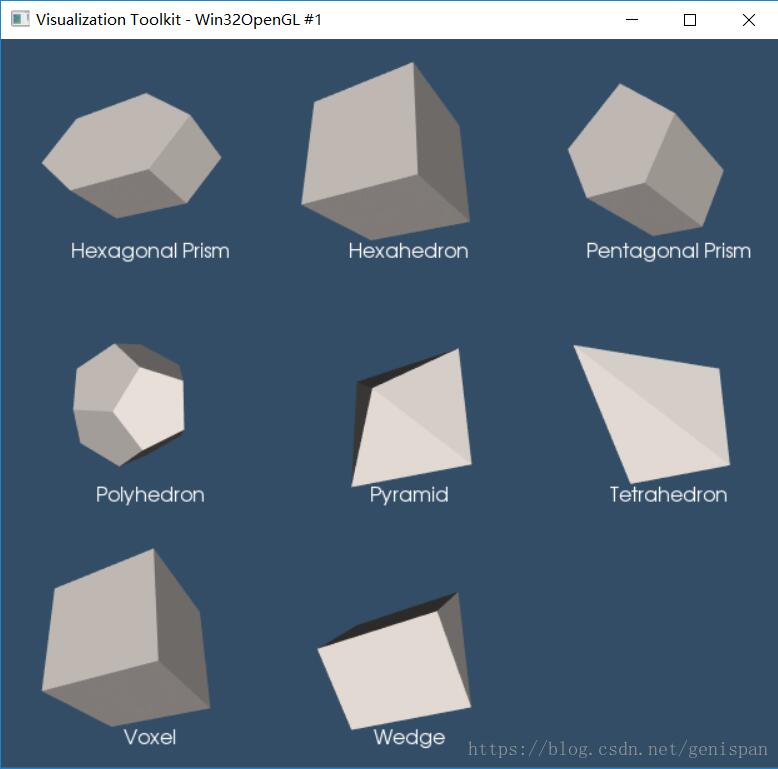
本文实例为大家分享了Python Grid使用和布局的具体代码,供大家参考,具体内容如下
#!/usr/bin/env python

import vtk

# 这个示例主要用于将不同的图像对象显示到指定的Grid中

def main():
 colors = vtk.vtkNamedColors()

 # Set the background color.
 colors.SetColor("BkgColor", [51, 77, 102, 255])

 titles = list()
 textMappers = list()
 textActors = list()

 uGrids = list()
 mappers = list()
 actors = list()
 renderers = list()

 uGrids.append(MakeHexagonalPrism())
 titles.append('Hexagonal Prism')
 uGrids.append(MakeHexahedron())
 titles.append('Hexahedron')
 uGrids.append(MakePentagonalPrism())
 titles.append('Pentagonal Prism')

 uGrids.append(MakePolyhedron())
 titles.append('Polyhedron')
 uGrids.append(MakePyramid())
 titles.append('Pyramid')
 uGrids.append(MakeTetrahedron())
 titles.append('Tetrahedron')

 uGrids.append(MakeVoxel())
 titles.append('Voxel')
 uGrids.append(MakeWedge())
 titles.append('Wedge')

 renWin = vtk.vtkRenderWindow()
 renWin.SetWindowName('Cell3D Demonstration')

 iRen = vtk.vtkRenderWindowInteractor()
 iRen.SetRenderWindow(renWin)

 # Create one text property for all
 textProperty = vtk.vtkTextProperty()
 textProperty.SetFontSize(16)
 textProperty.SetJustificationToCentered()

 # Create and link the mappers actors and renderers together.
 # 为每个独立的文本图形对象创建独立的Mapper和Actors,并绑定至每个grid中
 for i in range(0, len(uGrids)):
  textMappers.append(vtk.vtkTextMapper())
  textActors.append(vtk.vtkActor2D())#

  mappers.append(vtk.vtkDataSetMapper())
  actors.append(vtk.vtkActor())
  renderers.append(vtk.vtkRenderer())

  mappers[i].SetInputData(uGrids[i])
  actors[i].SetMapper(mappers[i])
  actors[i].GetProperty().SetColor(
   colors.GetColor3d("Seashell"))
  renderers[i].AddViewProp(actors[i])

  textMappers[i].SetInput(titles[i])
  textMappers[i].SetTextProperty(textProperty)

  textActors[i].SetMapper(textMappers[i])
  textActors[i].SetPosition(120, 16)
  renderers[i].AddViewProp(textActors[i])

  renWin.AddRenderer(renderers[i])

 gridDimensions = 3
 rendererSize = 300

 renWin.SetSize(rendererSize * gridDimensions,
     rendererSize * gridDimensions)

 # 渲染图形对象至不同的显示区域
 for row in range(0, gridDimensions):
  for col in range(0, gridDimensions):
   index = row * gridDimensions + col

   # (xmin, ymin, xmax, ymax)
   viewport = [
    float(col) * rendererSize /
    (gridDimensions * rendererSize),
    float(gridDimensions - (row + 1)) * rendererSize /
    (gridDimensions * rendererSize),
    float(col + 1) * rendererSize /
    (gridDimensions * rendererSize),
    float(gridDimensions - row) * rendererSize /
    (gridDimensions * rendererSize)]

   if index > len(actors) - 1:
    # Add a renderer even if there is no actor.
    # This makes the render window background all the same color.
    ren = vtk.vtkRenderer()
    ren.SetBackground(colors.GetColor3d("BkgColor"))
    ren.SetViewport(viewport)
    renWin.AddRenderer(ren)
    continue

   renderers[index].SetViewport(viewport)
   renderers[index].SetBackground(colors.GetColor3d("BkgColor"))
   renderers[index].ResetCamera()
   renderers[index].GetActiveCamera().Azimuth(30)
   renderers[index].GetActiveCamera().Elevation(-30)
   renderers[index].GetActiveCamera().Zoom(0.85)
   renderers[index].ResetCameraClippingRange()

 iRen.Initialize()
 renWin.Render()
 iRen.Start()


def MakeHexagonalPrism():
 """
  3D: hexagonal prism: a wedge with an hexagonal base.
  Be careful, the base face ordering is different from wedge.
 """

 numberOfVertices = 12

 points = vtk.vtkPoints()

 points.InsertNextPoint(0.0, 0.0, 1.0)
 points.InsertNextPoint(1.0, 0.0, 1.0)
 points.InsertNextPoint(1.5, 0.5, 1.0)
 points.InsertNextPoint(1.0, 1.0, 1.0)
 points.InsertNextPoint(0.0, 1.0, 1.0)
 points.InsertNextPoint(-0.5, 0.5, 1.0)

 points.InsertNextPoint(0.0, 0.0, 0.0)
 points.InsertNextPoint(1.0, 0.0, 0.0)
 points.InsertNextPoint(1.5, 0.5, 0.0)
 points.InsertNextPoint(1.0, 1.0, 0.0)
 points.InsertNextPoint(0.0, 1.0, 0.0)
 points.InsertNextPoint(-0.5, 0.5, 0.0)

 hexagonalPrism = vtk.vtkHexagonalPrism()
 for i in range(0, numberOfVertices):
  hexagonalPrism.GetPointIds().SetId(i, i)

 ug = vtk.vtkUnstructuredGrid()
 ug.InsertNextCell(hexagonalPrism.GetCellType(),
      hexagonalPrism.GetPointIds())
 ug.SetPoints(points)

 return ug


def MakeHexahedron():
 """
  A regular hexagon (cube) with all faces square and three squares around
  each vertex is created below.
  Setup the coordinates of eight points
  (the two faces must be in counter clockwise
  order as viewed from the outside).
  As an exercise you can modify the coordinates of the points to create
  seven topologically distinct convex hexahedras.
 """
 numberOfVertices = 8

 # Create the points
 points = vtk.vtkPoints()
 points.InsertNextPoint(0.0, 0.0, 0.0)
 points.InsertNextPoint(1.0, 0.0, 0.0)
 points.InsertNextPoint(1.0, 1.0, 0.0)
 points.InsertNextPoint(0.0, 1.0, 0.0)
 points.InsertNextPoint(0.0, 0.0, 1.0)
 points.InsertNextPoint(1.0, 0.0, 1.0)
 points.InsertNextPoint(1.0, 1.0, 1.0)
 points.InsertNextPoint(0.0, 1.0, 1.0)

 # Create a hexahedron from the points
 hex_ = vtk.vtkHexahedron()
 for i in range(0, numberOfVertices):
  hex_.GetPointIds().SetId(i, i)

 # Add the points and hexahedron to an unstructured grid
 uGrid = vtk.vtkUnstructuredGrid()
 uGrid.SetPoints(points)
 uGrid.InsertNextCell(hex_.GetCellType(), hex_.GetPointIds())

 return uGrid


def MakePentagonalPrism():
 numberOfVertices = 10

 # Create the points
 points = vtk.vtkPoints()
 points.InsertNextPoint(11, 10, 10)
 points.InsertNextPoint(13, 10, 10)
 points.InsertNextPoint(14, 12, 10)
 points.InsertNextPoint(12, 14, 10)
 points.InsertNextPoint(10, 12, 10)
 points.InsertNextPoint(11, 10, 14)
 points.InsertNextPoint(13, 10, 14)
 points.InsertNextPoint(14, 12, 14)
 points.InsertNextPoint(12, 14, 14)
 points.InsertNextPoint(10, 12, 14)

 # Pentagonal Prism
 pentagonalPrism = vtk.vtkPentagonalPrism()
 for i in range(0, numberOfVertices):
  pentagonalPrism.GetPointIds().SetId(i, i)

 # Add the points and hexahedron to an unstructured grid
 uGrid = vtk.vtkUnstructuredGrid()
 uGrid.SetPoints(points)
 uGrid.InsertNextCell(pentagonalPrism.GetCellType(),
       pentagonalPrism.GetPointIds())

 return uGrid


def MakePolyhedron():
 """
  Make a regular dodecahedron. It consists of twelve regular pentagonal
  faces with three faces meeting at each vertex.
 """
 # numberOfVertices = 20
 numberOfFaces = 12
 # numberOfFaceVertices = 5

 points = vtk.vtkPoints()
 points.InsertNextPoint(1.21412, 0, 1.58931)
 points.InsertNextPoint(0.375185, 1.1547, 1.58931)
 points.InsertNextPoint(-0.982247, 0.713644, 1.58931)
 points.InsertNextPoint(-0.982247, -0.713644, 1.58931)
 points.InsertNextPoint(0.375185, -1.1547, 1.58931)
 points.InsertNextPoint(1.96449, 0, 0.375185)
 points.InsertNextPoint(0.607062, 1.86835, 0.375185)
 points.InsertNextPoint(-1.58931, 1.1547, 0.375185)
 points.InsertNextPoint(-1.58931, -1.1547, 0.375185)
 points.InsertNextPoint(0.607062, -1.86835, 0.375185)
 points.InsertNextPoint(1.58931, 1.1547, -0.375185)
 points.InsertNextPoint(-0.607062, 1.86835, -0.375185)
 points.InsertNextPoint(-1.96449, 0, -0.375185)
 points.InsertNextPoint(-0.607062, -1.86835, -0.375185)
 points.InsertNextPoint(1.58931, -1.1547, -0.375185)
 points.InsertNextPoint(0.982247, 0.713644, -1.58931)
 points.InsertNextPoint(-0.375185, 1.1547, -1.58931)
 points.InsertNextPoint(-1.21412, 0, -1.58931)
 points.InsertNextPoint(-0.375185, -1.1547, -1.58931)
 points.InsertNextPoint(0.982247, -0.713644, -1.58931)

 # Dimensions are [numberOfFaces][numberOfFaceVertices]
 dodechedronFace = [
  [0, 1, 2, 3, 4],
  [0, 5, 10, 6, 1],
  [1, 6, 11, 7, 2],
  [2, 7, 12, 8, 3],
  [3, 8, 13, 9, 4],
  [4, 9, 14, 5, 0],
  [15, 10, 5, 14, 19],
  [16, 11, 6, 10, 15],
  [17, 12, 7, 11, 16],
  [18, 13, 8, 12, 17],
  [19, 14, 9, 13, 18],
  [19, 18, 17, 16, 15]
 ]

 dodechedronFacesIdList = vtk.vtkIdList()
 # Number faces that make up the cell.
 dodechedronFacesIdList.InsertNextId(numberOfFaces)
 for face in dodechedronFace:
  # Number of points in the face == numberOfFaceVertices
  dodechedronFacesIdList.InsertNextId(len(face))
  # Insert the pointIds for that face.
  [dodechedronFacesIdList.InsertNextId(i) for i in face]

 uGrid = vtk.vtkUnstructuredGrid()
 uGrid.InsertNextCell(vtk.VTK_POLYHEDRON, dodechedronFacesIdList)
 uGrid.SetPoints(points)

 return uGrid


def MakePyramid():
 """
  Make a regular square pyramid.
 """
 numberOfVertices = 5

 points = vtk.vtkPoints()

 p = [
  [1.0, 1.0, 0.0],
  [-1.0, 1.0, 0.0],
  [-1.0, -1.0, 0.0],
  [1.0, -1.0, 0.0],
  [0.0, 0.0, 1.0]
 ]
 for pt in p:
  points.InsertNextPoint(pt)

 pyramid = vtk.vtkPyramid()
 for i in range(0, numberOfVertices):
  pyramid.GetPointIds().SetId(i, i)

 ug = vtk.vtkUnstructuredGrid()
 ug.SetPoints(points)
 ug.InsertNextCell(pyramid.GetCellType(), pyramid.GetPointIds())

 return ug


def MakeTetrahedron():
 """
  Make a tetrahedron.
 """
 numberOfVertices = 4

 points = vtk.vtkPoints()
 points.InsertNextPoint(0, 0, 0)
 points.InsertNextPoint(1, 0, 0)
 points.InsertNextPoint(1, 1, 0)
 points.InsertNextPoint(0, 1, 1)

 tetra = vtk.vtkTetra()
 for i in range(0, numberOfVertices):
  tetra.GetPointIds().SetId(i, i)

 cellArray = vtk.vtkCellArray()
 cellArray.InsertNextCell(tetra)

 unstructuredGrid = vtk.vtkUnstructuredGrid()
 unstructuredGrid.SetPoints(points)
 unstructuredGrid.SetCells(vtk.VTK_TETRA, cellArray)

 return unstructuredGrid


def MakeVoxel():
 """
  A voxel is a representation of a regular grid in 3-D space.
 """
 numberOfVertices = 8

 points = vtk.vtkPoints()
 points.InsertNextPoint(0, 0, 0)
 points.InsertNextPoint(1, 0, 0)
 points.InsertNextPoint(0, 1, 0)
 points.InsertNextPoint(1, 1, 0)
 points.InsertNextPoint(0, 0, 1)
 points.InsertNextPoint(1, 0, 1)
 points.InsertNextPoint(0, 1, 1)
 points.InsertNextPoint(1, 1, 1)

 voxel = vtk.vtkVoxel()
 for i in range(0, numberOfVertices):
  voxel.GetPointIds().SetId(i, i)

 ug = vtk.vtkUnstructuredGrid()
 ug.SetPoints(points)
 ug.InsertNextCell(voxel.GetCellType(), voxel.GetPointIds())

 return ug


def MakeWedge():
 """
  A wedge consists of two triangular ends and three rectangular faces.
 """

 numberOfVertices = 6

 points = vtk.vtkPoints()

 points.InsertNextPoint(0, 1, 0)
 points.InsertNextPoint(0, 0, 0)
 points.InsertNextPoint(0, .5, .5)
 points.InsertNextPoint(1, 1, 0)
 points.InsertNextPoint(1, 0.0, 0.0)
 points.InsertNextPoint(1, .5, .5)

 wedge = vtk.vtkWedge()
 for i in range(0, numberOfVertices):
  wedge.GetPointIds().SetId(i, i)

 ug = vtk.vtkUnstructuredGrid()
 ug.SetPoints(points)
 ug.InsertNextCell(wedge.GetCellType(), wedge.GetPointIds())

 return ug


def WritePNG(renWin, fn, magnification=1):
 """
  Screenshot
  Write out a png corresponding to the render window.
  :param: renWin - the render window.
  :param: fn - the file name.
  :param: magnification - the magnification.
 """
 windowToImageFilter = vtk.vtkWindowToImageFilter()
 windowToImageFilter.SetInput(renWin)
 windowToImageFilter.SetMagnification(magnification)
 # Record the alpha (transparency) channel
 # windowToImageFilter.SetInputBufferTypeToRGBA()
 windowToImageFilter.SetInputBufferTypeToRGB()
 # Read from the back buffer
 windowToImageFilter.ReadFrontBufferOff()
 windowToImageFilter.Update()

 writer = vtk.vtkPNGWriter()
 writer.SetFileName(fn)
 writer.SetInputConnection(windowToImageFilter.GetOutputPort())
 writer.Write()


if __name__ == '__main__':
 main()
以上就是本文的全部内容,希望对大家的学习有所帮助,也希望大家多多支持【听图阁-专注于Python设计】。