Python基础学习之时间转换函数用法详解
本文实例讲述了Python基础学习之时间转换函数用法。分享给大家供大家参考,具体如下:
前言
python的时间格式分为多种,几种格式之间的转换方法时常是我们遇到的而且是经常忘记的点,python不像php,时间字符串和datetime是一起的,只需要strtotime和date函数就可以相互转化。虽然网上已经有很多python时间转换的文章,但是由于作者本人经常做海外业务,需要各种时区之间的转换,所以这篇文章会对按时区转换各种时间格式做一个总结。
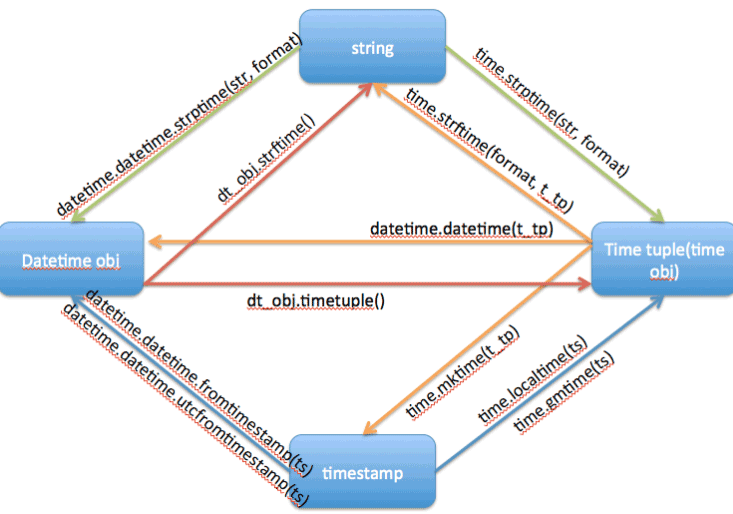
转换方法图示(图片转自网络):
一、字符串转时间戳
1、默认:
import time
def time_str_to_timestamp(string_time, _format="%Y-%m-%d %H:%M:%S"):
  return int(time.mktime(time.strptime(string_time, _format)))
2、按时区转:
import time
import datetime
from pytz import timezone as tz
def time_str_to_timestamp_by_timezone(string_time, _format="%Y-%m-%d %H:%M:%S”, from_tz=“UTC”, to_tz="America/Los_Angeles"):
  from_tz = tz(from_tz)
  to_tz = tz(to_tz)
  return int(time.mktime(
    datetime.datetime.strptime(string_time, _format).replace(
      tzinfo=from_tz).astimezone(to_tz).timetuple()))
二、时间戳转字符串
1、默认:
import time
def timestamp_to_str(timestamp, _format="%Y-%m-%d %H:%M:%S"):
  return time.strftime(_format, time.localtime(timestamp))
2、按时区转:
import datetime
from pytz import timezone as tz
def timestamp_to_str_by_timezone(timestamp, _format="%Y-%m-%d %H:%M:%S”, to_tz="America/Los_Angeles"):
  to_tz = tz(to_tz)
  return str(datetime.datetime.fromtimestamp(timestamp, to_tz).strftime(_format))
三、字符串转datetime
1、默认:
import datetime
def datetime_str_to_datetime(string_time, _format="%Y-%m-%d %H:%M:%S"):
  return datetime.datetime.strptime(string_time, _format)
2、按时区转:
import datetime
from pytz import timezone as tz
def datetime_str_to_datetime_by_timezone(string_time, from_tz=“UTC”, to_tz="America/Los_Angeles”, _format="%Y-%m-%d %H:%M:%S",):
  from_tz = tz(from_tz)
  to_tz = tz(to_tz)
  return datetime.datetime.strptime(string_time, _format).replace(
        tzinfo=from_tz).astimezone(to_tz)
四、datetime转字符串
1、默认:
import datetime
def datetime_to_datetime_str(date, _format="%Y-%m-%d %H:%M:%S"):
  return date.strftime(_format)
2、按时区转:
import datetime
from pytz import timezone as tz
def datetime_to_datetime_str_by_timezone(date, from_tz=“UTC”, to_tz="America/Los_Angeles”, _format="%Y-%m-%d %H:%M:%S"):
  from_tz = tz(from_tz)
  to_tz = tz(to_tz)
  date = date.replace(tzinfo=from_tz).astimezone(to_tz)
  return date.strftime(_format)
五、datetime转时间戳
1、默认:
import time
def datetime_to_timestamp(date):
  return int(time.mktime(date.timetuple()))
2、按时区转:
import time
from pytz import timezone as tz
def datetime_to_timestamp_by_timezone(date, from_tz=“UTC”, to_tz="America/Los_Angeles"):
  from_tz = tz(from_tz)
  to_tz = tz(to_tz)
  return int(time.mktime(date.replace(
      tzinfo=from_tz).astimezone(to_tz).timetuple()))
六、时间戳转datetime
1、默认:
import datetime
def timestamp_to_datetime(time_stamp):
  return datetime.datetime.fromtimestamp(time_stamp)
2、按时区转:
import datetime
from pytz import timezone as tz
def timestamp_to_datetime_by_timezone(time_stamp, to_tz="America/Los_Angeles"):
  to_tz = tz(to_tz)
  return datetime.datetime.fromtimestamp(time_stamp, to_tz)
PS:这里再为大家推荐几款关于日期与天数计算的在线工具供大家使用:
在线日期/天数计算器:
http://tools.jb51.net/jisuanqi/date_jisuanqi
在线万年历日历:
http://tools.jb51.net/bianmin/wannianli
在线阴历/阳历转换工具:
http://tools.jb51.net/bianmin/yinli2yangli
Unix时间戳(timestamp)转换工具:
http://tools.jb51.net/code/unixtime
更多关于Python相关内容感兴趣的读者可查看本站专题:《Python日期与时间操作技巧总结》、《Python数学运算技巧总结》、《Python数据结构与算法教程》、《Python Socket编程技巧总结》、《Python函数使用技巧总结》、《Python字符串操作技巧汇总》及《Python入门与进阶经典教程》
希望本文所述对大家Python程序设计有所帮助。