python 叠加等边三角形的绘制的实现
python语言程序设计基础 习题2.5
 import turtle
def drawTriangle(num,len,flag):#flag用来调整画三角形的方向
  flag*=-1
  len/=2
  if(num==1):
    if(flag==1):
      turtle.left(60)
      turtle.fd(len)
      turtle.right(120)
      turtle.fd(len)
      turtle.right(120)
      turtle.fd(len)
      turtle.left(120)
    else:
      turtle.right(60)
      turtle.fd(len)
      turtle.left(120)
      turtle.fd(len)
      turtle.left(120)
      turtle.fd(len)
      turtle.right(120)
  else:
    if(flag==1):
      turtle.left(60)
      turtle.fd(len/2)
      num=num-1
      turtle.right(60)
      drawTriangle(num,len,flag)
      turtle.fd(len/2)
      turtle.right(120)
      turtle.fd(len)
      turtle.right(120)
      turtle.fd(len)
      turtle.left(120)#注意递归过程中画笔返回的角度
    else:
      turtle.right(60)
      turtle.fd(len/2)
      num=num-1
      turtle.left(60)
      drawTriangle(num,len,flag)
      turtle.fd(len/2)
      turtle.left(120)
      turtle.fd(len)
      turtle.left(120)
      turtle.fd(len)
      turtle.right(120)#注意递归过程中画笔返回的角度


def main():
  turtle.setup(600,600, 200, 200)
  turtle.pendown()
  turtle.speed(2)
  turtle.pensize(5)
  drawTriangle(5,512,-1)
  turtle.hideturtle()#隐藏画笔图标
main()
turtle.done()#which returns after the main loop exits不知道啥意思,反正可以让窗口停住(欢迎评论告诉我啊)
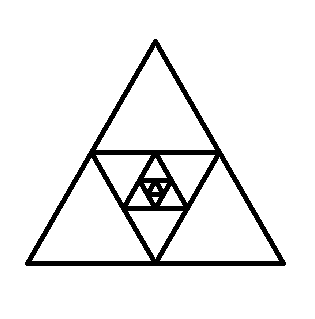
以上就是本文的全部内容,希望对大家的学习有所帮助,也希望大家多多支持【听图阁-专注于Python设计】。