Python 项目转化为so文件实例
思路是先将py转换为c代码,然后编译c为so文件,所以要安装以下内容:
python 安装:cython
pip install cython
linux 安装:python-devel,gcc
yum install python-devel
yum install gcc
初步编译
新建Test.py文件,内容如下
class test:

  def __init__(self):
    print('init')

  def say(self):
    print ('hello')
新建setup.py,内容如下
from distutils.core import setup
from Cython.Build import cythonize

setup(ext_modules = cythonize(["Test.py"]))
在bash中执行
python setup.py build_ext
运行后会生成build文件夹,如下
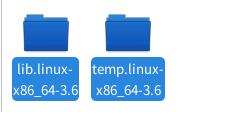
现在so文件就可以像普通py文件一样导入了

集成编译
做了以下内容:
1.文件夹编译
2.删除编译出的.c文件
3.删除编译的temp文件夹
将需要编译的目录和setup.py放在同一层级,执行python setup.py,so文件在build目录下
setup.py代码如下:
'''
Created on 2019年3月27日

@author: hylink
'''
#-* -coding: UTF-8 -* -

"""
执行前提:
  系统安装python-devel 和 gcc
  Python安装cython

编译整个当前目录:
  python py-setup.py
编译某个文件夹:
  python py-setup.py BigoModel

生成结果:
  目录 build 下

生成完成后:
  启动文件还需要py/pyc担当,须将启动的py/pyc拷贝到编译目录并删除so文件

"""

import sys, os, shutil, time
from distutils.core import setup
from Cython.Build import cythonize

starttime = time.time()
currdir = os.path.abspath('.')
parentpath = sys.argv[1] if len(sys.argv)>1 else ""
setupfile= os.path.join(os.path.abspath('.'), __file__)
build_dir = "build"
build_tmp_dir = build_dir + "/temp"

def getpy(basepath=os.path.abspath('.'), parentpath='', name='', excepts=(), copyOther=False,delC=False):
  """
  获取py文件的路径
  :param basepath: 根路径
  :param parentpath: 父路径
  :param name: 文件/夹
  :param excepts: 排除文件
  :param copy: 是否copy其他文件
  :return: py文件的迭代器
  """
  fullpath = os.path.join(basepath, parentpath, name)
  for fname in os.listdir(fullpath):
    ffile = os.path.join(fullpath, fname)
    #print basepath, parentpath, name,file
    if os.path.isdir(ffile) and fname != build_dir and not fname.startswith('.'):
      for f in getpy(basepath, os.path.join(parentpath, name), fname, excepts, copyOther, delC):
        yield f
    elif os.path.isfile(ffile):
      ext = os.path.splitext(fname)[1]
      if ext == ".c":
        if delC and os.stat(ffile).st_mtime > starttime:
          os.remove(ffile)
      elif ffile not in excepts and os.path.splitext(fname)[1] not in('.pyc', '.pyx'):
        if os.path.splitext(fname)[1] in('.py', '.pyx') and not fname.startswith('__'):
          yield os.path.join(parentpath, name, fname)
        elif copyOther:
            dstdir = os.path.join(basepath, build_dir, parentpath, name)
            if not os.path.isdir(dstdir): os.makedirs(dstdir)
            shutil.copyfile(ffile, os.path.join(dstdir, fname))
    else:
      pass

#获取py列表
module_list = list(getpy(basepath=currdir,parentpath=parentpath, excepts=(setupfile)))
try:
  setup(ext_modules = cythonize(module_list),script_args=["build_ext", "-b", build_dir, "-t", build_tmp_dir])
except Exception as e:
  print (e)
else:
  module_list = list(getpy(basepath=currdir, parentpath=parentpath, excepts=(setupfile), copyOther=True))
module_list = list(getpy(basepath=currdir, parentpath=parentpath, excepts=(setupfile), delC=True))
if os.path.exists(build_tmp_dir): shutil.rmtree(build_tmp_dir)
print ("complate! time:", time.time()-starttime, 's')
注意问题
1.编译后执行需要相同的python版本和编码
2.py中使用__file__内置变量的文件编译后调用时会出问题,暂时没有解决,还需要使用pyc代替
3.使用时注意权限控制
以上这篇Python 项目转化为so文件实例就是小编分享给大家的全部内容了,希望能给大家一个参考,也希望大家多多支持【听图阁-专注于Python设计】。